Customizable Right-Click Menu, USB-Free Cloud Rebuild, and AppData Shortcut: Inside Windows 11’s 11 November Changes for PC Gamers
Five years after the launch of Windows 11, the single biggest daily frustration for PC gamers, modders, and power users is finally getting a native fix. First introduced via the optional preview update KB5127936 (advancing version 25H2 to OS Build 26200.9818 and version 26H2 to OS Build 26300.9818) and expanding broadly during the November 2026 Patch Tuesday cycle, Microsoft's 11-feature package overhauls the sluggish right-click context menu, speeds up save-folder navigation, and lets unbootable rigs reinstall Windows and hardware drivers straight from the cloud.
Customizable Right-Click Menu: Restoring Windows 10 Text Labels and Taming App Extensions
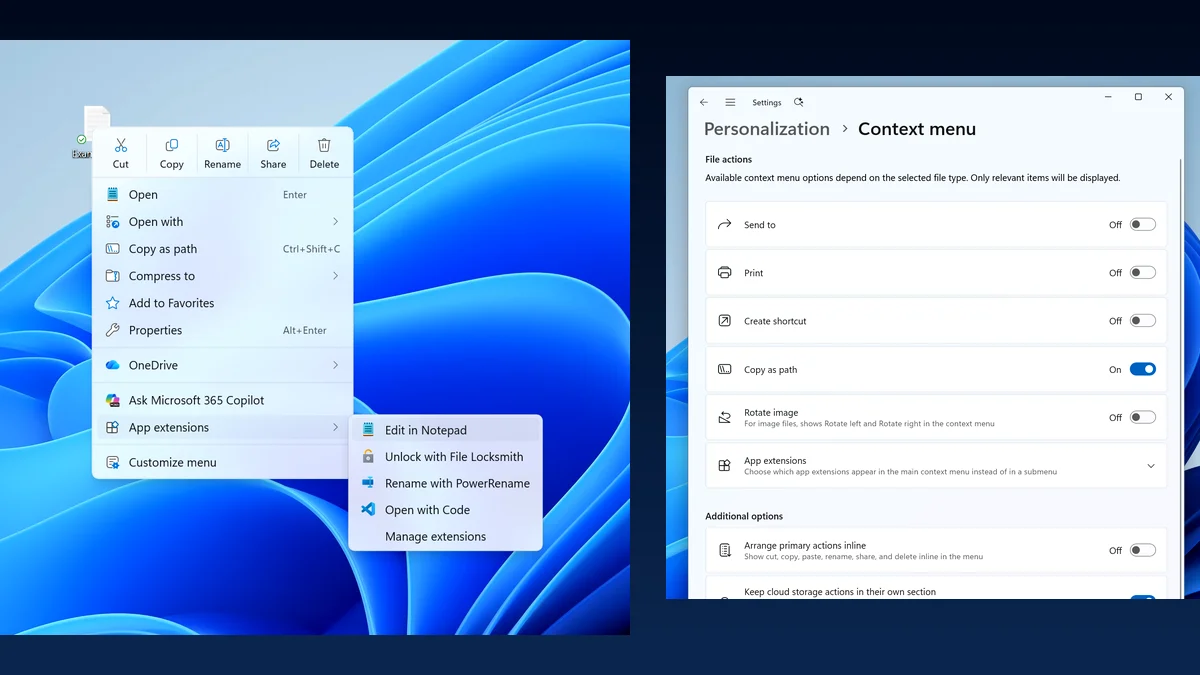
Since 2021, extracting a mod archive with 7-Zip or opening a configuration file in Notepad++ forced users either to click through the "Show more options" layer (or hold Shift + Right-click) or to manually alter the InprocServer32 key in the system registry, a tool Microsoft is simultaneously modernizing with its native WinUI 3 Registry Editor (ReactorRegedit). As File Explorer engineer Michael Novak explained on the official Windows Insider Blog, third-party app extensions piling onto the top level directly slowed down how fast the context menu rendered on every right-click.
To solve both latency and muscle-memory complaints, the updated context menu adds a "Customize menu" button at the very bottom, linking straight to a dedicated settings page under Settings > Personalization > Context menu with four granular controls:
- Inline Text Labels Instead of Icons: Core actions (Cut, Copy, Paste, Rename, Delete, and Share) can now be displayed as standard vertical text entries directly inside the menu instead of the cramped horizontal row of icons.
- Classic Properties Placement: The Properties command can be moved back to the very bottom of the right-click menu to match Windows 10 muscle memory.
- Third-Party App Extension Control: Users can choose which app extensions appear directly in the main menu, push secondary extensions into a dedicated submenu, or hide the extensions submenu entirely for faster opening speeds.
- Built-In Command Toggles: Native Windows commands such as Send to and Create shortcut can be toggled on or off, while the missing Print action can be restored to the primary menu.
The ~AppData Address Bar Shortcut, Xbox Mode Gaming Task View, and Multi-Monitor Fixes
For PC gamers who regularly clear DirectX shader caches, back up local save files, or tweak engine configuration files, File Explorer's address bar now supports the tilde (~) character. Typing ~AppData in the address bar jumps straight to your user profile folder and its subdirectories without typing %appdata%, while middle-clicking any folder in the address bar or Home view now opens it directly in a new tab.
On Windows gaming handhelds (such as the ROG Ally and Legion Go) and living-room PCs, Xbox mode receives a refreshed Gaming Task View interface equipped with a new navigation bar for instant access to Exit to Desktop and Power Options. Multi-monitor setups also gain stronger taskbar state persistence across display connections and disconnections, complementing the recalibrated Windows 11 26H2 memory compression engine that speeds up multitasking by up to 40%.
Cloud Rebuild and WinRE Wi-Fi: Reinstalling Windows 11 and Drivers Without a USB Drive
The second major pillar of KB5127936 is Cloud Rebuild. When an aggressive DDR5 memory overclock, a power outage, or a corrupted driver leaves a gaming PC unable to boot, you no longer need a second working computer to flash a bootable USB installation drive.
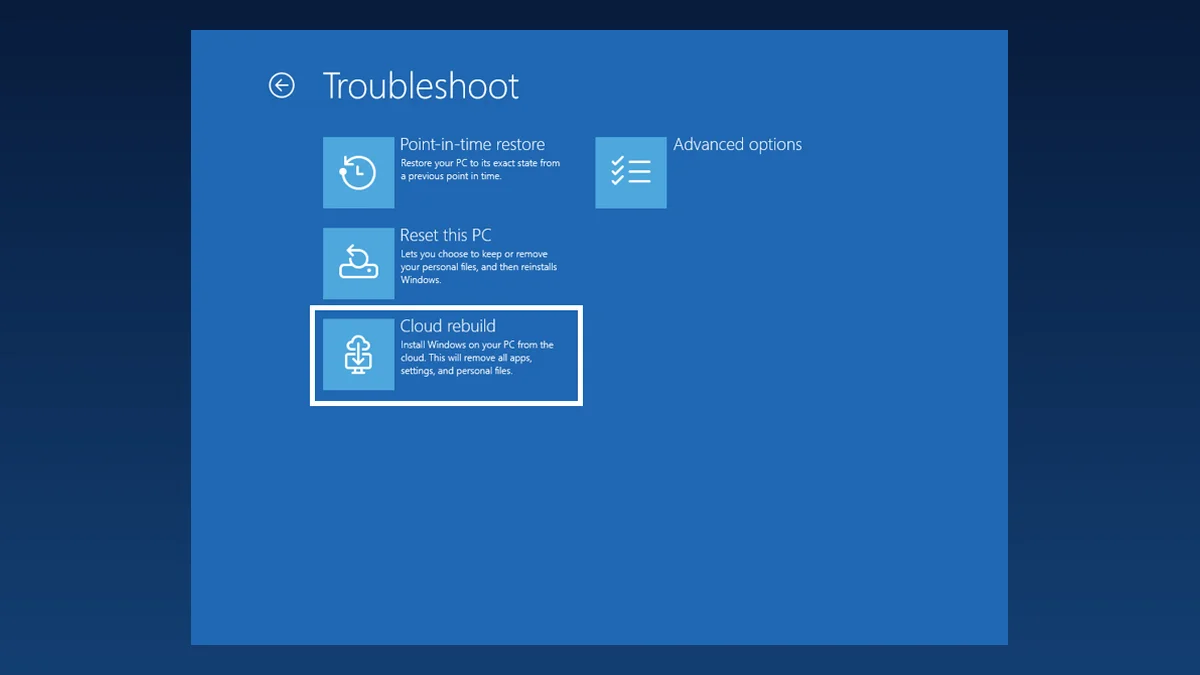
Accessible from a working desktop via Settings > System > Recovery > Rebuild PC or automatically after repeated boot failures inside the Windows Recovery Environment (WinRE > Troubleshoot > Recovery and uninstall > Cloud rebuild), the tool downloads a fresh Windows 11 image alongside your machine's specific hardware drivers directly from Windows Update. Even better, WinRE now automatically reuses Wi-Fi profiles saved in Windows so your rig can get online in recovery mode without an Ethernet cable, and includes an optional hardware-level Drive sanitization wipe before reinstalling.
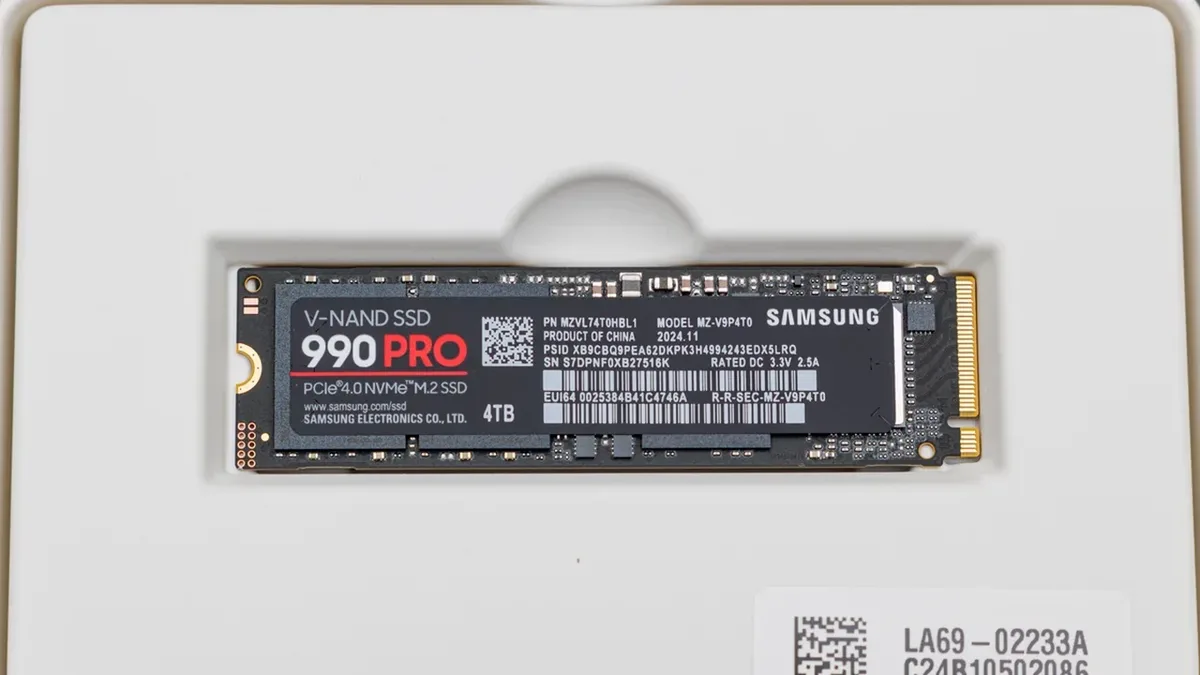
Samsung 990 PRO 2TB PCIe 4.0 NVMe M.2 SSD (7,450 MB/s)
- Up to 7,450 MB/s sequential read and 6,900 MB/s write speeds
- Dedicated LPDDR4 DRAM cache for consistent OS and frametime responsiveness
- Supports hardware drive sanitization and Windows 11 DirectStorage
Check Availability Samsung 990 PRO 2TB Availability on Amazon→
Full Breakdown of Windows 11's 11 November Changes (KB5127936)
| Feature (Builds 26200.9818 / 26300.9818) | Technical Change | PC Gaming & Hardware Impact |
|---|---|---|
| 1. Customizable Context Menu | Personalization > Context menu page, inline text labels, app extension filtering | Faster right-click rendering and classic Windows 10 layout without registry hacks |
| 2. Cloud Rebuild (WinRE) | Clean OS reinstallation + automatic hardware driver download from Windows Update | Recovers unbootable gaming PCs without needing a bootable USB flash drive |
| 3. Automated WinRE Wi-Fi | Recovery environment automatically reuses saved Windows Wi-Fi profiles | Instant wireless connectivity during crash recovery on desktops and laptops |
4. Tilde (~) Explorer Shortcut | Address bar supports ~ and ~AppData + middle-click opens folders in new tab | Faster access to local game saves, mod folders, and DirectX shader caches |
| 5. Xbox Mode Gaming Task View | Refreshed navigation bar with quick Exit to Desktop and Power Options buttons | Smoother controller navigation on Windows handhelds and fullscreen gaming setups |
| 6. Multi-Monitor Taskbar | Improved state persistence across monitor connections and disconnections | Prevents taskbar layout resets when a DisplayPort gaming monitor wakes from sleep |
| 7. Dark Mode Folder Options | Native dark theme support added to the legacy Folder Options dialog | Eliminates blinding white pop-ups on OLED monitors when toggling hidden files |
| 8. Modernized AutoPlay | Dark mode support, improved DPI scaling, and Notification Center integration | Cleaner prompts when plugging in external SSDs, capture gear, or peripherals |
| 9. Per-Monitor Magnifier | Independent zoom level per display and viewport locking (Ctrl + Win + K) | Keeps secondary monitoring or guide screens locked while gaming on the primary display |
| 10. Privacy & Device Info Card | Grouped Camera/Mic/Location permissions and expanded PC spec summary card | Quicker auditing of microphone and webcam access across games and voice apps |
| 11. Phone Link & Live Captions | Start menu hover previews for messages and screen-reader audio filtering | Check recent mobile notifications on hover without opening an extra app window |
My Take on the Spec Sheet
It took five years of pushback for Redmond to finally admit that replacing Copy, Paste, and Rename with unlabeled icons while burying 7-Zip behind an extra click was a desktop usability downgrade. Being able to strip out slow third-party shell extensions in two clicks, bring back inline text labels, and type ~AppData straight into the address bar to edit an .ini file or wipe a corrupted shader cache without opening the Run box is the exact kind of friction removal PC gamers actually feel every day. Pair that with Cloud Rebuild and automated WinRE Wi-Fi: anyone who has ever borked an OS installation while tightening secondary DDR5 timings at 2 AM without a spare USB thumb drive handy knows how valuable a driver-included cloud restore is, provided you keep your Steam library and local saves on a separate NVMe partition before pulling the trigger.

PC hardware enthusiast and competitive gamer, Arthur 'Heimdall' splits his time between France and the UK working in enterprise B2B software solutions. A business school graduate passionate about component benchmarking, he has been building, modding, and tuning PCs since childhood, optimizing every thermal degree and millisecond of display latency. An avid gamer across Assassin's Creed and sandbox titles, he forged his alliance with Grimtag and Chaya during late-night World of Warcraft raids before joining Pro-Gamer.