Windows 11 Adds Intel APX Toggle Ahead of Nova Lake CPU Launch: Why This Setting Won't Speed Up Your Current PC
While digging through the latest Windows 11 Insider Preview (Build 29695) release, Windows community researchers PhantomOcean3 and XenoPanther uncovered a brand-new system toggle labeled Advanced Performance Extensions (APX). Tucked inside the developer settings page, this switch prepares Windows 11 to unlock the biggest architectural expansion to the x86-64 instruction set in two decades. However, flipping it on your PC today will not yield a single extra frame per second: the feature is built specifically to lay the OS groundwork ahead of Intel's upcoming Core Ultra 400 "Nova Lake" processors.
Inside the New APX Toggle in Windows 11 Build 29695
Rolled out to testers on the experimental Windows Insider channels, Build 29695 introduces the new option under Settings > System > Advanced > For developers. Right below the standard Developer Mode switch, users can now spot the Advanced Performance Extensions (APX) toggle paired with a concise description: "Let Windows use APX for better performance."
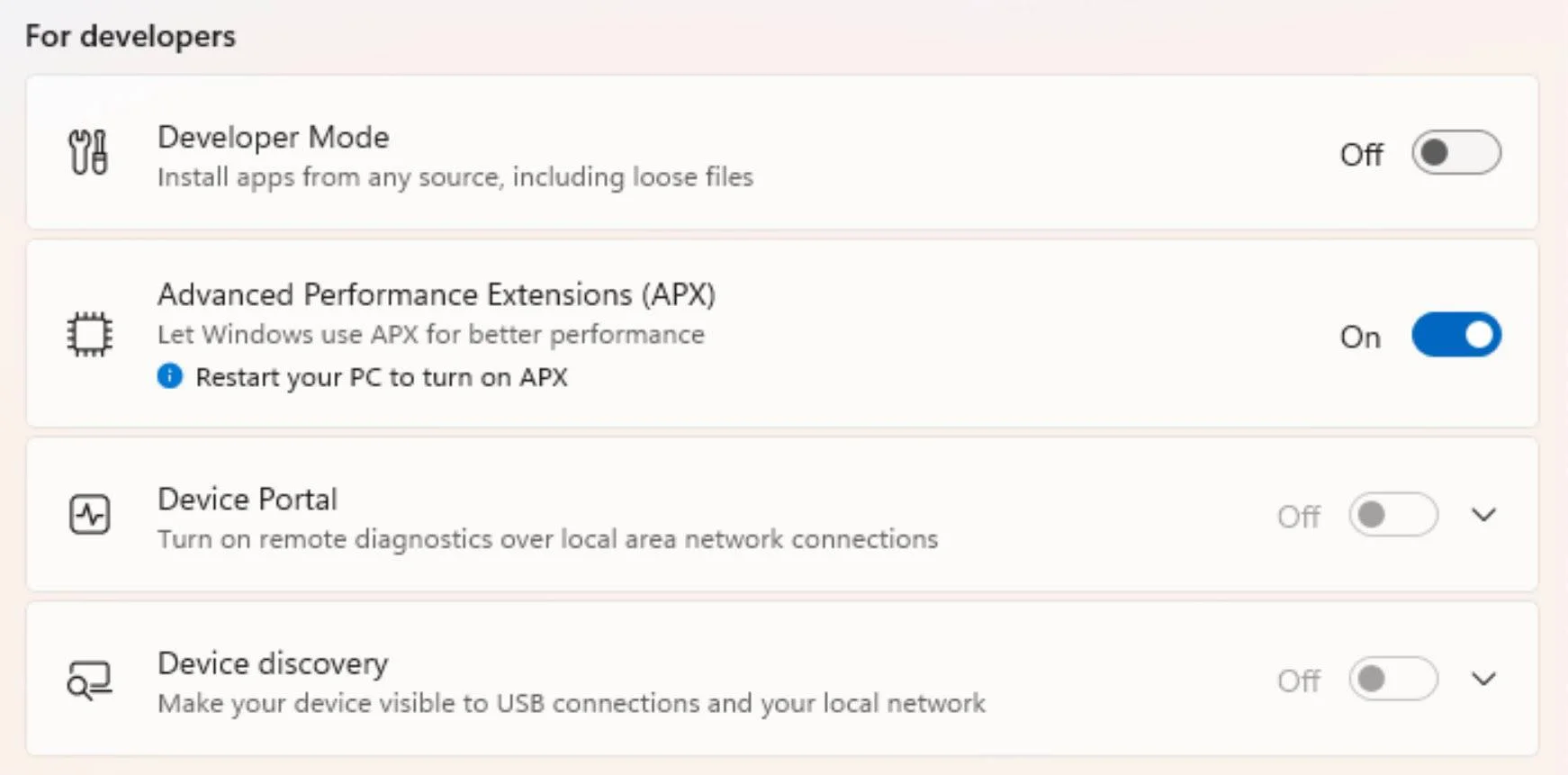
Switching the feature on immediately prompts a system notice reading "Restart your PC to turn on APX." Requiring a full reboot confirms that this setting is not a superficial power profile tweak, but a low-level kernel initialization flag that configures how the Windows NT kernel manages processor state from boot.
Doubling x86-64 Registers From 16 to 32: How Intel APX Works
To understand why Microsoft is wiring up operating system support well ahead of hardware availability, we have to look at how modern processors handle data. Ever since AMD and Intel transitioned x86 to 64-bit (x86-64) over twenty years ago, every mainstream PC processor has been limited to 16 General-Purpose Registers (GPRs), named RAX through R15. Compared to modern ARM architectures that rely on 31 general-purpose registers, x86 cores frequently run out of register space during complex workloads and are forced to spill temporary variables out to L1 cache or system memory.
With Intel APX, the chipmaker doubles the architectural register file from 16 to 32 general-purpose 64-bit registers by adding Extended GPRs R16 through R31. According to Intel's architectural specifications, APX revolves around three core pillars:
- 32 General-Purpose Registers (EGPRs): By keeping twice as many working variables directly inside ultra-fast core registers instead of spilling them to the stack, APX-compiled code executes with roughly 10% fewer memory loads and over 20% fewer memory stores, while shrinking dynamic instruction counts by around 10%.
- Three-Operand Instructions (NDD): Using a new instruction prefix called
REX2and New Data Destination (NDD) encoding, legacy two-operand integer instructions no longer have to overwrite one of their source registers to store a result. Instead, the CPU can add two input registers and write the output into a separate third register without extra register-copy instructions. - Enhanced Conditional Operations: APX introduces conditional compare, load, and store instructions that allow compilers to eliminate short branches, reducing costly branch misprediction penalties in heavy application and gaming code.
Why Current PCs See Zero Benefit and How It Connects to Nova Lake
If you install Windows 11 Build 29695 on an existing rig today, whether it runs an Intel Core Ultra 200 (Arrow Lake or Lunar Lake) chip, one of the newly spotted Intel Raptor Lake Next LGA 1700 processors, or a competing desktop build on an AM5 motherboard, enabling the APX toggle will do nothing at all. Current processors physically lack the R16 to R31 register banks and REX2 instruction decoders in silicon.
Check Availability for Intel Core Ultra on Amazon→
Conversely, even when an APX-capable CPU is installed, the chip cannot safely touch those 16 new registers unless the operating system explicitly supports them. Every time the Windows 11 thread scheduler performs a context switch between running applications, the OS kernel must save the exact state of all 32 registers via XSAVE state management and restore them when the thread resumes. By adding this toggle now alongside compiler enablement in GCC 16 and LLVM, Microsoft is making sure Windows 11 is fully prepared for Intel's enterprise Diamond Rapids Xeon chips and consumer Intel Core Ultra 400 "Nova Lake" processors, which are slated to pair APX with unified AVX10.2 vector instructions.
My Test Bench
Don't bother flipping this new Windows 11 toggle tonight expecting an extra ten frames per second on your current Core i9 or Ryzen rig: without actual Nova Lake silicon under the cooler, the switch does nothing at all. From a pure hardware engineering standpoint, though, doubling x86-64 general-purpose registers from 16 to 32 finally breaks a bottleneck we've been dragging around for over two decades.
Cutting memory loads by 10% and stores by 20% means far fewer wasted trips to the L1 cache and better performance per watt without turning your PC case into a space heater.

PC hardware enthusiast and competitive gamer, Arthur 'Heimdall' splits his time between France and the UK working in enterprise B2B software solutions. A business school graduate passionate about component benchmarking, he has been building, modding, and tuning PCs since childhood, optimizing every thermal degree and millisecond of display latency. An avid gamer across Assassin's Creed and sandbox titles, he forged his alliance with Grimtag and Chaya during late-night World of Warcraft raids before joining Pro-Gamer.