Six Switches on a 12V-2×6 Cable and a 9.5A Cutoff: How Corsair Simulates Live Pin Failures to Save GeForce RTX 5090 and 5080 GPUs
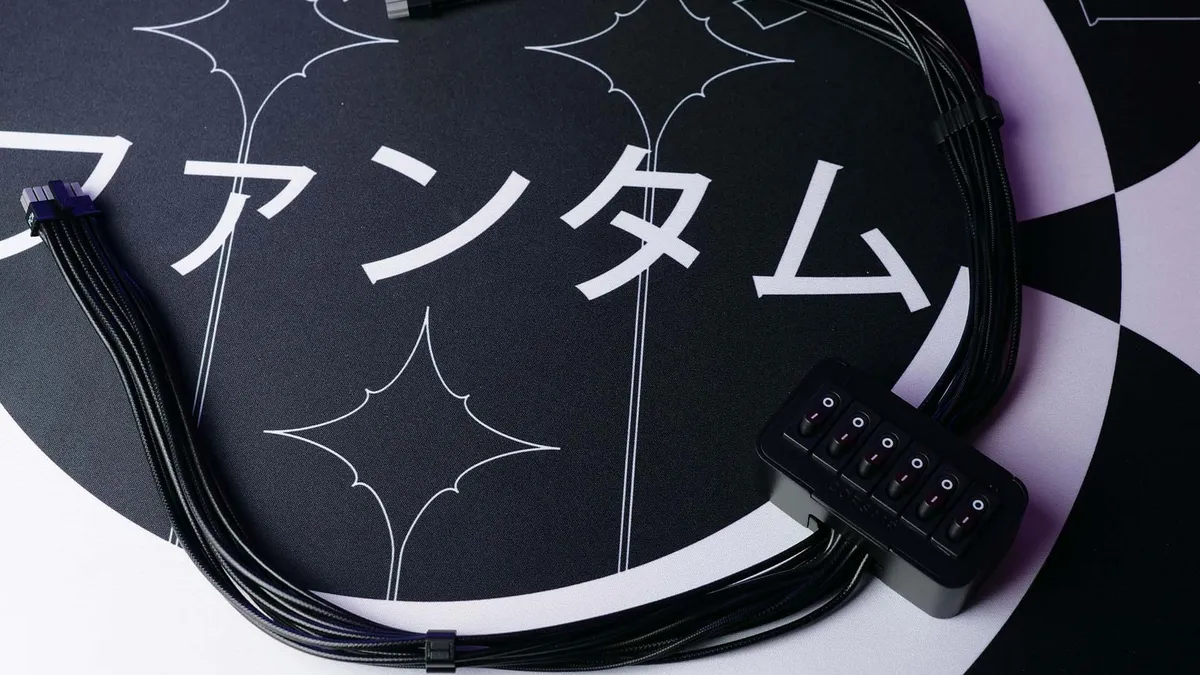
How do you prove that a PC power supply can genuinely save a flagship graphics card before its power connector melts under full load? To demonstrate the real-world effectiveness of its PinProtect and PinProtect+ electrical safeguards, Corsair engineered an unusual piece of non-commercial lab hardware: a custom 12V-2×6 power cable wired into an external breakout box with six physical toggle switches capable of severing individual +12V power pins on the fly.
A Six-Switch Breakout Box Built to Trigger Worst-Case 12V-2×6 Faults
Ever since the 12+4-pin power interface debuted on high-wattage graphics cards such as the GeForce RTX 4090, RTX 5080, and RTX 5090, its primary electrical vulnerability has been uneven current distribution. When a plug is seated at a slight angle, pulled tightly against a side panel, or suffers from a degraded terminal, contact resistance rises on specific pins. Because electricity follows the path of least resistance, the amperage meant to be shared evenly across six positive lines is forced through just two or three pins, creating localized thermal runaway that traditional single-rail or multi-rail Over-Current Protection (OCP) cannot detect.
While third-party accessory makers have tried placing external monitoring dongles with a 12A buzzer alarm between the PSU and 12+4-pin GPU connectors, and workstation builders have seen 12V-2×6 cable sleeving degrade under sustained dual-GPU loads, Corsair engineers decided to embed per-pin current sensing directly at the power supply terminal. To validate that protection on test benches, the company built a specialized 12V-2×6 test harness featuring a black inline control box embossed with the Corsair logo and equipped with six physical I/O toggle switches.
The electrical layout is straightforward and unforgiving: each of the six switches is wired directly in series with one of the six positive +12V power pins inside the 12V-2×6 cable (while leaving the six ground pins and four sense pins connected so the graphics card keeps running). By flipping one, two, three, four, or even five switches off while a GPU is running a heavy 3D workload, testers can immediately simulate dropped pin contacts and force the entire electrical load onto the remaining active conductors.
PinProtect on the RM1200e and PinProtect+ on the HX1000i Shift Crystal: 9.5A Thresholds and Emergency Shutdown
This custom fault-injection cable highlights the two tiers of per-pin overcurrent protection deployed across Corsair's latest ATX 3.1 and PCIe 5.1 power supplies:
- PinProtect (on the Corsair RM1200e ATX 3.1): This standalone hardware protection runs continuously in the background without requiring any software and cannot be turned off. It monitors the real-time current flowing through each of the six +12V pins. To account for normal transient power spikes on modern GPUs, the circuit features a default 30-second delay when moderate over-current is detected. However, during extreme fault testing on a GeForce RTX 5080 drawing roughly 250W, manually flipping five of the six switches off forces more than 20A onto a single remaining pin, prompting the PSU to cut power to the GPU, turn the screen black, and ramp the PSU cooling fan to 100% speed as an unmistakable audible warning.
- PinProtect+ (debuting on the Corsair HX1000i Shift Crystal): Featured on Corsair's flagship Cybenetics Platinum unit (which pairs side-mounted Shift connectors with transparent side panels and a 10-year warranty), the Plus tier links hardware per-pin sensing with CORSAIR iCUE software. The factory current limit is set to 9.5A per pin, and users can customize the threshold between 7A and 10A as well as adjust the shutdown delay window from 10 seconds to 180 seconds (or toggle the safeguard off entirely for extreme overclocking).
When the six-switch test cable is used on the HX1000i Shift Crystal under load, PinProtect+ responds in two distinct stages. As soon as toggled switches push any active pin past the 9.5A threshold, iCUE highlights the offending line on its live Pin 1 through Pin 6 amperage readout, triggers a desktop warning notification, and turns the PSU's RGB fan lighting bright red. If the imbalance continues past the preset delay, the power supply cuts power to the 12V-2×6 cable, spins its fan to 100%, and writes the fault to its log file so iCUE can alert the user on the next reboot. Alongside active electronic monitoring, Corsair also equips its ATX 3.1 cables with dual-tone grey-and-black connectors, giving builders clear visual confirmation that the plug is fully seated only when the grey tip disappears completely inside the socket.

My Take on the Spec Sheet
From an electrical engineering standpoint, this six-switch lab cable highlights the exact flaw that still haunts the 12V-2×6 standard: most graphics cards merge all six +12V pins into a single conductive plane on the PCB without per-pin load balancing. When five pins lose proper contact, the GPU blindly pulls its full wattage through the last surviving terminal until the plastic housing melts. By building per-pin OCP with a 9.5A threshold directly into the RM1200e and HX1000i Shift Crystal, Corsair addresses the root symptom at the power supply level without adding bulky inline adapters. And if Corsair's engineering team ever wants to send that six-switch breakout cable and an HX1000i Shift Crystal our way, our hardware test bench is wide open to push PinProtect+ to its limits. We have not yet had a physical unit on our desk,if the manufacturer's team would like to send over a review sample so we can put it through our full real-world testing protocol, our lab doors are wide open.

PC hardware enthusiast and competitive gamer, Arthur 'Heimdall' splits his time between France and the UK working in enterprise B2B software solutions. A business school graduate passionate about component benchmarking, he has been building, modding, and tuning PCs since childhood, optimizing every thermal degree and millisecond of display latency. An avid gamer across Assassin's Creed and sandbox titles, he forged his alliance with Grimtag and Chaya during late-night World of Warcraft raids before joining Pro-Gamer.