31 Years After Windows 95, Microsoft Rebuilds the Registry Editor in WinUI 3: Inside ReactorRegedit for PC Hardware and GPU Tweaks
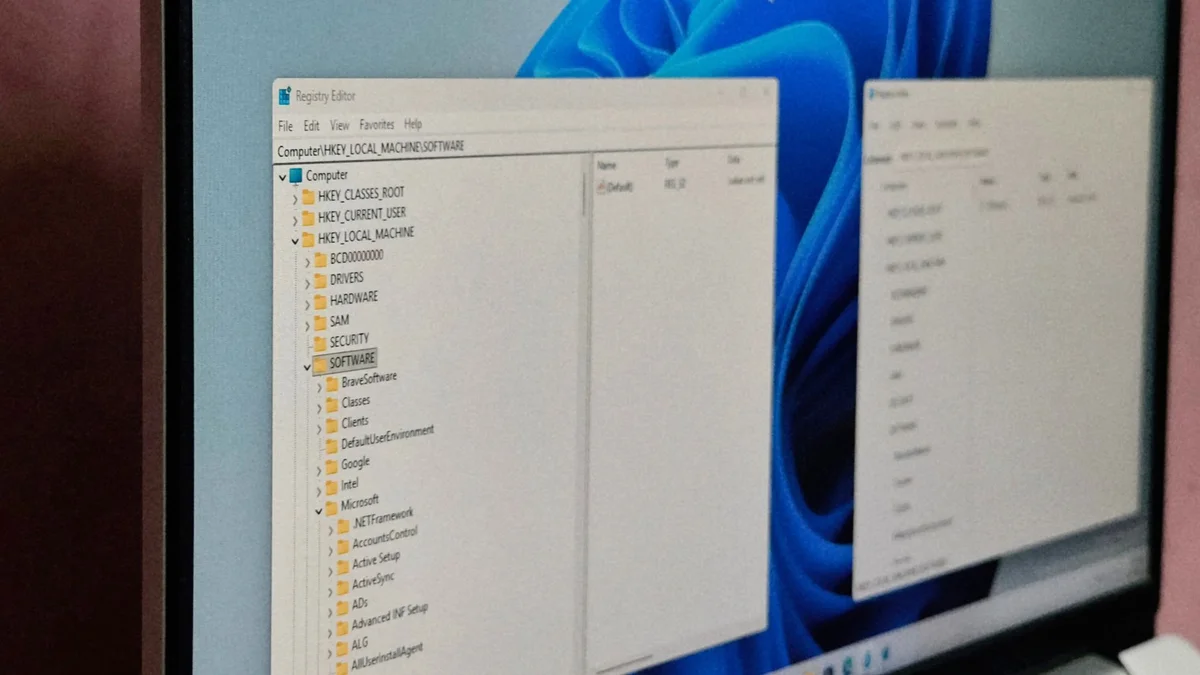
Whenever PC gamers need to disable Multiplane Overlay (MPO), force Message Signaled Interrupts (MSI mode) on a graphics card, or tweak CPU priority for a stubborn game in Windows 11, every troubleshooting guide leads to the exact same place: regedit.exe. That core system utility, with its classic dual-pane tree and stark Win32 menus, has remained virtually unchanged since Windows 95 shipped in August 1995. Thirty-one years later, Microsoft engineers have published a native WinUI 3 rewrite called ReactorRegedit inside the official open-source Microsoft UI Reactor repository on GitHub.
No XAML and No Legacy Win32 Chrome: Inside Reactor's Declarative C# Architecture
Rather than wrapping the decades-old Win32 executable in a superficial skin, ReactorRegedit serves as a working showcase for an experimental framework built by Microsoft: Microsoft.UI.Reactor. Where standard Windows 11 desktop development typically relies on XAML markup files (App.xaml, MainWindow.xaml), code-behind files, and heavy MVVM ViewModels, Reactor brings a React and SwiftUI-inspired declarative model straight to native WinUI 3 controls.
Every element of this modernized Registry Editor is authored in pure C# using typed factory methods and co-located state hooks (UseState, UseEffect, UseRef, and UsePersisted). Under the hood, a virtual tree reconciler diffs state changes and patches only the affected WinUI 3 controls. The app boots into a clean 1,000 by 600 pixel window featuring Windows 11's translucent Mica backdrop (BackdropKind.Mica), native dark mode support, rounded ContentDialog popups, and an AutoSuggestBox address bar. This visual push mirrors Microsoft's broader interface cleanup seen in the recent Windows 11 Start menu shortcut and WinUI 3 Search overhaul.
Live Access Across All 5 Root Hives and Asynchronous Search
Although Microsoft labels the project a developer sample, the source code is far from a static mockup. Its RegistryService.cs backend hooks directly into the live Windows 11 Registry using the Microsoft.Win32 .NET APIs. To eliminate the notorious UI freezes that plague classic regedit.exe when expanding massive branches, every subkey enumeration and value mutation runs asynchronously on background threads via Task.Run and posts results back through SynchronizationContext while displaying a compact ProgressRing in the status bar.
The application supports all five root hives (HKCR, HKCU, HKLM, HKU, and HKCC) while gracefully catching SecurityException and UnauthorizedAccessException errors so protected system keys never crash the session. All six registry value types work out of the box, including standard and expandable strings, multi-string arrays, binary data with a dedicated hex dump editor (EditBinaryDialog), and 32-bit DWORD or 64-bit QWORD integers with instant on-the-fly conversion between hexadecimal and decimal bases. That is the exact workflow PC enthusiasts rely on when a hidden Adrenalin driver registry key unlocks AMD Fluid Motion Frames 3 on Radeon RX 7000 and RX 9000 GPUs. An asynchronous search engine (SearchService.cs) also handles Ctrl+F and F3 queries across keys, values, and data with instant cancellation support via CancellationTokenSource.
Why the Classic 1995 regedit.exe Isn't Retiring Just Yet
Does this mean ReactorRegedit is ready to replace the built-in system executable in the next Windows 11 feature update? A closer look at App.cs explains why Microsoft classifies the repository as strictly experimental with no API guarantees. While creating, deleting, and recursively copying keys work reliably, several power-user features remain unimplemented placeholders:
| Feature | Classic regedit.exe (Win32 / Windows 95) | ReactorRegedit (WinUI 3 / C# Reactor) |
|---|---|---|
| UI & Theming | Legacy Win32 chrome, light mode only | Native WinUI 3, Mica backdrop, dark mode |
| Navigation & Search | Synchronous (can freeze UI on large hives) | Asynchronous (Task.Run + cancellation) |
| Value Editing | Full support (6 value types + Hex dump) | Full support (modern ContentDialog modals) |
| Import / Export (.reg) | Full file picker dialog for .reg scripts | Clipboard-only (no file picker integration) |
| ACL Permissions | Full security dialog via aclui.dll | Inactive placeholder (marked out of scope) |
| Favorites Storage | Persisted in Windows Registry | In-memory UseState (lost on app exit) |
Inside the source code, the Edit menu's ShowPermissions() handler contains a single comment noting that P/Invoke integration with Windows' native aclui.dll (EditSecurity) is out of scope for the initial implementation. Without it, users cannot take ownership of keys locked by TrustedInstaller. Similarly, even though RegFileService.cs includes a full parser for Windows Registry Editor Version 5.00 and REGEDIT4 headers, importing and exporting currently read and write exclusively through the Windows Clipboard rather than opening a file picker dialog. Finally, LoadHive, UnloadHive, and network registry connections are empty callbacks, and bookmarked favorites are held in a volatile UseState dictionary that wipes itself clean as soon as you close the window.
The Strategist's Take
Whenever I dig into HKLM to strip out telemetry, tune hardware-accelerated GPU scheduling, or clean up leftover display driver keys, I love what Microsoft.UI.Reactor is proving here. Running a WinUI 3 Registry Editor that runs asynchronously without locking up the window during a deep search, and without blasting my eyes with a blinding white Win32 background at 2 AM on an OLED monitor, is what Windows 11 should have shipped with on day one. Still, until Microsoft wires up the native ACL permissions dialog for TrustedInstaller keys and adds proper .reg file dialogs instead of clipboard workarounds, classic regedit.exe stays pinned to my taskbar, though our lab doors are wide open if the Windows team decides to turn this sample into a full PowerToys module.

Born and based in Montreal's Mile End district, Maëlle "Kaelen" became close friends with Chaya during their university software engineering years, bonding over late-night coding labs, campus LANs, and World of Warcraft raids alongside Grimtag and Heimdall. A game systems balancing consultant and lifelong theorycrafter, she cut her teeth in the early 2010s writing boss walkthroughs, frame-data breakdowns, and competitive meta guides for specialized French-language MMORPG and esports portals, including Mondes Persistants, as well as North American strategy collections. On Pro-Gamer, she leads in-depth walkthroughs, build optimization, and tactical esports coverage.