Your Keyboard's Windows Key: Why Microsoft Is Rethinking the Classic Start Menu Shortcut in Windows 11
Ever since Windows 95 debuted more than three decades ago, one reflex has been hardwired into every PC user's left hand: tapping the standalone Windows key to instantly pop open the Start menu. Now, as Microsoft rolls out a rebuilt search architecture in Windows 11, the company's shell leadership has confirmed it is actively evaluating how that foundational shortcut should behave in future releases.
A WinUI 3 Overhaul Turns Windows Search Into an Action Hub
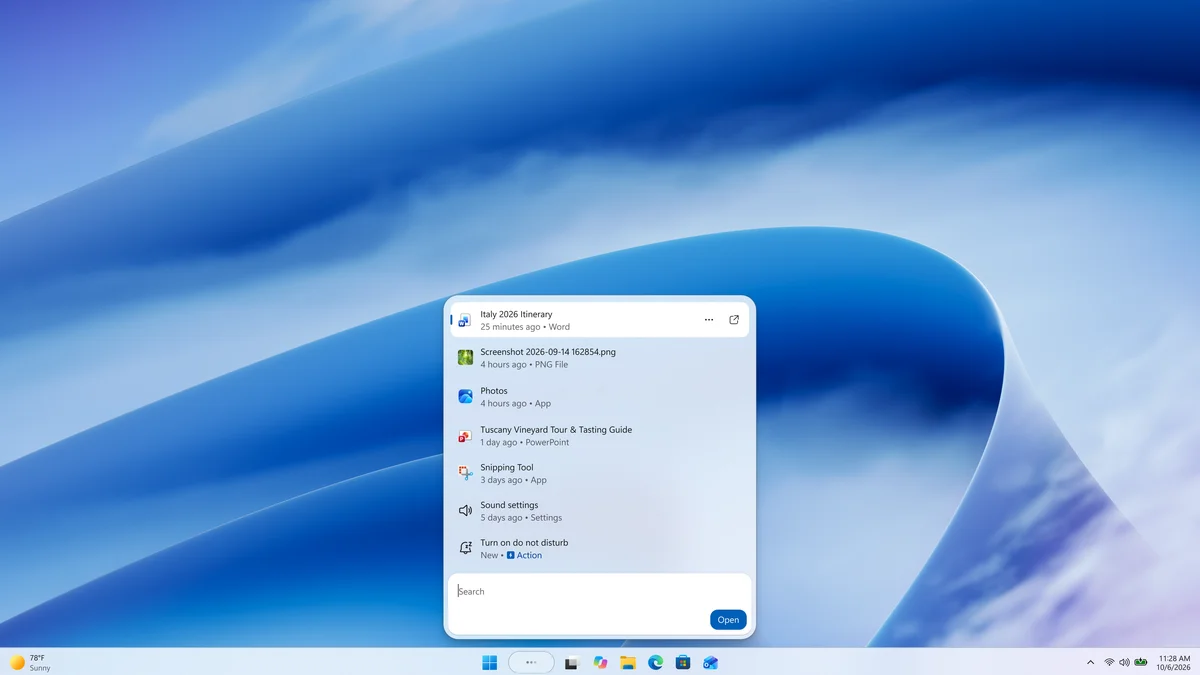
The discussion stems from Windows 11 Insider Preview Build 26340.9616, which arrived in the Experimental Channel in October 2026. Microsoft rewrote the taskbar's Windows Search interface from the ground up using WinUI 3, cutting memory overhead and replacing the bulky two-column split view with a fast, single-column results list after telemetry showed users rarely clicked the old right-hand preview pane.
More importantly, the update introduces inline Actions directly inside the search bar. Instead of digging through the Settings app or leaving an active workspace, users can type direct commands to toggle Dark Mode, switch Bluetooth on or off, mute system audio, adjust screen brightness, minimize all open windows, or snap two applications side by side.
Tali Roth Weighs New Capabilities Against Decades of Muscle Memory
Right now, pulling up this upgraded command hub requires pressing Win + S or clicking the taskbar search box, whereas pressing the standalone Windows key still opens the traditional Start menu with its grid of pinned apps. Following the rollout, several Windows Insiders reached out on X to ask whether Microsoft would let a single tap of the Windows key launch the new action-driven search interface directly.
Responding to that feedback, Tali Roth, Head of Windows Shell experiences at Microsoft, explained that the team plans to bring the WinUI 3 search engine into the Start menu first before deciding how the physical key should behave: "Once we've brought this experience to Start too we'll be looking into the right behavior for Win key since so many folks have built the muscle memory there." The effort runs alongside broader Windows 11 interface overhauls like Project Odeon aimed at modernizing system navigation.
What Changing the Windows Key Means for Daily PC Use and Gaming
For millions of PC gamers and power users, hitting the bottom-left key on a mechanical gaming keyboard is pure instinct. During a borderless fullscreen gaming session, a quick tap of the Windows key is the fastest way to surface the taskbar, check the system clock, adjust the volume mixer, or click a pinned utility located in a memorized spot on the Start grid.
Shifting the default behavior from a visual app menu to a text-first command palette would make native Windows feel much closer to PowerToys Run. While keyboard-driven users would welcome instant access to inline system toggles, anyone who relies on visual spatial memory to click pinned icons would face immediate friction if the traditional Start layout were sidelined without warning.
My Test Bench: Why Microsoft Needs a Dedicated Toggle
Testing Build 26340.9616 firsthand, the WinUI 3 rewrite is a genuine leap forward: the search flyout responds instantaneously, and typing a quick command to toggle Bluetooth or Night Light saves three unnecessary trips into the Settings app. Still, altering what the standalone Windows key does by default without offering a clear toggle in Personalization settings would be a major misstep. Thirty years of muscle memory should never be overwritten by force,giving PC users a simple switch to choose between the classic pinned Start grid and the new inline action hub is the only sensible path forward.

PC hardware enthusiast and competitive gamer, Arthur 'Heimdall' splits his time between France and the UK working in enterprise B2B software solutions. A business school graduate passionate about component benchmarking, he has been building, modding, and tuning PCs since childhood, optimizing every thermal degree and millisecond of display latency. An avid gamer across Assassin's Creed and sandbox titles, he forged his alliance with Grimtag and Chaya during late-night World of Warcraft raids before joining Pro-Gamer.