5 Shift Presses on Your PC Keyboard: 31 Years After Windows 95, Windows 11 Finally Lets You Block the Sticky Keys Pop-Up

Anyone who has ever spammed crouch on the Shift key during a tense round of Counter-Strike 2, Call of Duty, or Minecraft knows that piercing system beep by heart: five rapid presses on Shift are enough to yank your game out of exclusive fullscreen and throw up the Sticky Keys prompt. Thirty-one years after introducing the shortcut in Windows 95, Microsoft is finally updating how this legacy dialog (alongside Filter Keys) behaves in Windows 11 26H2 Insider Preview Builds 26320.9876 (Beta Channel) and 26340.9882 (Experimental Channel), announced by Stephen Lines on the official Windows Insider Blog.
Sticky Keys and Filter Keys: A Direct "Don't Ask Again" Option Right on the Pop-Up
Designed from the ground up as vital motor accessibility features, both keyboard tools rely on physical hardware triggers that routinely clash with PC gaming muscle memory:
- Sticky Keys: first introduced on Macintosh System 6 in 1988 before arriving in Windows 95 in August 1995, Sticky Keys allows users to execute multi-key modifier combinations (
Ctrl,Alt,Shift, or theWindows key) by pressing one key at a time instead of holding them down simultaneously. By default, Windows triggers the prompt whenever you press theShiftkey five times in a row. - Filter Keys: exclusive to Windows, this feature instructs the operating system to ignore brief or repeated keystrokes to assist users with hand tremors. Its pop-up warning triggers whenever the right
Shiftkey is held down for eight consecutive seconds, a common occurrence when holding sprint or slow-walk bindings in shooters and survival games.
Until now, clicking No on the "Turn on Sticky Keys?" dialog box over a running game merely dismissed the window for the current moment while leaving the five-press trigger armed. Permanently disabling the shortcut on a fresh Windows 11 install required tabbing out of your match and manually digging through Settings > Accessibility > Keyboard to flip off the shortcut toggle.
As detailed in the official Build 26320.9876 release notes on Microsoft Learn, the Sticky Keys and Filter Keys dialogs now include a built-in opt-out allowing you to choose not to be asked again directly from the dialog. A single confirmation right inside the pop-up permanently disables the shortcut trigger without opening the Settings app, building directly on Windows 11's 11 November quality-of-life upgrades (customizable right-click context menu, USB-free Cloud Rebuild, and the ~AppData shortcut).
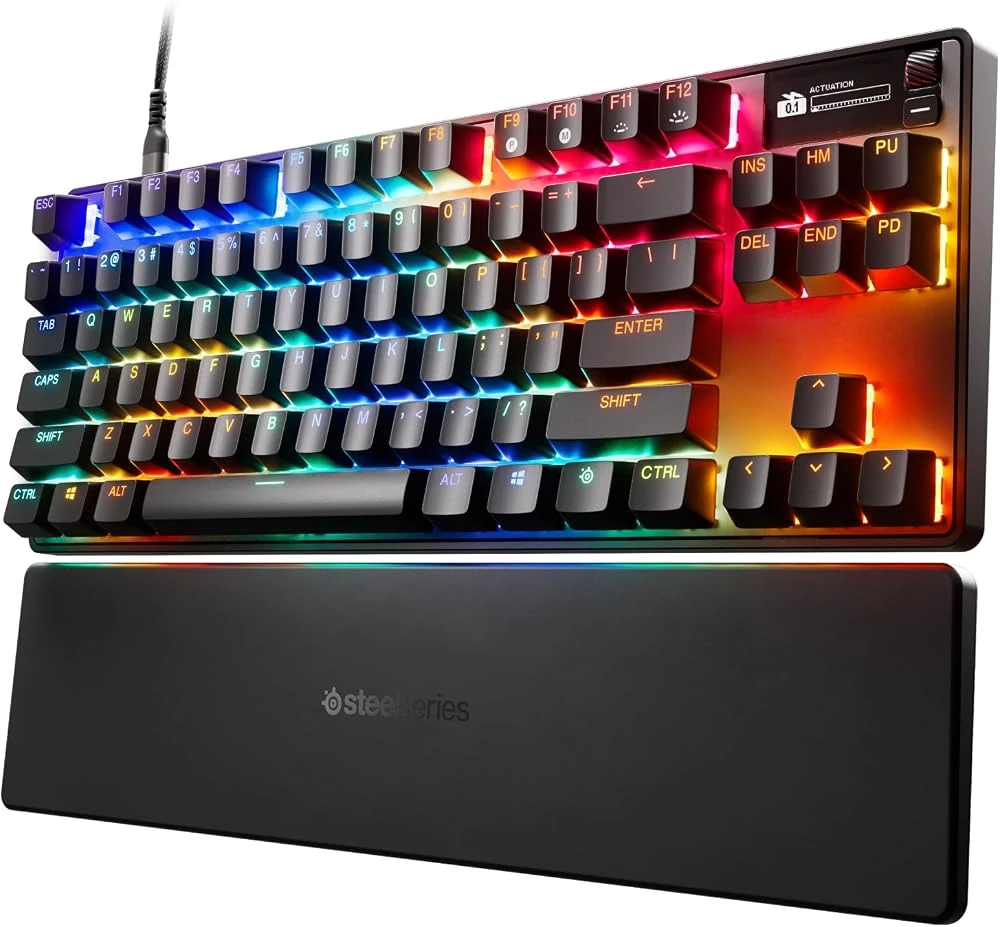
SteelSeries Apex Pro TKL (OmniPoint 2.0 Hall Effect Magnetic Switches)
- OmniPoint 2.0 adjustable Hall Effect magnetic switches from 0.1mm to 4.0mm
- Rapid Trigger technology for instant strafing and crouch responsiveness
- Compact tenkeyless layout with integrated OLED Smart Display
Beta Channel Moves to 26H2, Full Quick Settings in Xbox Mode, and WinUI 3 Search
Beyond stopping mid-game keyboard interruptions, Build 26320.9876 officially transitions the entire Windows Insider Beta Channel over to Windows 11, version 26H2 via a lightweight enablement package (eKB). Alongside Microsoft's ongoing work on the new WinUI 3 Registry Editor (ReactorRegedit), this release (paired with Experimental Build 26340.9882) ships three practical upgrades for desktop rigs and gaming handhelds:
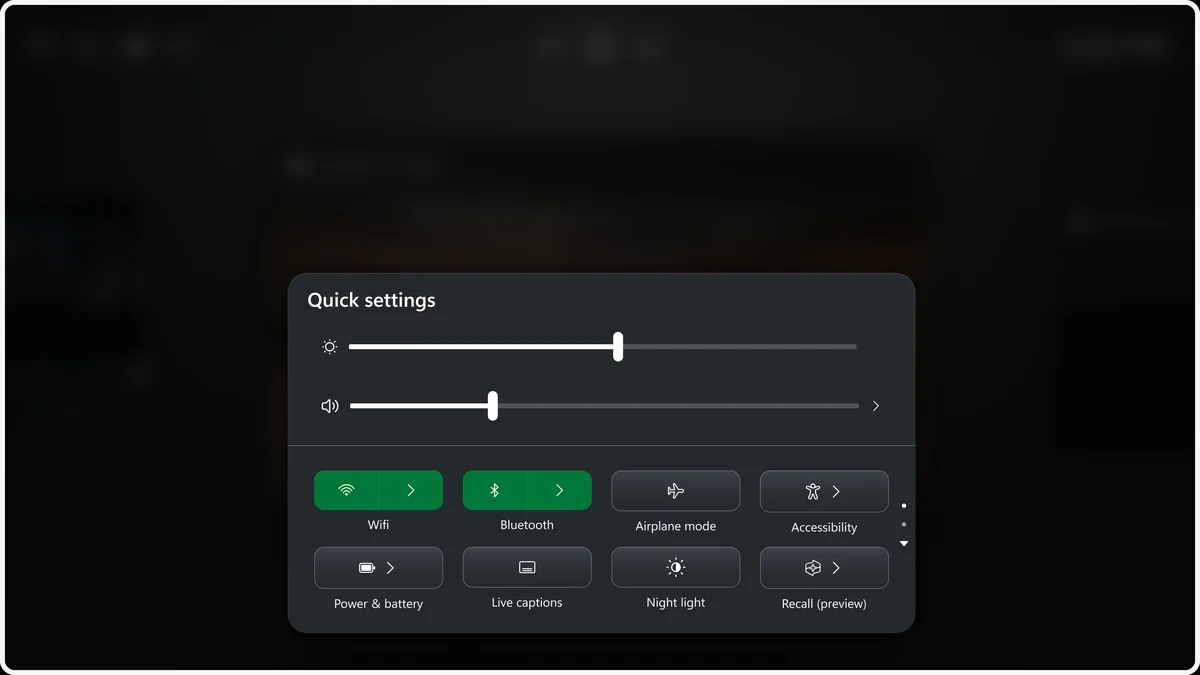
- Full Quick Settings in Xbox Mode: on Windows gaming handhelds (ROG Ally, Legion Go) and living-room PCs running fullscreen Xbox mode, the Gaming Task View navigation bar now provides direct access to the complete set of Windows taskbar Quick Settings (Wi-Fi, Bluetooth, audio volume, screen brightness, power profiles, and accessibility toggles) without dropping back to the desktop.
- WinUI 3 Windows Search With Inline Actions: the redesigned WinUI 3 search experience lets you execute system toggles directly inside search results (switching on Dark Mode or Bluetooth, adjusting display brightness, muting audio, or snapping active windows) alongside improved typo and synonym matching.
- Zero-Wait Windows Hello Unlock: Experimental Build 26340.9882 removes the delay where Windows forced you to wait for face or fingerprint recognition to time out before typing a PIN (whichever method succeeds first now unlocks the PC immediately), while Build 26320.9876 adds an option to temporarily boost screen brightness in dark rooms to assist infrared facial recognition.
Summary of Keyboard Prompt Changes and Windows 11 26H2 Upgrades (Builds 26320.9876 / 26340.9882)
| Feature | Trigger / Insider Channel | New 26H2 Behavior & Manual Settings Path |
|---|---|---|
| Sticky Keys | 5 rapid presses on Shift | Direct "don't ask again" opt-out inside the pop-up dialog (or Settings > Accessibility > Keyboard > Sticky Keys) |
| Filter Keys | Holding right Shift for 8 seconds | Permanent dismissal option right inside the prompt (or Settings > Accessibility > Keyboard > Filter Keys) |
| Xbox Mode Quick Settings | Build 26320.9876 (Beta 26H2) | Full taskbar Quick Settings accessible from the Gaming Task View bar without leaving Xbox Mode |
| WinUI 3 Search Inline Actions | Build 26320.9876 (Beta 26H2) | Toggle Dark Mode, Bluetooth, audio mute, and brightness directly from Windows Search results |
| Simultaneous Windows Hello & Auto-Brightness | Builds 26320.9876 & 26340.9882 | Enter PIN immediately without waiting for biometric scan timeout + temporary screen brightening in dark rooms |
My Take
This is the exact kind of legacy OS quirk that has made every keyboard-and-mouse player wonder why nobody at Redmond added a simple "Never show this again" checkbox back in 1995. On modern Hall Effect magnetic keyboards where actuation points drop down to 0.1mm with Rapid Trigger enabled, registering five micro-presses on Shift during a Counter-Strike 2 peek or an Apex Legends slide happens in a split second. On a clean Windows 11 install, forgetting to visit the Accessibility menu beforehand always resulted in an untimely alt-tab to the desktop accompanied by that unmistakable system beep right in the middle of a firefight. Being able to permanently kill the Sticky Keys and Filter Keys shortcut directly from the pop-up window, while also getting the full Quick Settings panel inside fullscreen Xbox mode on the 26H2 branch, shows the Windows Insider team is finally smoothing out real-world PC gaming friction.

SEO consultant for over 20 years and digital entrepreneur, Charles "Grimtag" is the founder of Pro-Gamer.gg, Retrocharting.com, and Gamescharting.com. A competitive gamer, streamer, and retro game collector, he has worked in the video game industry for over 15 years, notably as a consultant for leading game price comparison platforms. Passionate about real-time performance data and gaming technology, he analyzes competitive esports, gaming hardware benchmarks, and creator workflows on Pro-Gamer.gg with an authentic player perspective.