Keychron T1 HE: First Trackball Mouse With Magnetic Switches and 3-Axis Ball Adjustment Launches at $59.99

Ergonomic thumb-trackball mice have suffered from the same structural limitation for decades: regardless of your hand size or thumb length, the ball socket remains permanently fixed inside the plastic shell. With the new Keychron T1 HE (Wireless Adjustable Trackball Mouse), the hardware maker is shaking up a stagnant category by combining a three-axis adjustable trackball cradle, optical-magnetic hybrid switches with customizable actuation, and a 1,000 Hz wireless connection at an aggressive $59.99 price point.
A 34mm Thumb Trackball With 3-Axis Millimeter Adjustment
Following its compact bar-shaped Nape Pro trackball designed to sit right below a keyboard's spacebar, Keychron is now tackling the full-size right-handed everyday workstation mouse. While legacy competitors at best allow you to tilt the entire chassis on a hinge, the Keychron T1 HE introduces a physical three-dimensional adjustment mechanism built directly into the base of the mouse.
Using the included screwdriver on the bottom adjustment screws, users can physically shift the removable 34 mm resin trackball (supported by smooth ceramic bearings) across three independent axes so the sphere rests naturally beneath the thumb without awkward stretching:
- X-Axis (Left / Right): 3 to 3.5 mm of travel to move the ball closer to or further from the palm.
- Y-Axis (Front / Back): 3 to 3.5 mm of travel to accommodate both shorter thumbs and larger hands.
- Z-Axis (Up / Down): 2 to 2.5 mm of vertical height adjustment to fine-tune thumb contact angle.
Routine maintenance is equally straightforward: a dedicated removal hole on the underside lets you gently push the 34 mm ball out with the included screwdriver to wipe away dust and debris in seconds.
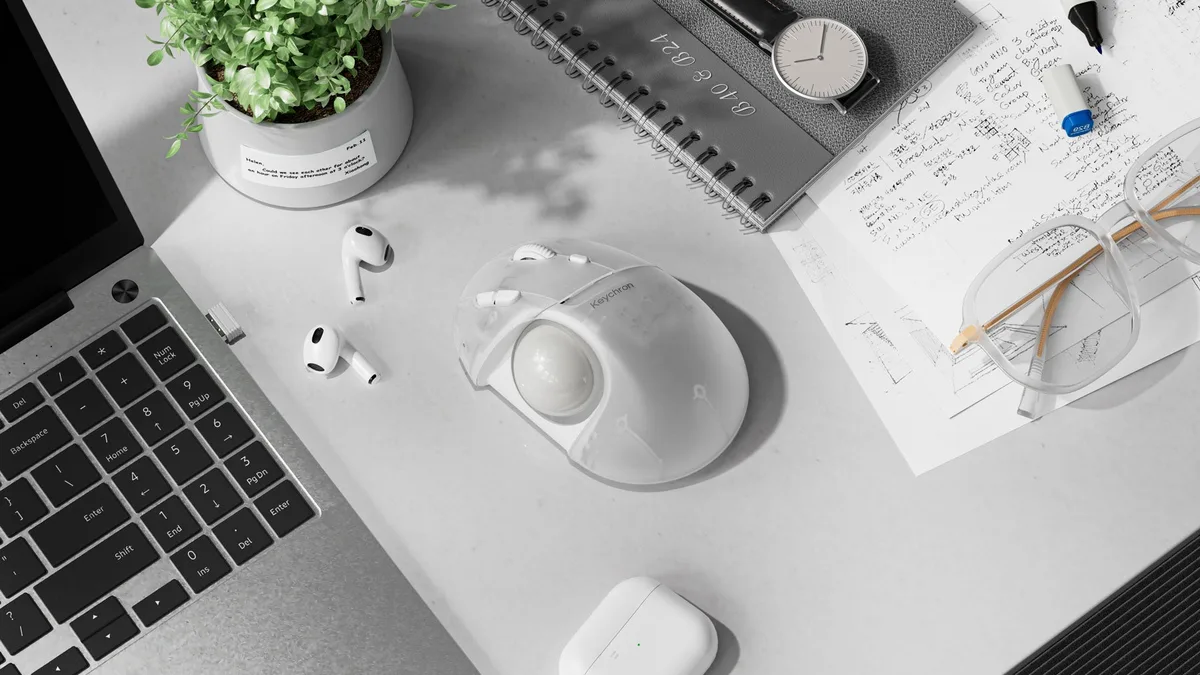
Keychron T1 HE Wireless Trackball Mouse
- 3-axis adjustable 34mm removable thumb trackball
- Keychron MagOptic hybrid switches (Rapid Trigger, 12 actuation steps)
- PixArt PAW3212 2,400 DPI sensor & 1,000Hz 2.4GHz wireless
- Browser-based Keychron Launcher & 600mAh battery (up to 106 hrs)
Keychron MagOptic Switches Bring Hall Effect and Rapid Trigger to a Trackball
The "HE" badge is more than just a nod to the brand's magnetic keyboards like the recent Keychron F4 HE 8K magnetic mini keypad. For the first time in a trackball mouse, the primary left and right buttons ditch traditional mechanical micro-switches prone to double-clicking in favor of hybrid Keychron MagOptic switches rated for up to 100 million clicks.
Operating across a tight ± 0.07 mm total click travel window, these switches support two selectable modes:
- Optical Mode: delivers crisp, consistent click registration with ultra-low power consumption.
- Magnetic Mode (Hall Effect): unlocks 12 adjustable actuation steps (allowing clicks to register on a hair-trigger tap or a deeper press) alongside Rapid Trigger, which dynamically resets the switch the instant your finger begins releasing pressure with zero mechanical debounce delay.
PixArt Sensor, 1,000Hz Wireless Polling, and Browser-Based Keychron Launcher
On the tracking and connectivity front, the Keychron T1 HE solves another major annoyance for users running high-refresh-rate monitors (144 Hz, 240 Hz, and above). Whereas almost all productivity trackballs are locked to a sluggish 125 Hz polling rate that makes cursor movement look choppy on modern gaming displays, Keychron includes a 1,000 Hz polling rate over both 2.4 GHz wireless and USB-C wired connections, alongside Bluetooth 5.2 (125 Hz) capable of pairing with up to three devices.
Tracking is handled by a power-efficient PixArt PAW3212 optical sensor rated up to 2,400 DPI (five onboard presets from 100 to 1,200 DPI via the dedicated DPI button, expandable up to 2,400 DPI in software), paired with 6 programmable buttons and a 24-step optical scroll wheel. The ergonomic shell measures 119.4 × 81.3 × 53.3 mm and weighs 160 ± 3 g, housing a 600 mAh battery rated for up to 98 hours in 2.4 GHz (1,000 Hz) mode and 106 hours over Bluetooth.
| Specification | Keychron T1 HE | Logitech MX Ergo S (Category Benchmark) |
|---|---|---|
| Trackball Module | 34mm removable, 3-axis adjustable position (X, Y, Z) | 34mm fixed socket (0° or 20° body tilt hinge) |
| Primary Switches | Keychron MagOptic (Optical + 12-step Hall Effect, Rapid Trigger, 100M clicks) | Quiet mechanical micro-switches (10M clicks) |
| Sensor & DPI | PixArt PAW3212 (100 to 2,400 DPI) | Optical sensor (512 to 2,048 DPI) |
| Polling Rate | Up to 1,000 Hz (2.4 GHz / USB-C) and 125 Hz (Bluetooth 5.2) | 125 Hz (Logi Bolt / Bluetooth) |
| Software Ecosystem | Keychron Launcher (Browser web app, onboard memory) | Logi Options+ (Background desktop installer) |
| Weight & Battery | 160 ± 3 g / 600 mAh (up to 98 hrs at 1,000 Hz / 106 hrs BT) | 259 g / USB-C rechargeable |
| Official Retail Price | $59.99 | $99.99 / €119.99 |
Another standout perk for users switching between a personal gaming rig and a locked-down work laptop is Keychron Launcher. Running directly inside Chromium browsers (Chrome, Edge, or Opera) with native support across Windows, macOS, and Linux, the web app lets you remap all 6 buttons, record macros, and tune MagOptic actuation steps directly to onboard memory without installing bloated background software.
Available in three colorways (Black, White, and Transparent), the Keychron T1 HE is up for pre-order now at $59.99, with initial shipments scheduled for early December 2026.
Check Availability for Logitech MX Ergo S on Amazon→
My Take on the Spec Sheet
Looking closely at Keychron's official spec sheet, it is easy to see why this release stands out. Obviously, nobody is going to swap out one of the best ultra-lightweight gaming mice weighing 45 grams for a thumb trackball in a competitive tactical shooter. However, if you want to give your wrist and carpal tunnel a genuine break after hours of intense aiming, edit video timelines, write code, or play strategy and city-building games with zero arm movement, the T1 HE fixes the exact pain points that have held legacy trackballs back. Bringing 1,000 Hz wireless polling to a thumb trackball finally eliminates the choppy 125 Hz cursor trail on 240 Hz monitors, and pairing 3-axis mechanical ball adjustment with zero-bloatware browser configuration at $59.99 makes $100+ legacy options look seriously dated. We have not yet had a physical unit on our desk,if the manufacturer's team would like to send over a review sample so we can put it through our full real-world testing protocol, our lab doors are wide open.

PC hardware enthusiast and competitive gamer, Arthur 'Heimdall' splits his time between France and the UK working in enterprise B2B software solutions. A business school graduate passionate about component benchmarking, he has been building, modding, and tuning PCs since childhood, optimizing every thermal degree and millisecond of display latency. An avid gamer across Assassin's Creed and sandbox titles, he forged his alliance with Grimtag and Chaya during late-night World of Warcraft raids before joining Pro-Gamer.