25 Years After Launch, the GameCube Gets Its Own Native Homebrew Store as Dolphin Depot Opens With 64 Apps
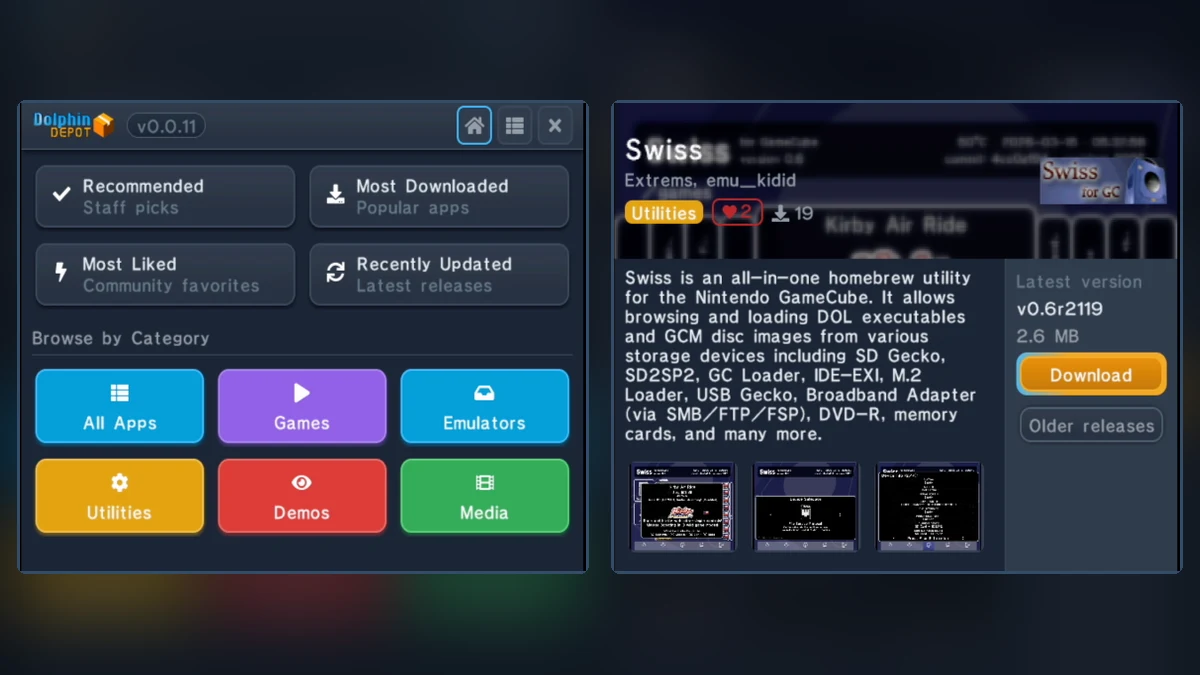
A quarter-century after its original 2001 debut, the Nintendo GameCube has reached a major milestone for real-hardware preservation. Created by hardware and software developer Maciej Kobus (better known across the modding scene as webhdx, the mind behind the open-source PicoBoot modchip and the ETH2GC network adapter), the Dolphin Depot homebrew store has officially entered public beta at dolphindepot.org. Much like the classic Homebrew Browser on the Nintendo Wii, this native client lets players browse, download, and update 64 homebrew applications, emulators, and games directly on their console without constantly pulling the SD card out to manage files on a PC.

From ETH2GC to a Custom Binary API Built for the GameCube's 24 MB of RAM
For decades, taking a GameCube online was an expensive niche hobby due to the scarcity and soaring secondhand prices of Nintendo's official Broadband Adapter (DOL-015, or BBA). That bottleneck vanished in March 2024 with the release of ETH2GC, an affordable, open-source Ethernet adapter powered by the ENC28J60 controller. Once network connectivity became accessible to everyday modders, the idea of an on-console storefront quickly followed to give the 128-bit cube a practical reason to go online.
Coined in February 2026 as a nod to Nintendo's original Project Dolphin codename, the native Dolphin Depot client (currently available in version v0.0.12 as a compact 784.4 KB GPL-3.0 package) communicates through a dedicated binary API engineered from scratch. This lightweight protocol allows the console to fetch catalog listings, screenshots, and release archives smoothly within the tight hardware constraints of the GameCube's 24 MB of main 1T-SRAM. It is the latest showcase of sixth-generation console engineering, arriving right alongside breakthroughs like the M2Slim kit fitting a full-size internal M.2 SATA SSD inside the PlayStation 2 Slim while keeping the DVD drive intact.
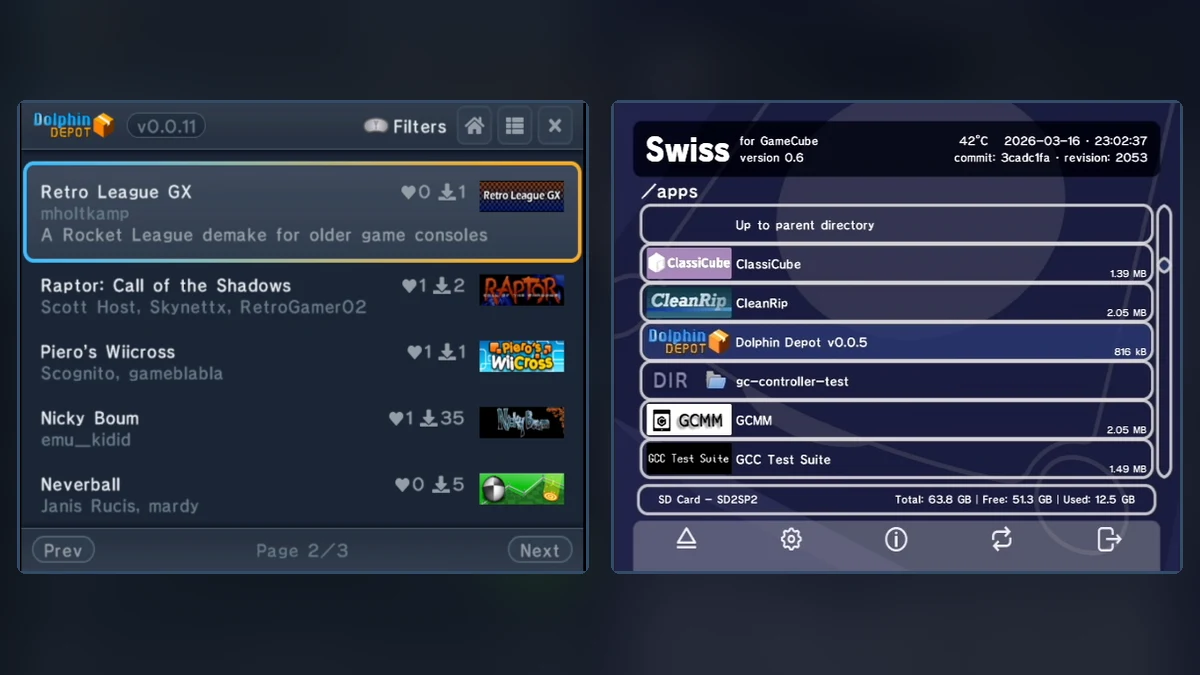
opening.bnr graphical banners rendered inside the /apps folder in Swiss.64 Apps at Launch and a Unified Packaging Standard for Swiss and Cubiboot
Beyond direct console downloads, Dolphin Depot tackles a twenty-year headache in the GameCube homebrew ecosystem: the lack of a unified packaging standard. While Wii developers rallied around the Homebrew Channel's folder structure early on, GameCube releases were historically scattered across inconsistent directory layouts. Dolphin Depot establishes a clean, universal on-device structure where every application lives inside /apps/{slug}/ alongside a primary executable named default.dol and a metadata banner file named opening.bnr.
- Automatic On-Console Updates: By enforcing the
/apps/{slug}/default.dollayout, the Dolphin Depot client automatically detects which applications are already installed on your storage device and notifies you as soon as a newer build is available to download. - Rich Visual Banners in Launchers: The
opening.bnrfile uses the exact binary banner format Nintendo created for retail GameCube discs, bundling a 96×32 pixel icon, title, developer name, and description. Modern bootloaders such as Swiss, Cubeboot, and Cubiboot read this file to render polished graphical entries instead of plain filenames. - An Open Registry of 64 Releases: The official DolphinDepot/registry GitHub repository already indexes 64 applications across Utilities, Emulators, Games, Demos, and Media. Highlights include essential utilities (Swiss, CleanRip, Game Boy Interface / GBI, 240p Test Suite, GCMM and GCMM exFAT, BlueRetro Companion, GBA Link Cable Dumper), staple emulators (RetroArch, Snes9x GX, Visual Boy Advance GX, Genesis Plus GX, Not64, CubeSX, ScummVM), and homebrew games or ports such as ClassiCube, Space Cadet Pinball, Neverball, Retro League GX (a retro Rocket League demake), and Giana's Return.
Hardware Requirements and Network Adapter Compatibility
Running the Dolphin Depot client on a Nintendo GameCube or Panasonic Q requires three core components: a way to boot unsigned code (such as a PicoBoot or PicoLoader modchip, a game save exploit, or an optical drive emulator like the GC Loader or FlippyDrive), a supported storage device to save downloaded packages (an SD2SP2 serial port adapter, an SD Gecko memory card adapter, or an MMCE device), and a compatible network adapter.
Check Availability for GameCube SD2SP2 Adapters on Amazon→
Prospective users should note one important hardware caveat documented in the installation guide: only the official Nintendo Broadband Adapter (BBA) and the open-source ETH2GC adapter are supported for network connectivity. Both the official Nintendo 56K Modem Adapter and the FlippyDrive Ethernet Adapter are currently unsupported for online store downloads. For enthusiasts who love pushing Nintendo's hardware to its limits, much like the community behind the secret F-Zero GX cheat codes unlocking hidden arcade parts 23 years later, copying the apps/dolphindepot/ folder onto your SD card once is all it takes to make your GameCube completely self-sufficient.
My Field Notes
Anyone who regularly uses a modded GameCube with an SD2SP2 adapter knows how tedious manual updates can be: prying a tiny microSD card out from underneath the console, hunting down the latest Swiss or Game Boy Interface build on GitHub, and organizing folders by hand on a PC. What webhdx has accomplished with Dolphin Depot goes far beyond the convenience of an on-screen downloader. By introducing a clean packaging standard with default.dol executables and web-generated opening.bnr banners, the project finally gives the GameCube the cohesive software ecosystem that the Wii enjoyed back in 2008 with the Homebrew Channel. Paired with an inexpensive ETH2GC adapter, it completely transforms the day-to-day experience of using original hardware.

Originally from Lyon, France, gaming journalist Bastien "Orion" relocated nearly a decade ago to Quebec City's Saint-Roch district, right in the heart of eastern Canada's development studio hub. Before crossing the Atlantic, he honed his versatile reporting style across classic French gaming web portals and specialist television outlets in the 2000s and 2010s, notably with JeuxVideo.fr and JeuxNews. Equally passionate about AAA blockbusters, North American studio culture, retro preservation, and community modding projects, he anchors Pro-Gamer's transatlantic desk and real-time coverage of US and Japanese industry announcements.