Up to 60% Faster Startup and Redesigned UI: Microsoft Finally Fixes the Sluggish Xbox App on Windows PC
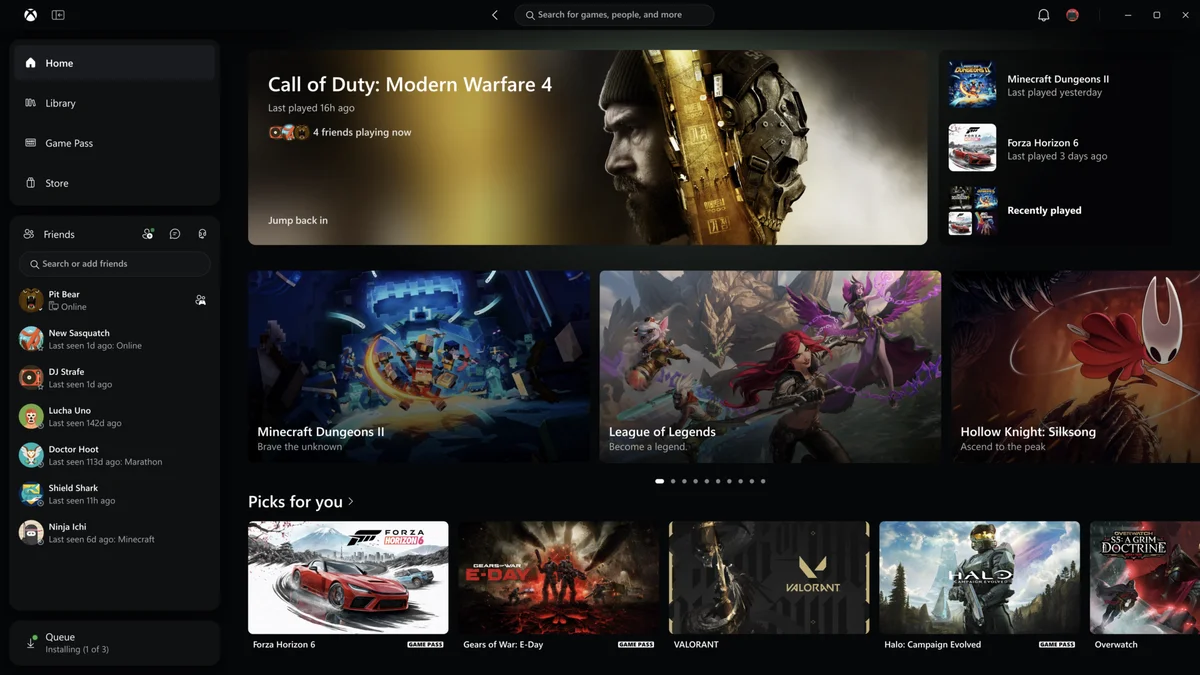
Long criticized by PC Game Pass subscribers for sluggish startup times and clunky menu transitions, Microsoft's desktop gaming client is finally getting a major technical overhaul. In an official announcement published on November 5, 2026 via Xbox Wire, Microsoft unveiled a redesigned Xbox App for Windows PC that launches up to 60% faster, alongside a streamlined library and an expanded web and cloud gaming interface.
Up to 60% Faster Startup and Snappier Menus: The Performance Breakdown
For years, PC players have pointed out the responsiveness gap between the Windows Xbox app and lighter desktop launchers. Rather than applying a purely cosmetic coat of paint, the Xbox engineering team focused heavily on cutting startup overhead and speeding up everyday navigation across the client.
According to Microsoft's internal benchmark testing, the performance gains across the updated Windows app break down into three main metrics:
- Up to 60% faster app launch times: cold starts on Windows have been heavily optimized so players reach their dashboard in a fraction of the previous wait time.
- Up to 50% faster page loading: switching between core destinations including Home, Store, and Game Pass now resolves up to twice as fast.
- Up to 65% faster in-app windows: secondary pop-ups, installation management prompts, and detailed game overlays open with minimal delay.
Check Xbox Game Pass Ultimate deals on Allkeyshop→
Redesigned Library, Integrated Social Sidebar, and Refreshed Game Cards
Beyond raw speed, the update introduces a cleaner structural layout internally codenamed Bastion. The left-hand sidebar has been split into two dedicated floating panels: an upper navigation block housing Home, Library, Game Pass, and Store, and a permanent lower Friends hub anchored directly above the compact download queue.
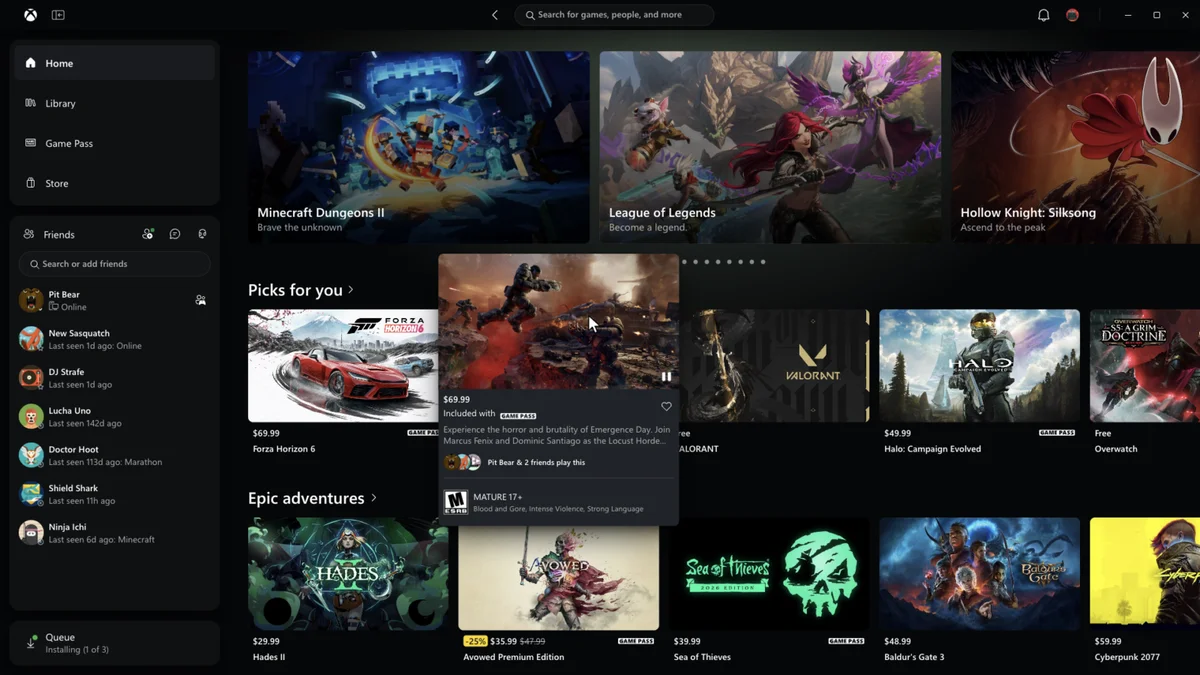
Bringing friends and party tools directly into the main navigation panel makes it much faster to check what teammates are playing, fire up a text chat, or jump into voice channels without losing track of the current store or library view.
Key usability upgrades arriving in the PC overhaul include:
- A simplified Library experience: updated filtering and sorting options let users organize installed titles, PC Game Pass catalogs, and linked third-party games much more cleanly. That extra clarity comes at a great time for players prioritizing their backlog ahead of the 14 titles leaving Xbox Game Pass on November 15, 2026.
- Unified top search bar: a single search field centered at the top of the app now pulls simultaneous results across store games, locally installed titles, add-ons, and player profiles.
- Refreshed interactive game cards: hovering over a game tile triggers a smooth preview card displaying video footage, store pricing, Game Pass inclusion, age ratings, and which friends are currently playing.
- Eagle-eyed mockups inside Microsoft's official screenshots: interestingly, the official press images shared by Xbox showcase tiles for Call of Duty: Modern Warfare 4, Forza Horizon 6, Gears of War: E-Day, and Halo: Campaign Evolved, alongside eye-catching placeholder tiles for Minecraft Dungeons II ("Brave the unknown") and Grounded 2 (Game Preview).

Refreshed Xbox Cloud Gaming Web Portal, Smart TVs, and VR Headsets
The interface refresh extends beyond native Windows installations. Following an initial preview with Insiders earlier this year, Microsoft is now rolling out its revamped Xbox Cloud Gaming web experience (play.xbox.com) to all players over the coming weeks.
Browser players gain a dedicated Library tab that unifies cloud-playable Game Pass titles and individually owned games supported under the Stream your own game feature, complete with filters for genre, recent activity, and input methods. A new Desktop mode makes far better use of wide PC monitors, while customization settings now include dark mode, light mode, and five new high-contrast accessibility themes.
Finally, Microsoft confirmed that this unified navigation design is also beginning to roll out to Xbox Cloud Gaming apps on supported Smart TVs and VR headsets, complementing recent QR code smartphone touch controller and Cloud Connect tests on Smart TVs. On Windows PC, the faster Xbox app is available starting today for all Xbox Insiders through the Xbox Insider Hub before its general public release.
My Take
Jumping daily between Steam and PC Game Pass on Windows has made the sluggishness of the Xbox app one of my biggest pet peeves for years. While Steam snaps open instantly, the Xbox client has historically felt weighed down by sluggish web wrappers, delayed store tabs, and a social menu that felt bolted on as an afterthought.
Microsoft prioritizing under-the-hood engineering with a 60% faster launch and 65% faster in-app windows is exactly the overhaul desktop players needed. Pinning the friends list directly into the left navigation bar and unifying search across installed games, add-ons, and players fixes the exact friction points that annoyed desktop users daily. If these speed gains hold up under heavy library loads once the update leaves the Insider ring, PC Game Pass will finally have the responsive native launcher it deserves.

SEO consultant for over 20 years and digital entrepreneur, Charles "Grimtag" is the founder of Pro-Gamer.gg, Retrocharting.com, and Gamescharting.com. A competitive gamer, streamer, and retro game collector, he has worked in the video game industry for over 15 years, notably as a consultant for leading game price comparison platforms. Passionate about real-time performance data and gaming technology, he analyzes competitive esports, gaming hardware benchmarks, and creator workflows on Pro-Gamer.gg with an authentic player perspective.