170W Board Power Yet a Charred Plug: How a Sapphire Radeon RX 9060 XT Pulse Melted Its 8-Pin Power Connector
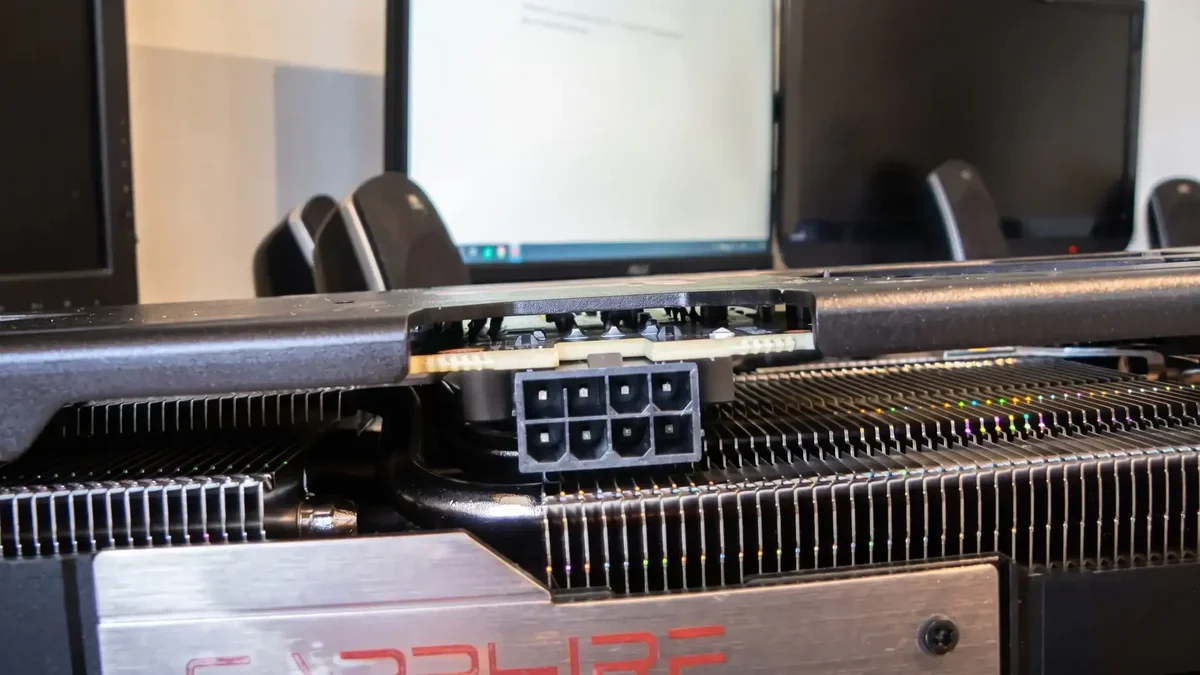
PC builders have grown accustomed to monitoring 16-pin (12VHPWR and 12V-2x6) cables with thermal cameras whenever a flagship graphics card pushes past 400W, yet basic electrical contact physics just delivered a sharp reminder that no connector is completely immune to heat damage. Over on the r/radeon community forum, user ThanksKooky118 shared photographs of a brand-new Sapphire Pulse AMD Radeon RX 9060 XT whose traditional 8-pin PCIe power connector melted during regular gaming loads.
A Loud Zap, an Instant Reboot, and Repeated Crashes in War Thunder
Purchased brand new from US retailer Newegg, the graphics card showed no visible defects out of the box. Installed inside a balanced mid-range rig pairing an AMD Ryzen 5 7600X processor with an ASRock X670E PG Lightning motherboard and 32GB of DDR5 memory, the card ran flawlessly throughout its first two weeks of daily operation.
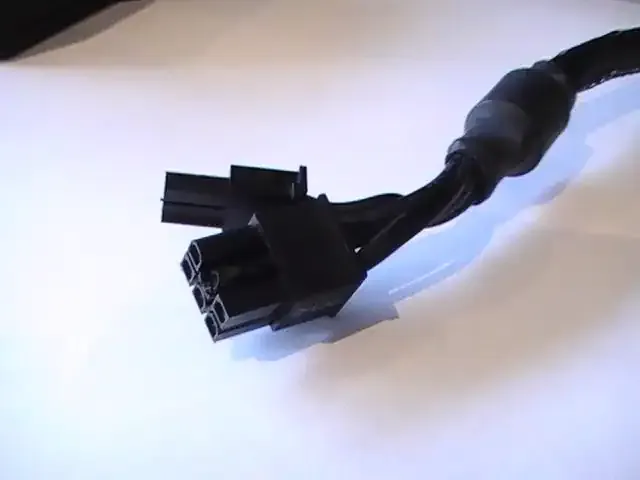
The first warning sign appeared at the two-week mark: the owner heard an audible electrical "zap" coming from inside the chassis, immediately followed by a sudden system reboot. Because the PC booted right back up without error codes, the event was initially brushed off as a transient power hiccup. A week later, however, the system began suffering hard crashes whenever the GPU was pushed under load in War Thunder. Upon opening the side panel and unplugging the PCIe power cable to inspect the card, ThanksKooky118 found blistered, melted plastic surrounding one of the +12V pins on both the PSU cable plug and the graphics card's onboard 8-pin header.
170W Typical Board Power on a Single 8-Pin Header: Looking at Sapphire's Spec Sheet
What makes this incident particularly notable from an engineering standpoint is the modest power envelope of the GPU involved. Built on the AMD RDNA 4 architecture (4nm Navi 44 silicon packing 32 Compute Units, 2,048 Stream Processors, and 32MB of Infinity Cache), the Sapphire Pulse AMD Radeon RX 9060 XT OC 16GB is rated for a Typical Board Power (TBP) of just 170W (with brief gaming spikes around 182W to 186W alongside a 3,290 MHz Boost Clock and 2,700 MHz Game Clock).
On the board design side, Sapphire did not cut corners on electrical durability: the Pulse model features a 10-layer 2oz copper High TG PCB, a 9-phase digital power delivery subsystem, Honeywell PTM7950 phase-change thermal material, and dedicated Fuse Protection integrated directly into the external PCIe power connector circuit.
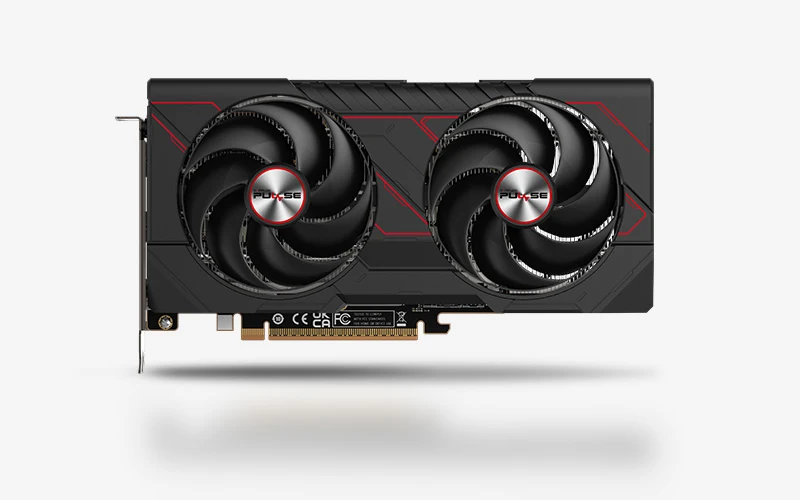
Sapphire Pulse AMD Radeon RX 9060 XT OC 16GB GDDR6
- AMD RDNA 4 GPU (32 Compute Units / 2,048 Stream Processors) with up to 3,290 MHz Boost Clock
- 16GB GDDR6 memory at 20 Gbps across a 128-bit bus + 32MB AMD Infinity Cache
- Efficient 170W Typical Board Power via a single 8-pin PCIe connector with built-in fuse protection
The Prime Suspect: An Aging Corsair AX1200 Modular Cable and High Contact Resistance
How does a 170W graphics card melt an 8-pin connector when the motherboard's PCI Express 5.0 x16 slot already supplies up to 75W of that total? In practice, the external 8-pin cable only needed to carry roughly 100W to 125W under sustained gaming loads, translating to about 8.5A to 10.5A split across three +12V pins (barely 3A to 3.5A per pin). Although the official PCI-SIG specification caps a standard 8-pin Molex Mini-Fit Jr. connector at 150W, a healthy 16 AWG or 18 AWG cable with High Current System (HCS) terminals can physically sustain 288W to 340W without overheating.
The critical variable lies in the power supply powering the rig: a Corsair Professional Series Gold AX1200 (1,200W) paired with its original modular 6+2-pin PCIe cable that had been in continuous service for several years. Originally released back in 2010, the AX1200 is a legendary PSU, but its cables have endured over a decade of plug-and-unplug cycles, bends, and thermal expansion. Over time, the internal metal spring leaves inside female crimp terminals can lose tension, spread slightly apart, or accumulate surface oxidation. If the 6+2-pin plug is also seated slightly off-axis or not latched 100% flush, the actual metal-to-metal contact patch shrinks to a tiny fraction of a square millimeter.
From there, Joule heating ($P = R times I^2$) takes over: elevated contact resistance on a single +12V pin turns that microscopic junction into a localized heating element while forcing adjacent +12V pins to shoulder an uneven share of the load. It is the exact same contact-resistance physics we recently analyzed when explaining why a 250W GeForce RTX 5070 can still melt a 16-pin power connector when terminal seating or pin tension is compromised.

Why Neither Sapphire's Onboard Fuse Nor the 1,200W PSU Tripped
Several readers wondered why neither the Corsair AX1200's protection circuitry nor Sapphire's onboard fuse prevented the plastic housing from melting. The answer comes down to how a series resistive fault behaves: unlike a dead short circuit that spikes current draw to 50A or 100A, a high-resistance pin still draws roughly the same 9A to 10A total current required by the GPU. To a single-rail 1,200W power supply capable of delivering 100A on its +12V rail, a 10A load looks completely normal. Likewise, Sapphire's onboard input fuse sits downstream of the connector header and is designed to blow during catastrophic overcurrent events, such as a shorted VRM power stage, rather than slow thermal buildup inside the plastic plug.
Catching an imbalanced or overheating pin before nylon housings reach their ~250°C melting point requires active per-wire current sensing, similar to the 9.5A per-pin cutoff protection Corsair recently demonstrated on its PinProtect Plus power supplies. Fortunately for ThanksKooky118, the failure was caught before causing broader system damage: Sapphire support instructed the user to process a direct replacement through Newegg's 30-day return window, while Corsair was contacted for a fresh replacement PCIe cable.
My Take on the Spec Sheet
Let's not lump the tried-and-true 8-pin PCIe connector into the same bucket as the 12V-2x6 standard. On a Molex Mini-Fit Jr. 8-pin header, the metal terminals are substantially beefier, pin spacing is generous, and the physical safety margin is nearly double the official 150W spec. However, basic electrical physics plays no favorites: if you feed a brand-new 2026 graphics card using a modular 6+2-pin cable that has been swapped across half a dozen builds since 2010 on an original Corsair AX1200, a loosened female socket leaf or a partially latched plug will eventually cook itself, even with barely 110W flowing through the wire. As I always tell Grimtag whenever he reaches into our spare cable bin on the test bench: always inspect the metal contacts inside your PCIe plugs before clicking them home, and retire modular cables that have survived a decade of GPU upgrades.

PC hardware enthusiast and competitive gamer, Arthur 'Heimdall' splits his time between France and the UK working in enterprise B2B software solutions. A business school graduate passionate about component benchmarking, he has been building, modding, and tuning PCs since childhood, optimizing every thermal degree and millisecond of display latency. An avid gamer across Assassin's Creed and sandbox titles, he forged his alliance with Grimtag and Chaya during late-night World of Warcraft raids before joining Pro-Gamer.