RTX Lens for RTX 5090: Codeh4ck's Free Utility Monitors Per-Pin Amperage and Triggers an Emergency PC Shutdown Before Melting
The fear of a melting power connector under heavy load continues to haunt high-end PC builders. With an official 575W TGP on the GeForce RTX 5090 and transient power spikes brushing right against the 600W ceiling of the 16-pin cable (12V-2x6 and 12VHPWR), even a slight electrical imbalance across a single contact pin can escalate into thermal failure. To counter this hazard without invasive hardware mods, independent developer Codeh4ck has released the official RTX Lens GitHub repository (version 1.1.8), a free and open-source Windows application distributed under the LGPL-3.0 license for real-time per-pin current monitoring.
Why Total Wattage Readings Cannot Save a 12V-2x6 Power Connector
On a standard 16-pin cable built to PCI-SIG and ATX 3.1 specifications, the entire power load travels across six +12V conductors paired with six ground pins and four sense pins. Under a balanced 600W load, current distributes evenly at roughly 8.33A per pin, staying safely below the 9.2A to 9.5A nominal rating of each metallic terminal. The blind spot of traditional monitoring tools is that they only report total board power: a graphics card drawing a seemingly normal 480W can suffer poor contact on two pins and quietly force 14A to 16A through the remaining adjacent wires.
That hidden asymmetry generates localized heat that softens and eventually chars the plastic connector housing. While some manufacturers are testing hardware cutoffs such as Corsair's six-switch 12V-2x6 test rig and 9.5A PinProtect Plus cutoff system, everyday owners rely on embedded telemetry inside their existing components. That is the exact gap filled by RTX Lens (originally developed under the project name RTX5090Monitor): it polls per-pin sensors continuously to trigger progressive warnings or shut down the system before terminal damage occurs.
ASUS ROG Astral, WireView Pro II, and MSI PSUs: Comparing Both Ends of the Cable
Not every graphics card on the market includes individual current-sensing shunts on each 12V line. While RTX Lens displays core clocks, GPU voltage, temperatures, and fan speeds on any desktop GeForce RTX card running 64-bit Windows 10 (build 17763 or later) or Windows 11, granular per-pin current monitoring works by tapping into three specific hardware ecosystems equipped with dedicated pin sensors:
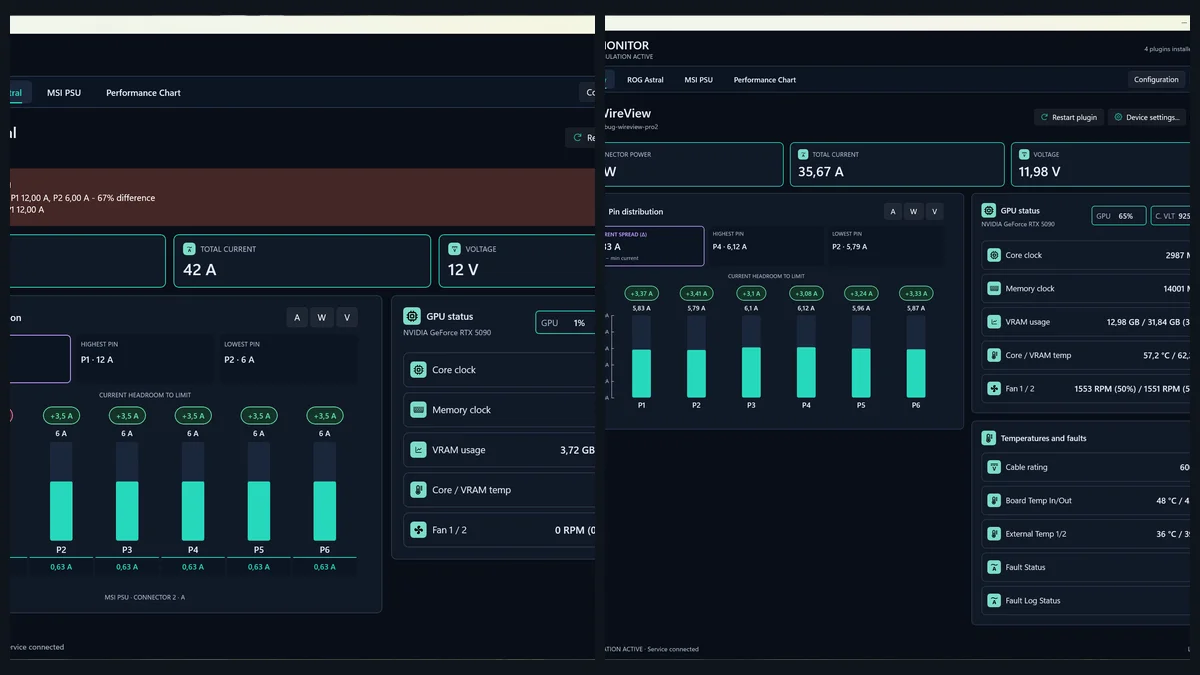
- ASUS ROG Astral GeForce RTX 5090 and RTX 5080 GPUs: reads the onboard current controllers on the GPU side of the power connector via LibreHardwareMonitor, showing exactly how amperage is shared across all six 12V pins entering the board.
- Thermal Grizzly WireView Pro II (including Noctua Edition): interfaces directly with the inline monitoring module plugged into the GPU power header to report per-pin current, voltage, and wattage alongside cable rating detection, connector temperatures, and hardware fault flags.
- MSI MPG Ai1300TS and Ai1600TS PCIE5 Power Supplies: reads PSU-side sensor telemetry across both 12V-2x6 ports simultaneously, tracking per-pin current, internal PSU temperature, fan status, and native Safeguard+ protection profiles.
The standout capability of the utility is cross-cable comparison. Builders pairing a supported MSI power supply with either a WireView Pro II or an ASUS ROG Astral GeForce RTX 5090 graphics card can compare per-pin amperage at both ends of the exact same 12V-2x6 cable in real time. Any discrepancy between the PSU output terminals and the GPU input plug immediately exposes abnormal wire resistance or an imperfectly seated connector.
Automated Windows Emergency Shutdown, Xeneon Edge Widget, and Mobile Companion Apps
To keep hardware protection active without cluttering the taskbar, RTX Lens installs a standalone background Windows service (RTX Lens Service, listening locally on port 59273). Even after you close the desktop interface, the background service continues polling sensors and enforcing user-defined safety rules:
- Automated PC Shutdown: customizable per-device warning thresholds that trigger desktop reminders, switch to an emergency low-power profile via MSI Afterburner Safeguard+, or execute an automated Windows shutdown if a dangerous overcurrent or thermal warning persists during unattended rendering or gaming.
- Android and iPhone Companion Apps: local network pairing via a QR code under Configuration → Mobile Access, allowing users to inspect live pin charts and warning logs on Android (
RTX-Lens.apk) or iOS (RTX-Lens.ipasideloaded via AltStore Classic). - Corsair Xeneon Edge Widget and PSU Fan Tuning: includes a dedicated
rtxlens.icuewidgetpackage for live telemetry on Corsair's Xeneon Edge secondary display in iCUE, a six-point custom fan curve editor for MSI Ai1300TS/Ai1600TS power supplies, and a Performance Chart session recorder that exports interactive HTML graphs.
My Test Bench
Looking closely at workshop failure reports on GeForce RTX 5090 cards since launch reveals a clear pattern: almost no melted 16-pin connectors are caused by exceeding total board TGP. Instead, silent contact resistance on one or two pins forces the remaining conductors to carry over 13A for hours on end. Until now, builders running ASUS ROG Astral cards, WireView Pro II adapters, and MSI digital PSUs had to juggle three separate vendor utilities that could not cross-reference their data. By unifying both ends of the 12V-2x6 cable into a lightweight, open-source Windows service with an automatic emergency shutdown trigger, Codeh4ck delivers the exact software watchdog that high-wattage GPU owners needed from day one.

PC hardware enthusiast and competitive gamer, Arthur 'Heimdall' splits his time between France and the UK working in enterprise B2B software solutions. A business school graduate passionate about component benchmarking, he has been building, modding, and tuning PCs since childhood, optimizing every thermal degree and millisecond of display latency. An avid gamer across Assassin's Creed and sandbox titles, he forged his alliance with Grimtag and Chaya during late-night World of Warcraft raids before joining Pro-Gamer.