DualSense and DualShock 4 Support Arrives in the Xbox PC App Alongside Amazon Luna Controllers
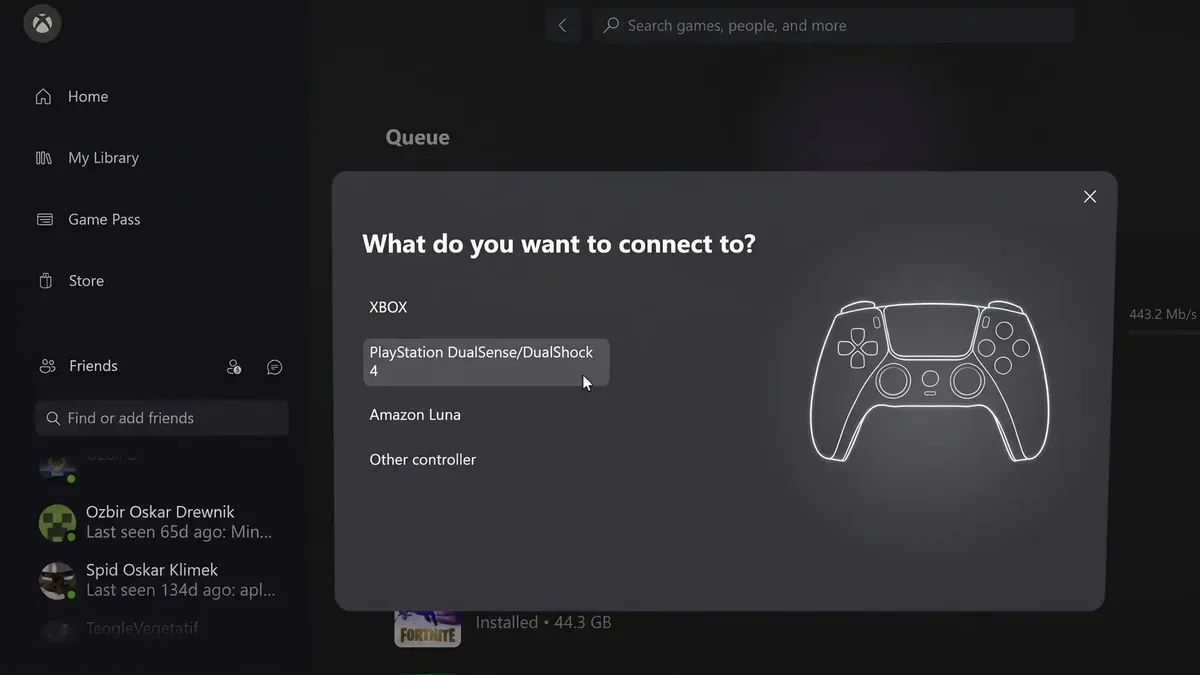
Using a PlayStation controller on Windows 11 to play local PC Game Pass titles has historically required third-party workarounds. A quiet interface update spotted this weekend inside the Xbox PC App is changing that workflow: Microsoft has added a dedicated controller connection menu that explicitly lists Sony's DualSense (PS5) and DualShock 4 (PS4) gamepads alongside the Amazon Luna controller.
Inside the New Controller Connection Prompt in the Xbox PC App
Hardware tracker Zuby Tech shared two screenshots of the updated Xbox PC App on Sunday, November 15, showing both the English and Polish localizations of the Windows client. Clicking the controller icon in the top-left corner of the window, located right next to the Xbox logo above the Home, My Library, and Game Pass tabs, now brings up a modal overlay asking: "What do you want to connect to?"
Instead of restricting the pairing and detection flow to first-party hardware, the Xbox PC launcher now presents four distinct options:
- XBOX: covering official Xbox Wireless Controllers, Elite Series gamepads, and licensed hardware such as Ryan Whitaker's 101g 3D-printed Xbox Nano controller.
- PlayStation DualSense/DualShock 4: paired with an official vector wireframe illustration of Sony's DualSense controller highlighting its symmetrical thumbsticks, central touchpad, D-pad, and face buttons.
- Amazon Luna: Amazon's cloud gaming controller, which Microsoft already supports across its browser and Fire TV streaming endpoints.
- Other controller: a catch-all option for third-party Windows Bluetooth and USB gamepads.
Bridging the Gap Between Windows XInput and PlayStation DirectInput
The technical hurdle behind PlayStation controllers on the Xbox app comes down to how Windows handles input APIs. Games packaged for the Microsoft Store and the PC Game Pass catalog rely natively on Microsoft's XInput standard, whereas both the DualShock 4 and DualSense communicate via DirectInput / HID by default.
While select modern multiplatform releases include built-in Sony SDK libraries for wired USB-C DualSense features (such as adaptive triggers and haptic feedback) and Xbox Cloud Gaming already recognizes PlayStation pads, a large portion of locally installed Game Pass titles simply ignore DirectInput devices. Unlike Valve's launcher, which translates controller inputs on the fly through Steam Input, the Xbox PC app forced players to rely on community wrappers like DS4Windows or DSX (paired with the ViGEmBus virtual driver) to emulate a virtual Xbox 360 pad.
Between Microsoft's ongoing work on the unified GameInput API for Windows 11 and internal hardware projects like the leaked Xbox Elite Series 3 controller with Hall-effect sticks, adding native onboarding for DualSense, DualShock 4, and Amazon Luna controllers directly inside the PC app removes a major point of friction for multi-console households. Microsoft has yet to publish official release notes clarifying whether this menu also activates an app-wide XInput translation layer for older local PC Game Pass games, as the update appears to be rolling out gradually across Windows builds.
My Field Notes
On my own Windows 11 test rig, keeping DS4Windows around just to make a DualSense behave properly inside local PC Game Pass installs has always felt like an unnecessary chore, especially when double-input conflicts pop up between the physical PlayStation pad and the emulated Xbox controller. Seeing Microsoft build a dedicated PlayStation DualSense/DualShock 4 entry complete with a DualSense wireframe right into the Xbox PC app's connection menu is a pragmatic win for PC players. The key technical test now is whether Microsoft pairs this UI onboarding with a built-in XInput wrapper so every legacy Game Pass title recognizes Sony's controllers out of the box without third-party drivers.

Originally from Lyon, France, gaming journalist Bastien "Orion" relocated nearly a decade ago to Quebec City's Saint-Roch district, right in the heart of eastern Canada's development studio hub. Before crossing the Atlantic, he honed his versatile reporting style across classic French gaming web portals and specialist television outlets in the 2000s and 2010s, notably with JeuxVideo.fr and JeuxNews. Equally passionate about AAA blockbusters, North American studio culture, retro preservation, and community modding projects, he anchors Pro-Gamer's transatlantic desk and real-time coverage of US and Japanese industry announcements.