120 FPS Performance Mode, Handheld Battery Play, and Ryzen AI NPU: Microsoft Officially Launches Auto SR on ROG Xbox Ally X and PCs
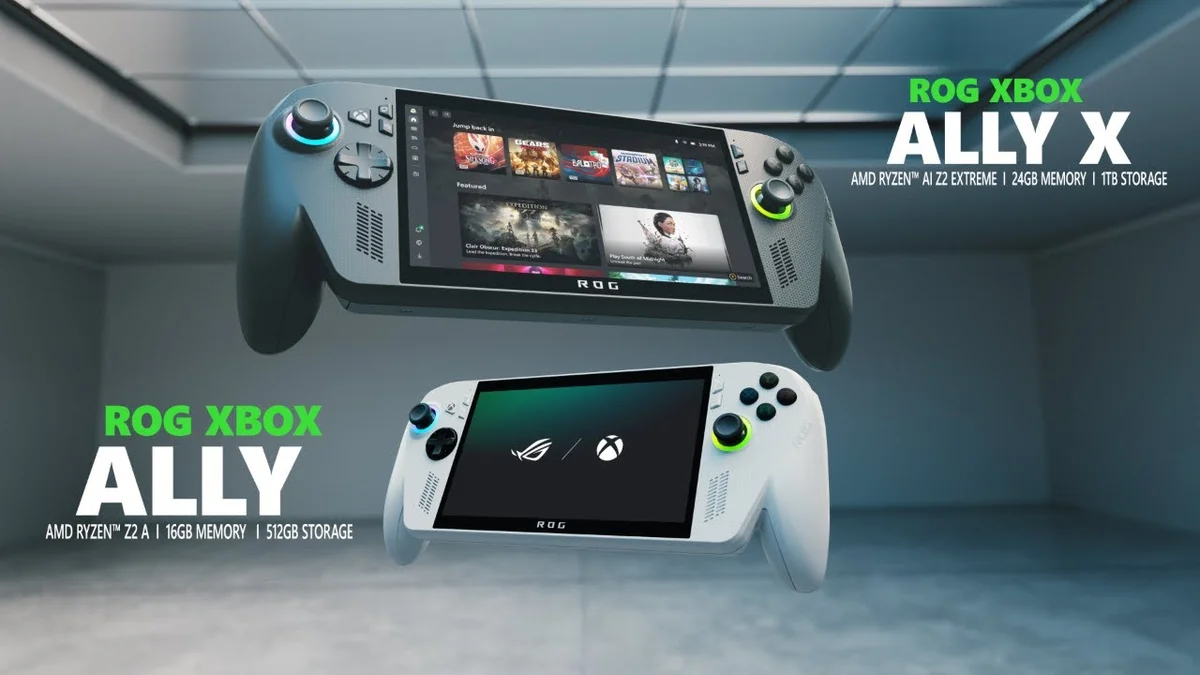
After six months of testing limited to Xbox Insiders, Microsoft is officially bringing its AI-powered upscaling technology, Automatic Super Resolution (Auto SR), out of preview on the ROG Xbox Ally X as well as the recently launched OLED-equipped ASUS ROG Xbox Ally X20 handheld. At the same time, the Redmond company is expanding Auto SR availability to select Windows 11 Copilot+ PCs powered by AMD Ryzen AI processors, pairing this general release with four major technical upgrades requested by portable gamers.
Undocked Handheld Play on Battery, 120 FPS Performance Mode, and Native 1080p Input
In a technical breakdown published by Stefan Bojanic (Product Manager, AI Models) on the official Microsoft DirectX Developer Blog, the engineering team detailed the removal of the biggest restriction from the initial April 2026 preview. Until now, Auto SR strictly required the ROG Xbox Ally X to be docked and connected to an external TV or monitor. Starting today, Auto SR works natively in handheld mode right on the built-in display, even when unplugged and running on its 80 Wh battery.
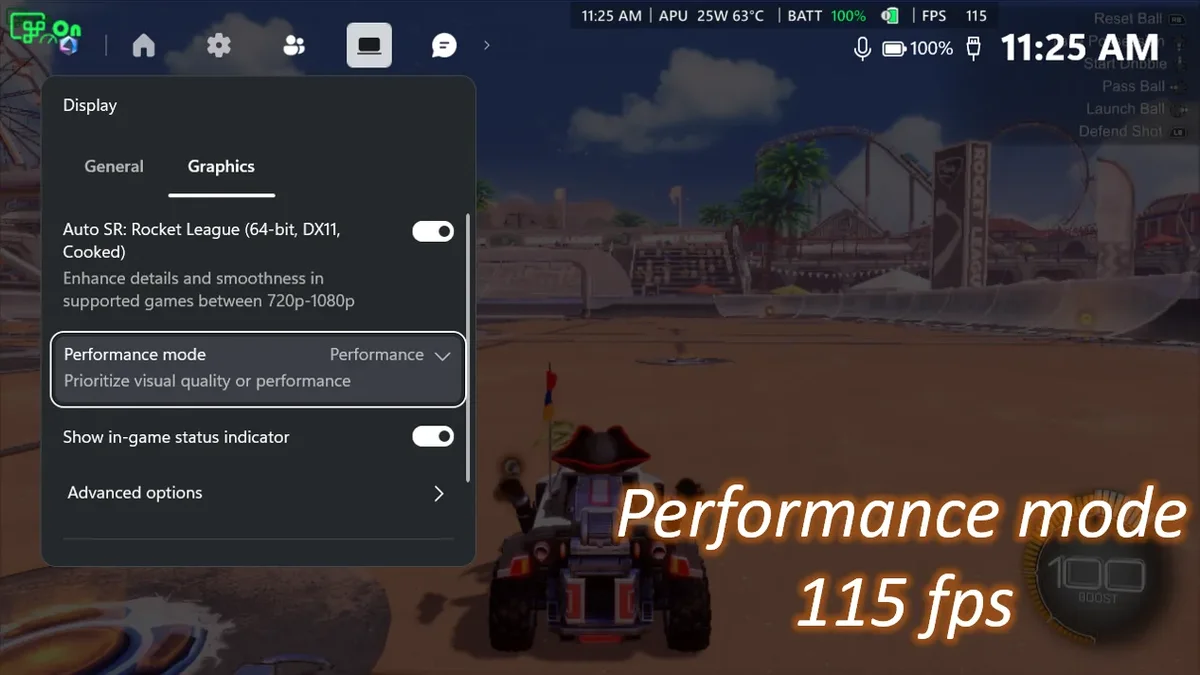
The second major milestone is the debut of a new Performance Mode capable of running at up to 120 FPS. Whereas the original algorithm topped out around 60 to 75 FPS (now designated as Quality Mode), this new profile nearly doubles the framerate ceiling to match the 120 Hz refresh rate of the ROG Xbox Ally X and X20 screens in fast-paced competitive titles. In Rocket League running at 720p with High in-game graphics settings, Microsoft recorded an average of 70 FPS in Quality Mode (APU at 24 W and 65 °C) compared to 115 FPS in Performance Mode (APU at 25 W and 63 °C), delivering a 64% framerate jump that players can toggle on the fly via the Xbox Game Bar.
Third, Microsoft is streamlining resolution configuration by adding native support for games running at 1080p. During the preview phase, players had to manually lower a game's internal resolution to 720p or 800p before Auto SR would kick in, a counterintuitive extra step since most games default to 1080p to match the handheld's built-in screen. Auto SR now accepts 1080p input directly and upscales it up to 1440p when docked to a higher-resolution TV or monitor. When used at 1080p on the internal screen in handheld mode, it still provides visual sharpness improvements, particularly in older titles.
Finally, the fourth upgrade resolves the previous conflict between Windows' AI upscaler and its dynamic range pipeline: Auto SR now works simultaneously with Auto HDR. Players no longer have to choose between higher framerates and vivid color highlights, whether playing on an external HDR television or on the VESA DisplayHDR True Black 1400 certified OLED panel of the ROG Xbox Ally X20.
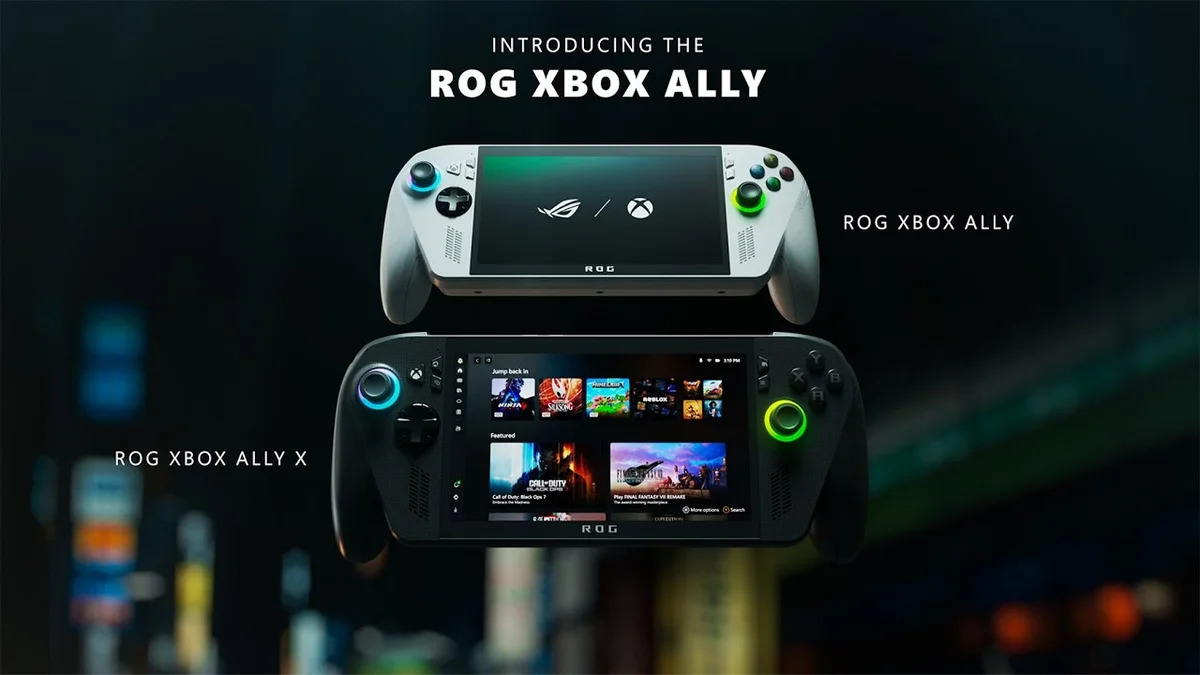
ASUS ROG Xbox Ally X (Ryzen AI Z2 Extreme, 24GB RAM, 1TB)
- AMD Ryzen AI Z2 Extreme APU (8 cores, Radeon 890M GPU, and 50 TOPS XDNA NPU)
- 24GB LPDDR5X-8000 unified memory and 1TB PCIe 4.0 NVMe SSD
- 1080p 120Hz VRR display (7-inch IPS on Ally X or 7.4-inch 1,400-nit OLED on X20)
- Supports NPU-powered Microsoft Auto SR, AMD FSR, and 80Wh high-capacity battery
Why NPU Offloading Bypasses GPU Frametime and Memory Bandwidth Bottlenecks
While this rollout complements recent AMD software milestones such as AMD FSR 4.1.2 landing in the Xbox Series X|S GDK, Auto SR takes a fundamentally different architectural path. Whereas game-integrated upscalers (AMD FSR, NVIDIA DLSS, Intel XeSS) and driver-level spatial scalers (AMD RSR, NVIDIA NIS) execute on the GPU and must squeeze their execution into a tiny 1 to 2 millisecond window to avoid hurting frame times, Auto SR offloads its entire reconstruction model onto the dedicated 50 TOPS XDNA Neural Processing Unit (NPU) built into the AMD Ryzen AI Z2 Extreme processor.
| Technical Feature | Microsoft Auto SR (Official Launch) | Auto SR (Xbox Insider Preview) | GPU Upscalers (FSR / XeSS / RSR) |
|---|---|---|---|
| Hardware Compute Unit | Dedicated NPU (in parallel with GPU) | Dedicated NPU (in parallel with GPU) | GPU shader/matrix cores (1 to 2 ms/frame) |
| Supported Play Modes | Handheld on battery & Docked mode | Docked to external display only | Handheld and docked |
| Framerate Ceiling | Up to 120 FPS (Performance Mode) | 60 to 75 FPS maximum | Engine and GPU dependent |
| Input Resolutions | 720p, 800p, and native 1080p (to 1440p) | 720p / 800p (manual reduction required) | All supported resolutions |
| Auto HDR Compatibility | Yes (simultaneous in Windows 11) | No (mutually exclusive) | Yes |
| API & Game Coverage | OS-level across DirectX 10, 11, and 12 | OS-level across DirectX 10, 11, and 12 | Per-game integration (FSR/XeSS) or driver (RSR) |
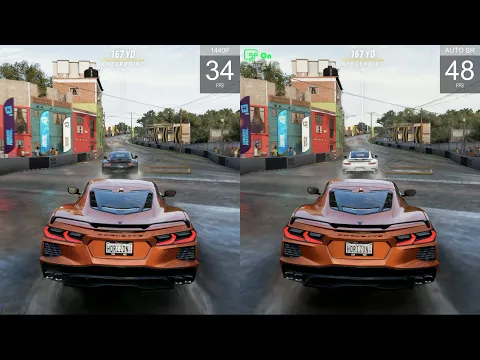
By running its AI model on the NPU in parallel with the Radeon 890M integrated GPU, Auto SR gets a full extra frame of processing time with virtually zero GPU frametime overhead, allowing the graphics core to move straight to rendering the next frame in exchange for one frame of latency. Furthermore, on handheld PCs where shared LPDDR5X-8000 memory bandwidth is tightly constrained, Auto SR uses larger neural models to reconstruct fine surface detail rather than forcing the game engine to stream heavy high-resolution textures through memory every frame. In Forza Horizon 5 running on Ultra settings, Microsoft demonstrates 1440p-level visual fidelity paired with more than a 30% FPS boost over native 1440p rendering.
How to Enable Auto SR and Performance Mode on ROG Xbox Ally X and Ryzen AI PCs
Built directly into Windows 11, Auto SR works across thousands of existing DirectX 10, DirectX 11, and DirectX 12 titles without requiring developer patches. In its documentation on the official Automatic Super Resolution support page, Microsoft notes that game-integrated upscalers (such as AMD FSR, DLSS, or XeSS) remain the primary choice when supported by a studio, while Auto SR steps in across titles that lack native upscaling or hit memory bandwidth limits, highlighting games like DOOM: The Dark Ages, The Outer Worlds 2, Grounded 2, Avowed, Frostpunk 2, Assassin's Creed Shadows, Control, and Tom Clancy's Rainbow Six Siege.
To enable Auto SR on a ROG Xbox Ally X, ROG Xbox Ally X20, or supported AMD Ryzen AI Copilot+ PC (alongside Qualcomm Snapdragon X and Intel Core Ultra Series 3 systems):
- Install the latest Windows 11 updates and update Xbox Game Bar.
- Download or update the Auto Super Resolution Package from the Microsoft Store (exiting Xbox fullscreen mode temporarily if needed via Game Bar > Settings > Exit Xbox mode).
- While in-game, press the Xbox button (or
Win + Gon a keyboard), navigate to Widgets > Display > Graphics, and switch between Quality and Performance mode in real time.
Microsoft confirms that handheld battery play, 1080p input support, and expanded compatibility for AMD Ryzen Copilot+ PCs are live today, while the 120 FPS Performance Mode and simultaneous Auto HDR support are rolling out progressively through Windows 11 updates.
My Take on the Spec Sheet
This is the exact kind of system-level update that finally justifies paying for dedicated neural silicon inside a gaming handheld. As I was discussing earlier with Chayane, who regularly points out how blurry driver-level spatial scalers look in older titles lacking native FSR, putting the Ryzen AI Z2 Extreme's 50 TOPS XDNA NPU to work on real-time game rendering instead of leaving it idle is a genuine architectural win. As long as Auto SR was locked to docked play and capped at 60 to 75 FPS, its practical value on a portable machine remained frustratingly narrow. By unlocking undocked battery play, native 1080p input without menu gymnastics, and a Performance Mode that pushes Rocket League from 70 to 115 FPS without adding a single watt of load to the Radeon 890M GPU, Microsoft delivers a versatile safety net for thousands of DirectX 10, 11, and 12 games. What I want to measure next on our test bench is how sustained NPU inference affects total system draw on the 80 Wh battery and whether that single frame of latency is noticeable in twitch shooters: if the teams at ASUS ROG and Xbox would like to send a ROG Xbox Ally X or X20 to our lab for full telemetry testing, our workbench is wide open!

PC hardware enthusiast and competitive gamer, Arthur 'Heimdall' splits his time between France and the UK working in enterprise B2B software solutions. A business school graduate passionate about component benchmarking, he has been building, modding, and tuning PCs since childhood, optimizing every thermal degree and millisecond of display latency. An avid gamer across Assassin's Creed and sandbox titles, he forged his alliance with Grimtag and Chaya during late-night World of Warcraft raids before joining Pro-Gamer.