Multiboxing in World of Warcraft (2026 Guide): Official Blizzard Rules, Ban Risks, and Allowed Methods
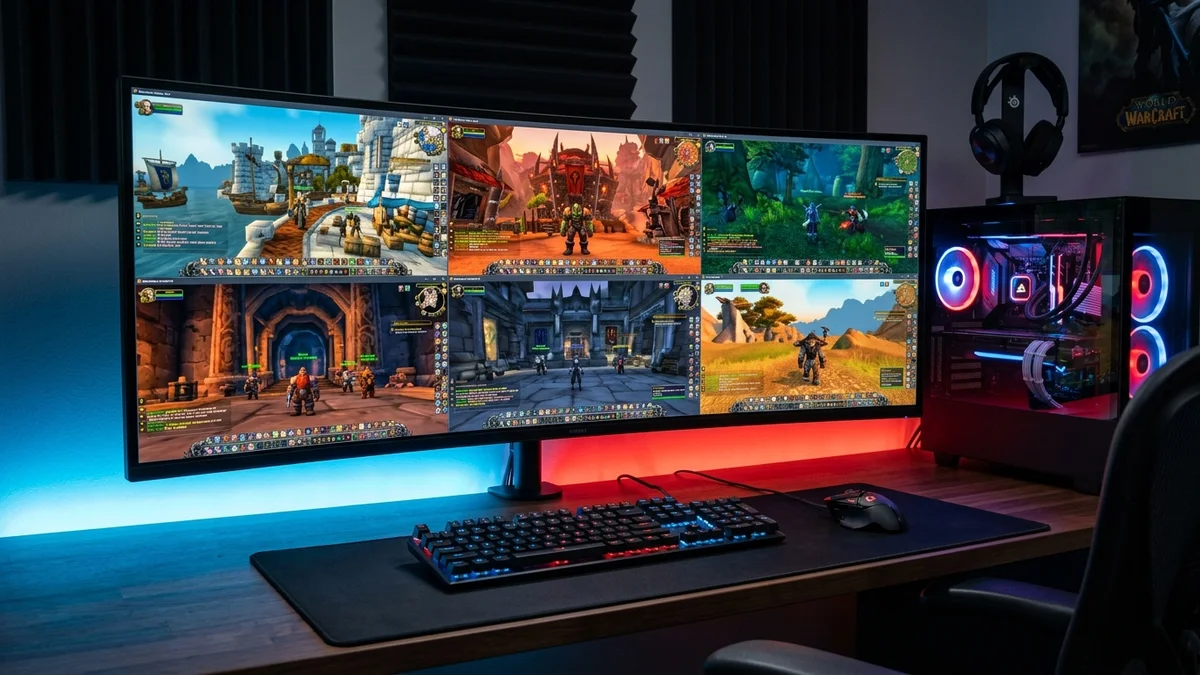
Multiboxing in World of Warcraft has carried a notorious reputation for nearly two decades. Anyone who roamed the farming zones or battlegrounds of past expansions remembers that surreal sight. A compact column of ten elemental shamans marching in lockstep, turning as one solid block, and instantly deleting any player with a synchronized volley of lightning bolts.
Today, that fantasy of a synchronized personal army is dead and buried. Yet World of Warcraft still sees thousands of dedicated players launching multiple game accounts every single day.
Blizzard drew a firm line between legal time management and automated cheating. If you want to run multiple accounts in 2026 without facing an account closure, here is our complete guide to Blizzard official rules, ban risks, and allowed methods.
What Blizzard Strictly Forbids: The Definite End of Input Broadcasting
For many years, Blizzard tolerated software multiboxing under the assumption that a human was physically pressing the keys. The unwritten rule was simple: as long as a third-party bot was not playing for you while you slept, duplicating your actions was not considered an outright exploit by game masters.
That status quo shattered between late 2020 and early 2021. Blizzard released a decisive update to its Terms of Service targeting keystroke and mouse-click duplication software directly.
Blizzard official stance leaves zero room for doubt: the use of any software or hardware that mirrors, duplicates, or broadcasts keystrokes across multiple game clients simultaneously is an actionable offense punishable by permanent account termination.
This forbidden practice is technically known as input broadcasting. The second a third-party program (such as the legacy broadcasting features of ISBoxer, Keyclone, or HotkeyNet) intercepts a keystroke and duplicates it across several game windows, you are in violation of the rules.
Do not make the mistake of believing hardware solutions protect you. Some players attempted to bypass software detection by building USB hardware multiplexers or custom split keyboards. Blizzard official policy applies equally to hardware: any physical device that clones input signals across multiple machines or clients is strictly banned.
Blizzard internal Warden anti-cheat and server-side behavioral analysis detect these patterns effortlessly. When the game servers receive incoming packets from five separate characters carrying identical movement coordinates and millisecond-matched combat latency, your accounts get flagged immediately.
The consequences are uncompromising. When Blizzard issues bans for input broadcasting, game masters do not merely terminate the secondary mining account. The entire Battle.net account gets closed, wiping out your primary characters, rare mounts, and twenty years of hard-earned achievements.
What Remains 100% Legal and Allowed in 2026: The Golden Rules
Following these heavy ban waves, many players assumed multiboxing had become completely illegal. That is incorrect. Playing multiple accounts remains fully supported by Blizzard, provided you follow two fundamental rules.
First, consider account ownership limits. Blizzard official support policy explicitly allows a single player to register and run up to 8 active World of Warcraft licenses under one Battle.net account. Blizzard welcomes players who pay multiple monthly subscriptions to progress several avatars simultaneously.
Second comes the unbreakable golden rule that every multi-account player must respect: one key press or mouse click must perform only one action in one active game window.
As long as every single action remains entirely manual and individual, nothing prevents you from having four game windows open across your monitors. To cast a spell on character B, you must click its window (or hover over it) and press your hotkey. To make character C cast a buff, you manually repeat that exact motion on its own dedicated window.
This is where the distinction between banned broadcasting software and legitimate Window Managers comes in. Arranging your WoW clients into a neat grid, switching between instances using standard Windows shortcuts, or enabling focus-follows-mouse (mouse-over focus) is 100% compliant with Blizzard rules.
These display utilities merely interact with your operating system to adjust window borders and dimensions. They never inject code into the game binary, never read memory, and never manipulate your character controls.
Why Players Still Multibox in Modern Retail and Expansions
With synchronized multi-character combat gone, why do thousands of players still run three, four, or five accounts in 2026?
The primary answer lies in crafting and professions. Ever since the profession revamp introduced in Dragonflight and continued through The War Within and Midnight, the game economy heavily revolves around specialized talent trees and the Concentration mechanic.
Maintaining an army of crafting alts allows dedicated players to fulfill personal crafting orders, spend daily concentration pools across multiple blacksmiths and alchemists, and manufacture high-end raid consumables without paying inflated Auction House prices.
The second major advantage is market trading. Dedicated Auction House players keep a secondary account running continuously on a side monitor. This dedicated merchant character can scan market trends, post auctions, and process mail while the primary character runs Mythic+ dungeons or progresses through guild raids.
Finally, alt leveling remains popular. By grouping your high-level main with one or two leveling alts, you can use the built-in /follow macro command to navigate through quest zones. While /follow remains disabled in battlegrounds and arenas to prevent PvP disruption, it remains fully functional and legal in open-world questing.
Optimizing Your Setup: How to Run Multiple Clients Without Overheating
Running several modern World of Warcraft instances places serious demands on your hardware. If you launch four clients with maxed-out settings, even a high-end gaming PC will suffer severe performance drops.
The most important optimization step is capping the frame rate on inactive background windows. By default, WoW renders frames at full speed even when a window is unfocused. To immediately relieve your graphics card, enter this command into your secondary game clients:
/console maxFPSBk 20This simple CVars command caps background instances at 20 frames per second whenever their window loses focus. Your GPU load drops dramatically, reserving maximum rendering power for your active main character. For additional performance tweaks, check out our in-depth guide to WoW graphics settings and hidden CVars.
Set all secondary clients to the lowest graphic preset (quality level 1). Turn off compute shaders, drop view distance to minimum, and disable ground clutter. These basic tweaks cut GPU memory allocation significantly.
System memory represents the biggest bottleneck. A modern WoW client consumes between 3GB and 5GB of RAM depending on loaded addons and zone assets. To comfortably run four accounts alongside Discord and browser tabs, 32GB of high-speed system memory is the practical minimum standard. This is especially true if you multitask heavily, as discussed in our look at how Discord tests game mode to reduce background CPU and RAM usage.
For the processor, look for a modern CPU with at least 8 cores and 16 threads (such as an AMD Ryzen 7 or Intel Core i7). World of Warcraft places heavy single-thread demands on each active client. Having ample physical cores allows Windows to schedule each game instance cleanly without frame stuttering.
Toward Safe and Clean Window Management Tools
The retirement of legacy broadcasting tools left a void for legitimate multi-account enthusiasts. Many players still rely on clumsy DIY scripts or generic window managers that do not handle modern ultra-wide monitors cleanly.
The future of clean multiboxing relies on lightweight, transparent utilities designed specifically to respect Blizzard boundaries. These modern display tools focus on three essential tasks: instant window snapping without aspect ratio distortion, borderless fullscreen window arrangement, and seamless hotkeys to cycle active game instances instantly.
Evaluating software safety is straightforward: if an application requires no administrator privileges, modifies zero World of Warcraft game files, and offers no options to duplicate key inputs, your accounts remain safe.
Here at Pro-Gamer, we are currently developing a dedicated companion tool designed specifically for clean multi-window management. This lightweight, free, and 100% Blizzard-compliant utility will soon join our Pro-Gamer software toolbox, allowing you to organize your multi-account sessions effortlessly without putting your licenses at risk.
Multiboxing in World of Warcraft has not vanished, it has matured. By replacing automated exploits with smart, compliant window organization, dedicated players can continue to maximize their playtime while respecting the community and the rules of the game.

SEO consultant for over 20 years and digital entrepreneur, Charles 'Grimtag' Ronchain is the founder of Pro-Gamer.gg, Retrocharting.com, and Gamescharting.com. A competitive gamer, streamer, and retro game collector, he has worked in the video game industry for over 15 years, notably as a consultant for leading game price comparison platforms. Passionate about real-time performance data and gaming technology, he analyzes competitive esports, gaming hardware benchmarks, and creator workflows on Pro-Gamer.gg with an authentic player perspective.