MSI RTX 5070 Capped at 180W Burns an ASUS ROG Strix 650W PSU Socket While Its 12V-2x6 Header Survives
Undervolting a graphics card is usually one of the smartest ways to trim heat and noise inside a gaming rig. Yet a PC builder just learned the hard way that lowering sustained wattage cannot fix an improper power setup. In a thread shared on r/pcmasterrace, user u/lil_zoghi reported that their MSI GeForce RTX 5070 Shadow 2X melted a power connector despite being undervolted to around 180W. Surprisingly, the damage happened entirely on the power supply side.
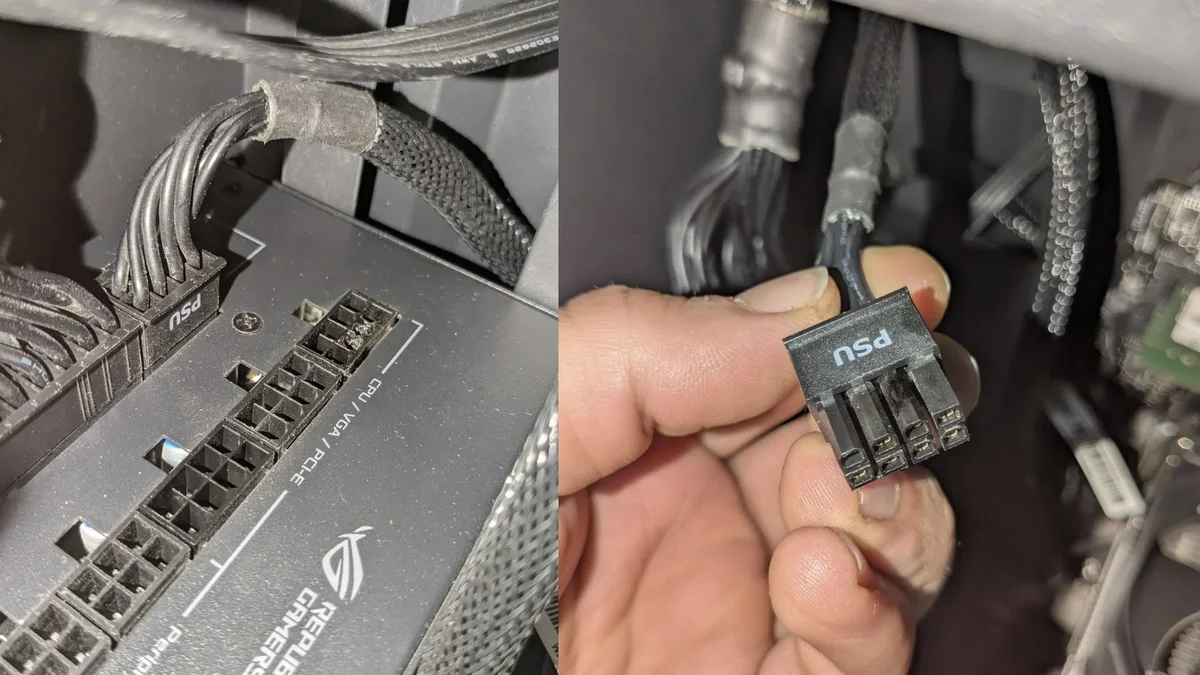
PSU 8-Pin Port Melted While the GPU 12V-2x6 Survived
At first glance, the hardware pairing does not look extreme. The MSI GeForce RTX 5070 Shadow 2X carries an official 250W TGP and draws power through a 16-pin 12V-2x6 header. The owner paired it with an older ASUS ROG Strix 650W power supply, a non-ATX 3.x unit that lacks a native 12V-2x6 cable.
Unlike earlier GeForce RTX 5070 melted 16-pin connector cases, the 12V-2x6 port on the graphics card itself escaped completely unharmed. Photos posted by the owner and circulated by UNIKO's Hardware show the thermal failure focused exclusively on the modular PSU end, where the 8-pin PCIe socket and matching cable housing melted and charred.
Fortunately, the graphics card survived the ordeal. After testing the MSI RTX 5070 Shadow 2X in a friend's PC, the owner confirmed it still runs without issues, leaving only the ASUS power supply and cable dead. Tellingly, u/lil_zoghi admitted this is already the second time their power supply has burned since installing this RTX 5070.
Why a 180W Power Cap Still Melts a Single-Cable Setup
The root cause comes down to a classic cabling shortcut. Instead of connecting two separate 8-pin PCIe leads to the GPU's 16-pin adapter as required by the card's documentation, the user ran the entire adapter from a single 8-pin PCIe cable on the PSU side.
On paper, that shortcut can look safe enough. A motherboard PCIe slot supplies up to 75W and a single 8-pin PCIe cable is rated for 150W, adding up to 225W on paper. That makes a 180W undervolt seem well within limits, much like the 180W 8-pin PCIe thermal failure seen on a GALAX RTX 5060 Ti 16GB.
In real gaming workloads, however, software overlays only report averaged draw. Modern graphics cards still produce brief transient power spikes that can approach or exceed their 250W TGP. Funneling that entire load through a single 8-pin lead on an older non-ATX 3.1 PSU, compounded by any contact resistance on an aging socket, creates localized heat at the PSU terminal until the plastic housing gives way.
Three Practical Wiring Rules to Protect Your Rig
Even a mid-range card with a careful undervolt demands clean upstream power delivery. Before closing your side panel, three simple checks prevent avoidable hardware loss:
- Run two independent 8-pin PCIe cables: when using a 12V-2x6 adapter, always plug in two dedicated cables from separate PSU ports rather than a single daisy-chained or Y-split lead.
- Seat both ends completely: inspect the latch on both the graphics card and the power supply unit, keeping the harness free of tight bends right behind the plug.
- Upgrade to an ATX 3.1 / PCIe 5.1 PSU: a 750W or 850W power supply with a native 12V-2x6 cable removes the adapter entirely and offers real headroom for transient spikes.
My Test Bench
I see too many builders treat an undervolt as a safety net for questionable PSU wiring. Watching a monitoring overlay sit at 180W tells you nothing about millisecond transient spikes or contact resistance building up on an older modular socket. When a power supply burns twice on the same card while the GPU's own 12V-2x6 header stays clean, the diagnosis is straightforward: the bottleneck lives upstream. Before I ever touch a voltage curve, I count the physical PCIe leads leaving the PSU and verify every pin sits flush.

PC hardware enthusiast and competitive gamer, Arthur 'Heimdall' splits his time between France and the UK working in enterprise B2B software solutions. A business school graduate passionate about component benchmarking, he has been building, modding, and tuning PCs since childhood, optimizing every thermal degree and millisecond of display latency. An avid gamer across Assassin's Creed and sandbox titles, he forged his alliance with Grimtag and Chaya during late-night World of Warcraft raids before joining Pro-Gamer.