Adrenalin 26.11.1 Patch Released: AMD Officially Halts the Runaway atieclxx.exe Process Draining NVMe Drives
After days of intense scrutiny from PC hardware enthusiasts and RDNA 3 / RDNA 4 owners, AMD Software: Adrenalin Edition 26.11.1 is officially live. This optional driver update (internal driver branch 26.20.15.16, Windows Driver Store version 32.0.32015.16001) directly targets the most alarming flaw introduced in the 26.10.x branch: continuous, unprompted background writes hammered onto the primary system SSD by AMD's display event utility.
An Official End to Idle and Window-Resizing NAND Write Loops
According to the official release documentation (article reference RN-RAD-WIN-26-11-1) published on the official AMD Software: Adrenalin Edition support and download portal, AMD's driver engineering team has resolved both triggers of the storage wear bug across Radeon RX 7000 Series and newer graphics cards (including the entire Radeon RX 9000 Series lineup):
- Excessive System Drive Writes at Idle: Fixed the underlying loop where the system drive experienced constant background write activity while the PC sat completely idle on the desktop.
- Window Movement and Resizing Write Spikes: Eliminated the abnormal disk write bursts triggered whenever users dragged or resized application windows in Windows 10 and Windows 11.
As we documented in our initial breakdown of the AMD Radeon Adrenalin driver bug writing up to 432 GB daily at idle, the culprit was atieclxx.exe (AMD External Events Client Module). Tied to the Windows AMD External Events Utility service, the process repeatedly rewrote FreeSync-related registry keys and temporary system data at a steady rate of 0.65 MB/s to 5 MB/s. Left unchecked on an always-on rig, that translated into 56 GB to more than 400 GB of pointless NAND writes every single day, steadily chipping away at the rated TBW (Terabytes Written) endurance of primary NVMe drives.
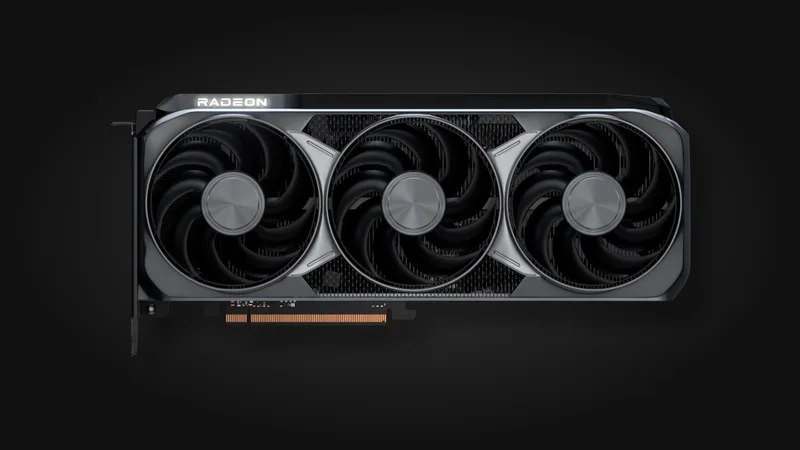
AMD Radeon RX 9070 XT (16GB GDDR6)
- AMD RDNA 4 Architecture (Navi 48) with FSR 4 & AFMF 3 Support
- 16GB GDDR6 VRAM on a 256-bit Memory Bus
- Patched Adrenalin 26.11.1 Driver Support (Zero Idle SSD Write Drain)
- Current November 2026 Retail Street Pricing (Custom AIB Models)
Transitioning to 26.11.1 If You Used a Temporary Workaround
While waiting for AMD's official patch, thousands of Radeon owners deployed interim safeguards to keep their NVMe drives from taking unnecessary wear. Depending on which fix you applied over the past week, here is how to make a clean transition to Adrenalin 26.11.1:
| Previous Workaround Applied | Behavior After Installing Adrenalin 26.11.1 | Recommended Post-Install Step |
|---|---|---|
Radeon-atieclxx-SSD-Fix v2.1 (Targeted NTFS ACL Mode) | The scheduled task detects that abnormal writes have stopped and automatically lifts the NTFS lock | Optional: run ENTFERNEN.cmd to cleanly remove the scheduled monitoring task |
Disabled AMD External Events Utility in services.msc | Driver installation typically resets the service, though manual startup locks can persist | Verify in services.msc that Startup Type is set back to Automatic to restore full FreeSync support |
| Rolled back to Adrenalin 26.9.1 or older | Direct in-place upgrade while preserving custom game profiles | On Windows 10 systems, confirm that Smart Access Memory (Resizable BAR) remains enabled in Adrenalin |
For readers who installed the open-source Radeon-atieclxx-SSD-Fix v2.1 utility built to block 56 GB of daily SSD writes without disabling FreeSync, the tool's self-retiring mechanism works exactly as advertised. Once Adrenalin 26.11.1 updates the DriverStore folder and atieclxx.exe stops hammering the disk, the background task automatically removes its SYSTEM write-permission lock without requiring manual intervention.
Known Issues Listed in Adrenalin Edition 26.11.1
Because version 26.11.1 was fast-tracked specifically to eliminate the SSD write bug, it does not introduce new game-specific profiles beyond those already supported in 26.10.2. However, AMD's release notes outline several known issues currently under investigation for upcoming WHQL releases:
- Cyberpunk 2077 (Radeon RX 9000 Series): Intermittent application crashes or driver timeouts may occur when AMD FSR Upscaling, Radeon Anti-Lag, and in-game Frame Generation are all active simultaneously while video playback is running on a secondary monitor. AMD recommends disabling in-game Frame Generation as a temporary workaround.
- Phantom Blade Zero (Radeon RX 9000 Series): Visual corruption may appear on character hair models. Disabling the High-Quality Hair setting resolves the glitch for now.
- Assassin's Creed Black Flag Resynced (Radeon RX 7000 Series): Intermittent application crashes or driver timeouts may occur on certain RDNA 3 setups.
- War Thunder (Radeon RX 5000 Series): Intermittent driver timeouts may occur on RDNA 1 cards; affected players are advised to stay on Adrenalin Edition 26.9.1.
- Smart Access Memory on Windows 10: SAM may occasionally become disabled after completing the driver upgrade on Windows 10 machines, so double-check the toggle under Performance > Tuning after rebooting.
- Ryzen AI 400 Series Mobile Processors: An unresponsiveness bug when pressing
Alt+Tabin Call of Duty: Modern Warfare Remastered (Ryzen AI Max PRO 400 Series) and a launch black screen in Gears of War: Reloaded (Ryzen AI 9 400 Series, bypassed by toggling Windowed to Fullscreen) remain on the open tracking list.

Check Availability for AMD Radeon RX 9060 XT 16GB Graphics Cards on Amazon→
My Take on the Spec Sheet
Shipping a targeted hotfix less than a week after community testing exposed the root cause is the exact turnaround time AMD needed here, especially when physical SSD endurance is on the line. If you deployed the open-source Radeon-atieclxx-SSD-Fix script or manually killed the AMD External Events Utility service over the past few days, I strongly recommend moving over to Adrenalin 26.11.1 today. It gets your rig back onto a clean, unpatched native driver stack with FreeSync and Adrenalin hotkeys working out of the box, without relying on third-party NTFS permission locks across future Windows updates. Out of pure test-bench habit, I still suggest opening Task Manager's Details tab for thirty seconds after rebooting and enabling the I/O Write Bytes column: watching atieclxx.exe stay locked at zero bytes while dragging windows across the desktop is a welcome sight for any NVMe drive.

PC hardware enthusiast and competitive gamer, Arthur 'Heimdall' splits his time between France and the UK working in enterprise B2B software solutions. A business school graduate passionate about component benchmarking, he has been building, modding, and tuning PCs since childhood, optimizing every thermal degree and millisecond of display latency. An avid gamer across Assassin's Creed and sandbox titles, he forged his alliance with Grimtag and Chaya during late-night World of Warcraft raids before joining Pro-Gamer.