Call of Duty: Modern Warfare 4 Optic Rail Position Guide: How to Move Your Sight in Gunsmith for Better ADS Visibility
Launched on October 23, 2026 by Infinity Ward, Call of Duty: Modern Warfare 4 introduces several major ergonomic upgrades inside its weapon customization suite (Gunsmith). Among the most valuable yet easily overlooked settings when building a loadout is the Optic Rail Position slider. This mechanic lets you slide your sight forward or backward along the weapon’s upper Picatinny rail to fine-tune your Aim Down Sights (ADS) sight picture without spending an extra attachment slot across any of the 33 launch weapons.
Prerequisites: Which Weapons and Optics Support Rail Position Adjustment?
Before looking for the slider inside your menus, make sure your loadout meets the three conditions required by the Modern Warfare 4 Gunsmith system:
- Unlock Create-a-Class (Player Level 4): Custom loadouts and the Gunsmith menu unlock at Player Level 4 (default preset classes do not allow optic rail tuning).
- Unlock the Optic Attachment Slot: Level up your chosen weapon in Multiplayer or DMZ on the Hajin map until the Optic slot becomes available.
- Equip a Non-Magnified (1x) Optic: Rail Position sliding only works with non-magnified Red Dot, Reflex, Micro-Dot, and Holographic sights. High-zoom sniper scopes and ACOG optics with fixed eye relief do not display the rail slider.
Step-by-Step Guide: How to Move Your Optic Position in the MW4 Gunsmith
When equipping a reflex or holographic sight on an assault rifle like the M4 or a fast-handling SMG such as the ISO Nightshade, the outer housing frame can sometimes feel cramped or block peripheral sightlines. Follow these exact steps to reposition the optic on your weapon’s rail:
- Step 1 (Open the Gunsmith): From the Multiplayer or DMZ main menu, navigate to the Weapons tab, pick your custom loadout, and select Gunsmith.
- Step 2 (Select the Optic Slot): Click on the Optic attachment slot above the receiver and scroll through your unlocked non-magnified sights.
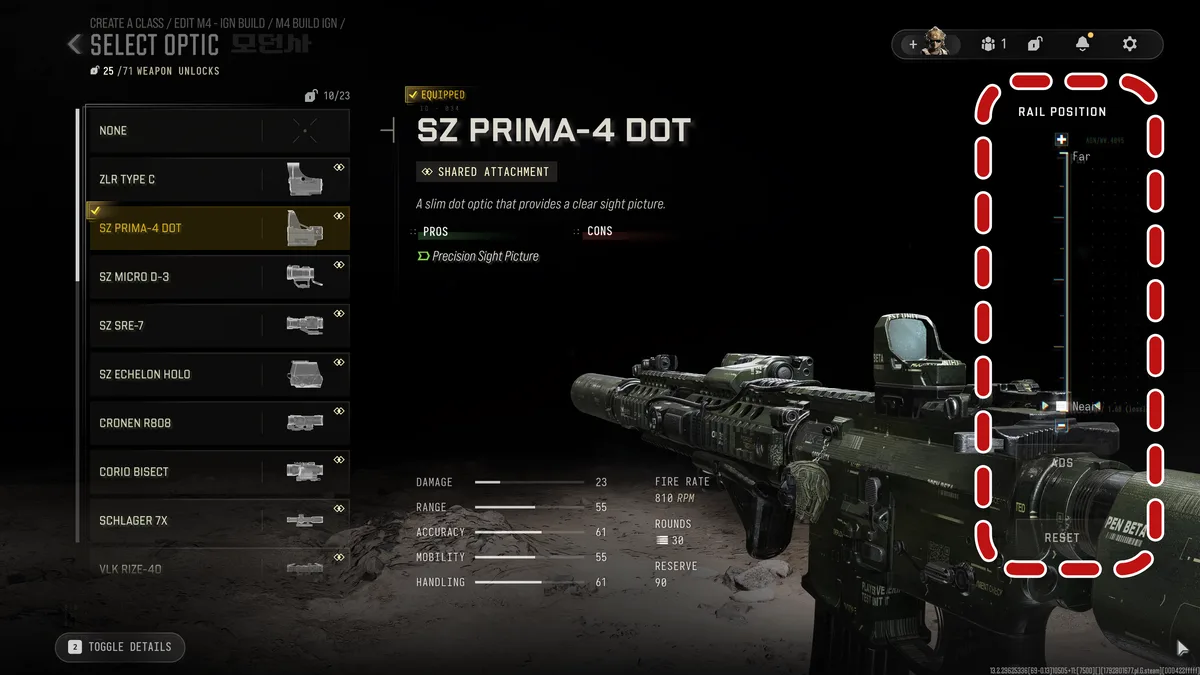
- Step 3 (Locate the Rail Position Bar): Look at the right side of the screen, directly underneath the attachment stat bars, to spot the horizontal Rail Position indicator.
- Step 4 (Slide Between Near, Mid, and Far in Real-Time ADS): Use your platform’s dedicated bumpers or keys (L1 / R1 on PS5, LB / RB on Xbox, or the on-screen slider on PC) to shift the sight notch by notch between Near, Mid, and Far. New for launch: Gunsmith now previews the adjustment directly from your first-person ADS perspective in real time, so what you see in the menu is exactly what you get in a match.
- Step 5 (Test in the Firing Range and Save Manually): Hold or press the Firing Range shortcut to test target tracking on the 10m, 25m, and 50m dummies, then manually save your Weapon Build before backing out of the menu.
| Gunsmith Action | PlayStation 5 | Xbox Series X|S | PC (Mouse & Keyboard) |
|---|---|---|---|
| Open the Optics Menu | Cross on the Optic slot | A on the Optic slot | Left-click on the Optic slot |
| Move Optic Closer (Near) | L1 | LB | Q / A key or drag the slider left |
| Move Optic Further Away (Far) | R1 | RB | E key or drag the slider right |
| Preview in the Firing Range | Triangle (hold / press) | X (hold / press) | Click the Firing Range button at the bottom |
Near vs. Mid vs. Far Comparison: Which Optic Rail Position Should You Use?
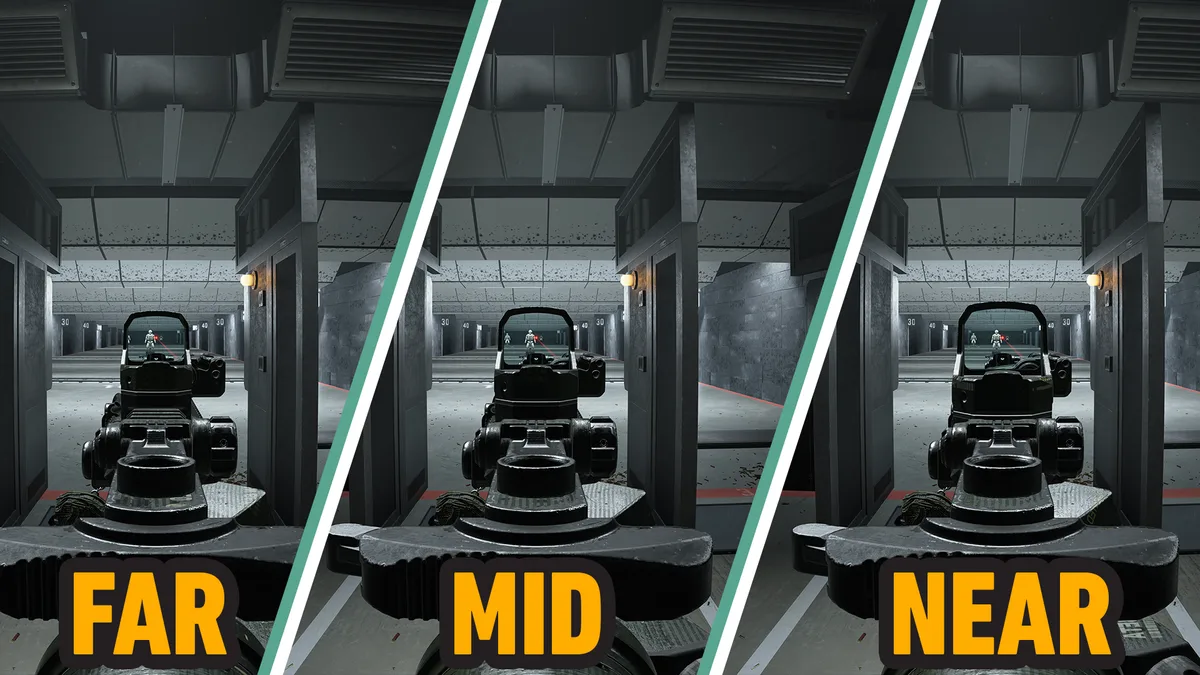
In its official launch patch notes, Infinity Ward confirms that Optic Rail Placement is a cosmetic camera adjustment that does not mathematically alter your weapon’s vertical or horizontal recoil values. However, changing the distance between your operator’s eye and the glass lens dramatically changes perceived visual recoil and target tracking during sustained firefights:
| Rail Position | Lens Window Size | Peripheral Awareness | Perceived Visual Recoil | Recommended Weapon Classes |
|---|---|---|---|---|
| Near | Largest (fills the center of the screen) | Slightly framed by the outer housing ring | Smoother (the reticle dot stays well inside the glass during full-auto sprays) | SMGs, aggressive Assault Rifles (M4, ISO Nightshade), and close-to-medium range engagements |
| Mid | Balanced (default placement) | Standard | Neutral | All-around 6v6 Multiplayer rifle builds |
| Far | Smallest (pushed toward the handguard) | Maximum clear view around the weapon | Bouncier (the dot appears to jump closer to the frame edges inside a smaller window) | Battle Rifles, LMGs, or bulky holographic sights with thick outer casings |
Our In-Game Recommendation: If you feel that default optics in Modern Warfare 4 look too small or restrict your visibility when tracking fast-moving targets, slide your optic all the way to Near. Widening the glass window in the center of your monitor makes full-auto tracking noticeably cleaner and prevents the red dot from bouncing against the metal bezel.
Don’t Forget Manual Weapon Build Saving in the Launch Patch
One critical change introduced in the October 23 launch update explains why some players notice their optic position resetting between matches:
- In the Pre-Game Gunsmith Menu: During the Beta, backing out of Gunsmith automatically saved a new Weapon Build and flooded players’ inventories. Infinity Ward has now made Weapon Build saving in Gunsmith a strictly manual process. Always press the Save Build prompt before leaving the Gunsmith menu after adjusting your rail position.
- Editing Loadouts In-Match: Conversely, any attachment or rail position tweaks you make to a loadout while already inside a live match are still automatically saved.
Reticle Customization, the Blue Dot Grind, and New Thermal Filters
Alongside rail sliding, the Call of Duty: Modern Warfare 4 Gunsmith brings back a full reticle progression system that runs parallel to the shared Weapon Camo grind (spanning Multiplayer, DMZ, and Season 1 Warzone) and the Prestige climb up to Level 1,000. Every optic features multiple reticle shapes and color variations unlocked through ADS eliminations, culminating in the fan-favorite Blue Dot reticle for maximum contrast against both bright and dark map backgrounds.
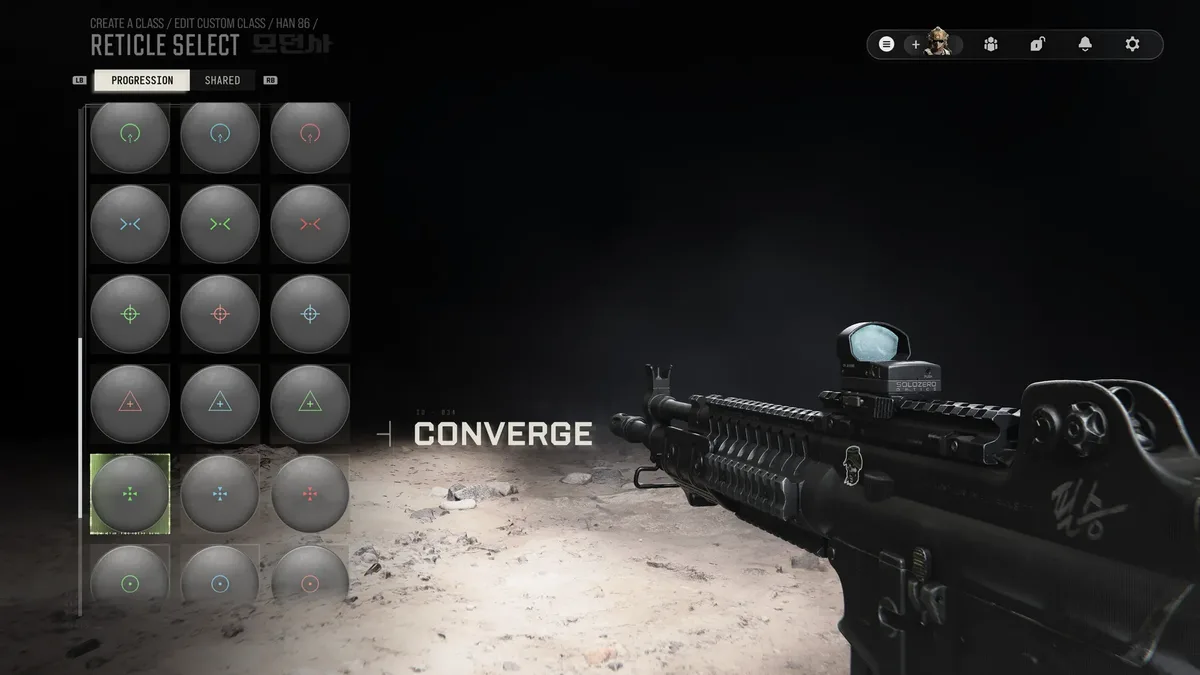

Infinity Ward has also upgraded how thermal optics work. Unlocking and equipping a custom reticle on a thermal sight now applies a completely different thermal imaging color filter. If you like the zoom level and housing of a specific thermal scope for spotting enemies through smoke in DMZ or Search & Destroy, but dislike its default heat-signature color palette, simply swap its reticle in Gunsmith to switch to a cleaner thermal visual filter.

SEO consultant for over 20 years and digital entrepreneur, Charles 'Grimtag' Ronchain is the founder of Pro-Gamer.gg, Retrocharting.com, and Gamescharting.com. A competitive gamer, streamer, and retro game collector, he has worked in the video game industry for over 15 years, notably as a consultant for leading game price comparison platforms. Passionate about real-time performance data and gaming technology, he analyzes competitive esports, gaming hardware benchmarks, and creator workflows on Pro-Gamer.gg with an authentic player perspective.