ASUS GPU Tweak III Refusing to Open After the Latest NVIDIA Driver Update? Version 2.2.1.1 Finally Fixes the Startup Lockout
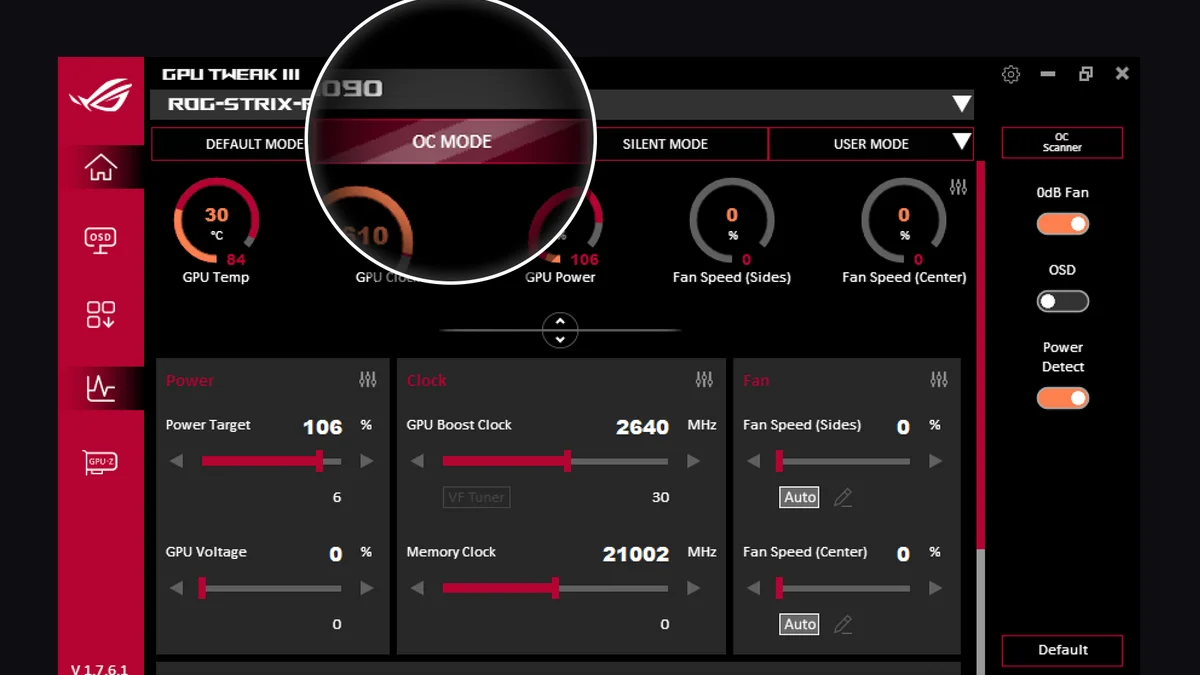
Double-clicking the desktop shortcut, watching the Windows cursor spin for half a second, and seeing nothing appear in the system tray has been a frustrating routine for ASUS graphics card owners over the past few days. Since updating to NVIDIA's latest October driver branches, many players running ROG Strix, ROG Astral, TUF Gaming, or ProArt cards found themselves completely locked out of their tuning utility. Released by ASUS on October 21, 2026 as a 107.72 MB installer package, stable update ASUS GPU Tweak III 2.2.1.1 resolves this startup failure while patching a crash affecting multi-GPU systems.
NVIDIA GeForce 616.92 and Newer Drivers: Startup Lockout Resolved
The headline fix in version 2.2.1.1 (which follows version 2.1.9.5 from September 18) directly targets compatibility with NVIDIA GeForce Game Ready driver 616.92 and subsequent releases, including NVIDIA's GeForce 617.70 hotfix driver deployed to stop 360Hz G-SYNC Pulsar black flashes. A software initialization bug prevented GPU Tweak III from launching whenever driver version 616.92 or later was installed on the system.
Beyond locking users out of the main dashboard, the launch failure meant custom voltage-frequency curves configured in VF Tuner, tailored 0dB fan profiles (including chassis fans wired to onboard FanConnect II headers), and the in-game on-screen display (OSD) failed to load with Windows. Installing version 2.2.1.1 restores normal startup behavior immediately without forcing players to roll back their GeForce drivers.
Multi-GPU Level Sense Crash Fix, Onimusha UI Theme, and Live Update Tweaks
ASUS software engineers also addressed a stability issue tied to Level Sense. Built into flagship models such as the ROG Astral and ROG Matrix series, Level Sense relies on an onboard IMU sensor to monitor physical graphics card sag in real time and alert users if the PCB tilts beyond a safe threshold. Prior to this patch, switching between graphics cards inside GPU Tweak III on a multi-card rig could trigger an immediate application crash.
Here is the complete official changelog for ASUS GPU Tweak III v2.2.1.1 (Stable):
- NVIDIA Driver Fix: Addressed a bug that prevented GPU Tweak III from launching when NVIDIA GeForce Game Ready driver version 616.92 or later was installed.
- Level Sense Multi-GPU Fix: Resolved an issue where the Level Sense feature could cause GPU Tweak III to crash when switching between cards in a multi-card setup.
- New UI Theme: Added a theme based on Capcom's upcoming Onimusha: Way of the Sword, available for supported ASUS graphics cards.
- Expanded Plug-in Scope: Expanded the scope of captured items for the built-in Plug-in feature.
- Live Update Optimization: Optimized the device and version detection mechanism for the Live Update feature.
Check Availability ASUS GeForce RTX Graphics Cards Availability on Amazon→
My Test Bench: Why This Startup Failure Was More Than Just an Annoyance
When a tuning utility refuses to open after a driver update, it is tempting to shrug it off and let the card run at stock clocks until the next patch lands. On high-end modern hardware, however, GPU Tweak III does more than adjust boost offsets or draw an FPS overlay in the corner of your monitor: it also runs the background monitoring service for Power Detector+.
Across versions 2.1.8.0 and 2.1.9.5 in August and September, ASUS upgraded Power Detector+ with an emergency auto-shutdown toggle that powers down the PC if sustained over-current is detected across any of the six power pins on the 12V-2x6 connector. At a time when melted 12+4-pin connectors have pushed power supply makers like Super Flower to build dedicated 12A hardware alarm dongles, having GPU Tweak III silently fail to launch on driver 616.92 meant losing that per-pin software safety net at boot.
If you are running an ASUS card on a recent NVIDIA driver, grab the 2.2.1.1 installer directly from the official ASUS page so your fan curves and power monitoring stay active in the background.
PC hardware enthusiast and competitive gamer, Arthur 'Heimdall' splits his time between France and the UK working in enterprise B2B software solutions. A business school graduate passionate about component benchmarking, he has been building, modding, and tuning PCs since childhood, optimizing every thermal degree and millisecond of display latency. An avid gamer across Assassin's Creed and sandbox titles, he forged his alliance with Grimtag and Chaya during late-night World of Warcraft raids before joining Pro-Gamer.