Minecraft on Nintendo Switch 2 Is Getting Joy-Con 2 Mouse Controls: First Look at Closed Beta Settings
Following its native Nintendo Switch 2 debut in late October 2026, Mojang Studios is finally addressing the biggest missing feature requested by the console community. Native Joy-Con 2 mouse controls are now being tested in the Minecraft Closed Beta on Nintendo Switch 2, complete with independent sensitivity sliders, left-handed support, and full button remapping.
Ambidextrous Joy-Con 2 Mouse Support in Action
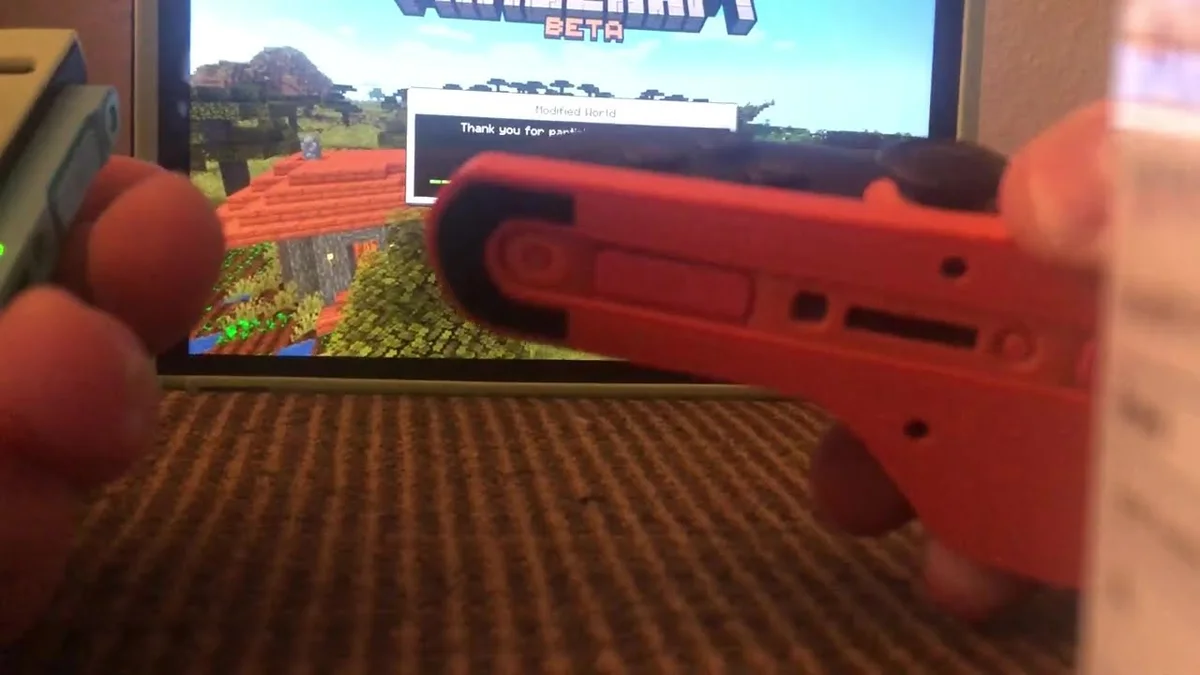
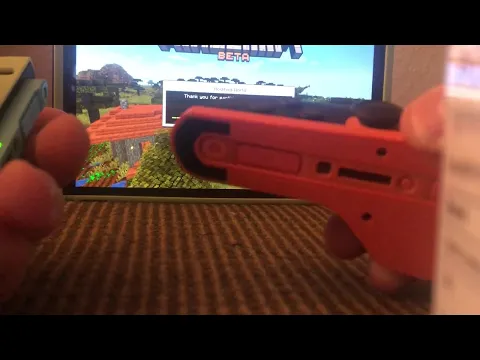
When the dedicated Nintendo Switch 2 edition of Minecraft launched alongside update 26.60, players quickly noticed that the console's built-in optical sensor mode was not yet supported. Mojang Studios is now actively testing the feature in the latest Minecraft Closed Beta build for Switch 2, with a first look at the new control scheme shared in gameplay footage by beta tester TheMissingLink.
By placing one detached Joy-Con 2 sideways on a flat surface, players can glide the controller just like a desktop mouse to look around, aim, and manage their inventory, while holding the opposite Joy-Con 2 normally for analog stick movement. In the new settings menu, players can freely designate either the Right Joy-Con 2 or the Left Joy-Con 2 as their active mouse pointer, making the setup immediately accessible to both right-handed and left-handed builders.
This test build arrives right on the heels of Mojang's ongoing technical polish for Nintendo's new hardware, shortly after Minecraft Update 26.62 resolved Switch 2 crashes and entity freezes.
Independent Sensitivity Sliders and Default Keybinds
To prevent fast camera turns from making inventory management feel overly twitchy, Mojang has separated the optical sensor adjustments into two dedicated bars: Cursor Sensitivity for crafting tables, chests, and menus, and Camera Sensitivity for first-person and third-person look speed.
While every input in the Joy-Con 2 mouse submenu can be freely rebound, the default layout maps core building and survival actions to the shoulder triggers and face buttons within easy reach of your fingertips:
| In-Game Action | Default Joy-Con 2 Mouse Input | Primary Function |
|---|---|---|
| Break Blocks / Attack / Select | ZR Button | Acts as left-click for mining blocks, melee combat, and picking up inventory stacks |
| Place Blocks / Interact | ZL Button | Acts as right-click for placing blocks, opening chests, and using crafting stations |
| Jump / Fly Up | A Button | Standard jump in Survival mode and vertical ascent while flying in Creative mode |
| Crouch / Fly Down | B Button | Sneaking along block edges in Survival and descending in Creative mode |
| Character Movement | Opposite Joy-Con 2 Stick | Full 360-degree movement and sprinting handled by the off-hand controller |
Completing the Nintendo Switch 2 Technical Package
Adding optical mouse precision rounds out the major upgrades introduced in the native Nintendo Switch 2 edition of Minecraft. Since late October, Switch 2 players have had access to the Vibrant Visuals rendering pipeline, an expanded 28-chunk render distance, native GameChat and GameShare integration, and high-frame-rate modes reaching up to 120 FPS in Fancy mode, as detailed in our Minecraft Nintendo Switch 2 vs. PS5 performance breakdown.
Pairing that 120 FPS responsiveness with direct mouse aiming bridges the gap between console portability and PC building speed. Currently limited to Closed Beta participants on Nintendo Switch 2, Joy-Con 2 mouse controls will roll out to all players in an upcoming free update once testing concludes.
My Field Notes
Anyone who has spent hours sorting through a massive storage room or laying down intricate roof stairs on a thumbstick knows how much faster a mouse feels in Minecraft. What stands out to me in this Switch 2 beta implementation is that Mojang didn't just map the optical sensor to the camera and call it a day: splitting Cursor Sensitivity and Camera Sensitivity into separate sliders is essential so your pointer doesn't fly past the crafting grid. Being able to rest either the left or right Joy-Con 2 on a coffee table or sofa armrest and build at 120 FPS makes this update one of the most practical quality-of-life additions on the console so far.
Minecraft
Explore official trailers, technical specs and all latest coverage for Minecraft.

Originally from Lyon, France, gaming journalist Bastien "Orion" relocated nearly a decade ago to Quebec City's Saint-Roch district, right in the heart of eastern Canada's development studio hub. Before crossing the Atlantic, he honed his versatile reporting style across classic French gaming web portals and specialist television outlets in the 2000s and 2010s, notably with JeuxVideo.fr and JeuxNews. Equally passionate about AAA blockbusters, North American studio culture, retro preservation, and community modding projects, he anchors Pro-Gamer's transatlantic desk and real-time coverage of US and Japanese industry announcements.