Xbox Fullscreen Mode and WinUI 3 Search: How Windows 11 Build 26340.9843 Upgrades Controller, OLED Display, and Search Shortcuts
Running a Windows 11 gaming handheld or a living-room PC with nothing but a controller has long suffered from the same annoying friction: the moment you needed to switch Wi-Fi networks, pair Bluetooth earbuds, or dim the display, you were forced to drop out of the full-screen interface and wrestle with the standard Windows desktop. With the release of Windows 11 Insider Preview Build 26340.9843 in the Experimental channel (built on Windows 11 version 26H2), Microsoft finally closes that gap while adding direct action sliders to its overhauled system search.
Full Quick Settings Arrive in Xbox Mode's Gaming Task View Bar
Designed to deliver a console-style startup and navigation flow on handhelds like the ASUS ROG Ally X, Lenovo Legion Go, and MSI Claw, Windows 11's Xbox Mode (the Full Screen Experience) has been maturing rapidly throughout October. Just two weeks after Microsoft added controller-friendly Exit to Desktop and Power Options (Shut down, Restart, Lock, and Sign out) to the bottom bar in Build 26340.9750, the software giant is rolling out the missing piece of the puzzle alongside its broader Windows 11 and Xbox 25th anniversary gaming push.
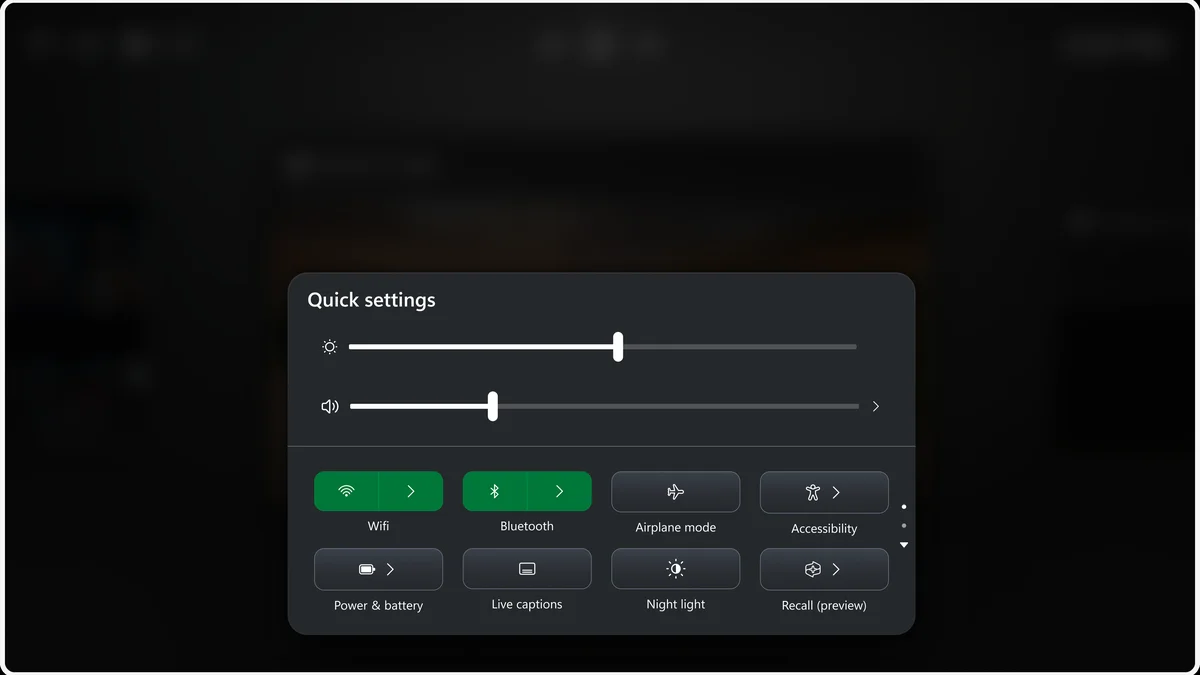
In Build 26340.9843, the navigation bar at the bottom of Gaming Task View now integrates the complete set of Quick Settings normally found on the Windows taskbar. By long-pressing the Xbox button on a controller (or swiping up from the bottom edge of a touchscreen), players can cycle through open app cards using the LB and RB shoulder bumpers and open the full Quick Settings panel without ever leaving Xbox Mode.
From this unified bar, you can toggle Wi-Fi connections, pair Bluetooth controllers or headsets, fine-tune master volume and screen brightness sliders, or switch on Airplane mode and Energy Saver using only your gamepad.

WinUI 3 Windows Search Gains Inline Sliders, Result Filters, and Phone Link Actions
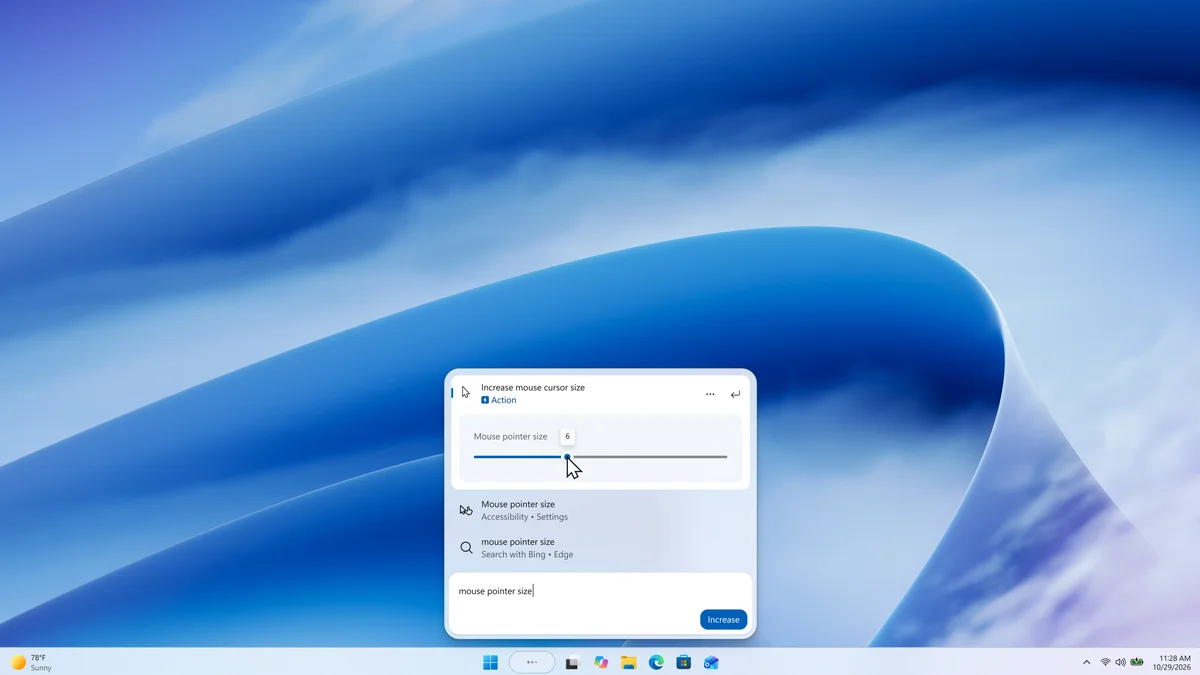
Alongside the handheld gaming upgrades, Build 26340.9843 significantly expands the rebuilt Windows Search experience. Following internal discussions around how the keyboard's Windows key should interact with WinUI 3 Search, the bottom-centered search launcher now introduces five major functional upgrades:
- Inline Action Sliders: Typing a query for audio volume, screen brightness, or mouse cursor size now surfaces an interactive slider right inside the search results, letting you adjust levels on the fly without opening the Settings app.
- Phone Link Actions: With a smartphone connected via Phone Link, you can initiate a phone call, send a text message to a contact, or toggle your phone's Do Not Disturb mode directly from Windows Search. Android support is live now, with iPhone integration scheduled for early 2027.
- Dedicated Result Filters: New filter tabs let you narrow down results across Files & Folders, Settings, Actions, and web answers.
- Richer Previews and Microsoft Store Discovery: Hovering over Word or PowerPoint files reveals inline previews along with the author, file path, and last modified date. Search also surfaces apps and games from the Microsoft Store (which can be toggled off in Settings > Privacy & security > Search).
- Quick History Cleanup: Right-clicking any recent item in the initial search view now lets you remove it immediately via Remove from list or rate result accuracy with thumbs up and down buttons.
Magnifier Shortcut Toggle and Per-App Privacy Controls in Beta Build 26220.9836
For testers on the Beta channel (Windows 11 version 25H2), Microsoft also released Build 26220.9836, introducing a welcome quality-of-life toggle in Settings > Accessibility > Magnifier that lets users disable the Windows + Plus (+) keyboard shortcut. Enabled by default for years, this hotkey frequently triggered accidental screen zooms during intense gaming sessions or when using custom macro bindings.
Build 26220.9836 also adds granular per-app permission controls for camera, microphone, and location access across traditional desktop (Win32) applications, while fixing a bug that reset custom mouse settings and desktop wallpapers after a reboot. Microsoft notes one known issue in Experimental Build 26340.9843: the real-time CPU speed readout in Task Manager may temporarily stop updating after installing the flight.
My Hands-On Take: The Missing Piece Windows 11 Handhelds Desperately Needed
Testing Xbox Mode on a portable rig like the ROG Ally X or a couch PC hooked up to an OLED TV made one thing painfully obvious: not having Quick Settings inside Gaming Task View was Microsoft's biggest usability blind spot compared to SteamOS. Dropping back to the desktop just to reconnect Bluetooth headphones or lower screen brightness at night immediately broke the console illusion. By embedding the full Quick Settings tray right into the Xbox Mode navigation bar in Build 26340.9843, Microsoft finally delivers a self-contained gamepad interface, while the new inline sliders in WinUI 3 Search make everyday desktop tweaks faster than ever.

PC hardware enthusiast and competitive gamer, Arthur 'Heimdall' splits his time between France and the UK working in enterprise B2B software solutions. A business school graduate passionate about component benchmarking, he has been building, modding, and tuning PCs since childhood, optimizing every thermal degree and millisecond of display latency. An avid gamer across Assassin's Creed and sandbox titles, he forged his alliance with Grimtag and Chaya during late-night World of Warcraft raids before joining Pro-Gamer.