Auto-GPU Switching, VRR, and Native NVIDIA Drivers: Pop!_OS 26.04 LTS Takes Aim at Windows 11 PC Gaming
On November 24, 2026, System76 officially shipped Pop!_OS 26.04 LTS, a long-term support release built on Ubuntu 26.04 LTS and powered by its custom Rust-based COSMIC Epoch 1.12 desktop environment. Detailed in System76's official launch post and available directly from the Pop!_OS download page, this release tackles the exact pain points that have kept many PC gamers tethered to Windows 11.
Rather than treating gaming as an afterthought, System76 built key quality-of-life fixes directly into the compositor and settings stack. Automatic discrete GPU selection on hybrid machines, native Variable Refresh Rate controls, proper multi-monitor cursor confinement, and tighter Steam Big Picture support turn Pop!_OS 26.04 LTS into a serious desktop gaming contender right out of the box.
A Ready-to-Play Kernel and GPU Driver Stack Out of the Box
Right from first boot, Pop!_OS 26.04 LTS ships with Linux Kernel 7.2.15, the open-source Mesa 26.2.3 graphics stack, and Wayland 1.26. Just as importantly for GeForce owners, System76 maintains dedicated installation images with the NVIDIA 595.104.02 driver pre-packaged, eliminating manual repository setup before you even install Steam.
Four official ISO variants are available at launch: a standard build for Intel, AMD, and NVIDIA GTX 10 Series or older graphics; a dedicated NVIDIA image supporting GTX 16 Series through the latest GeForce RTX GPUs; plus two ARM64 editions with and without NVIDIA drivers. Because System76 continuously rolls out newer kernels and hardware enablement updates on Pop!_OS, modern desktops, including the company's own System76 Thelio Prime Linux desktop, stay current without waiting for the next LTS cycle.
VRR, Multi-Monitor Pointer Constraints, and Hybrid Auto-GPU Switching
Smooth frame pacing and reliable display behavior make or break Linux gaming. Pop!_OS 26.04 LTS exposes Variable Refresh Rate (VRR) directly inside Settings > Displays on supported FreeSync and G-Sync monitors, cutting out screen tearing and micro-stutter without editing compositor config files.
Two additional upgrades resolve long-standing multi-monitor and laptop headaches:
- Wayland Pointer Constraints and Fullscreen Fixes: Native support for the Wayland Pointer Constraints protocol keeps your mouse locked inside fullscreen games across dual- or triple-monitor desks, paired with cleaner fullscreen window behavior.
- Automatic GPU Selection on Hybrid Systems: Gaming laptops and dual-GPU PCs combining integrated Intel or AMD graphics with a discrete NVIDIA or AMD card now route demanding 3D titles to the dedicated GPU automatically, with no session logouts or manual graphics-mode switching required.
Steam Big Picture, Gamepad Keyboard, and COSMIC's Lightweight Rust Core
Living-room and couch-gaming rigs also get meaningful attention. System76 refined fullscreen handling for Steam Big Picture and introduced a native on-screen keyboard supporting both touch and gamepad input. Entering login credentials, naming save files, or searching your library from the couch no longer forces you to reach for a wireless keyboard.
Underneath, COSMIC benefits from being written from the ground up in Rust. Its compositor keeps CPU and RAM overhead impressively lean, leaving more system headroom for games running through Steam and Proton. System76's official launch video walks through the 26.04 LTS release and its desktop improvements:
Constellations Themes, Native Apps, and Upgrade Timeline
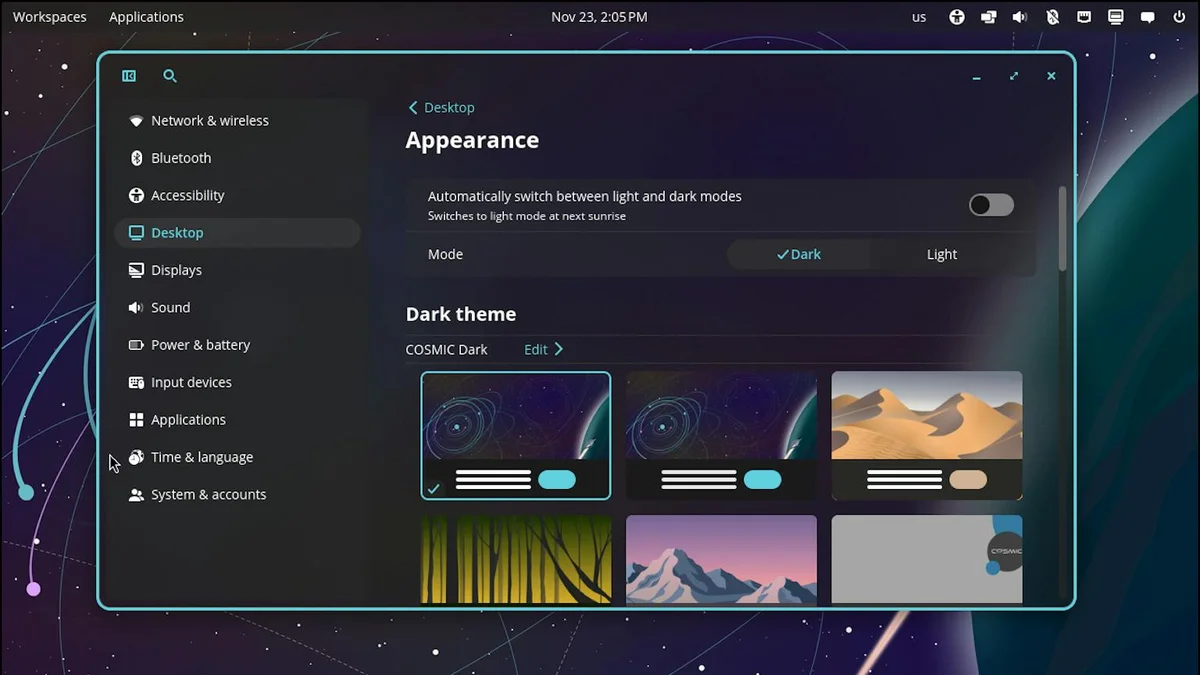
On the desktop side, the headline visual addition is Constellations, COSMIC's one-click bundled theme packs. From Settings > Desktop > Appearance, users can switch wallpapers, accent colors, icons, fonts, and layouts simultaneously, toggle automatic light and dark modes, apply the translucent Frosted Glass effect, and export custom setups to back up or share.
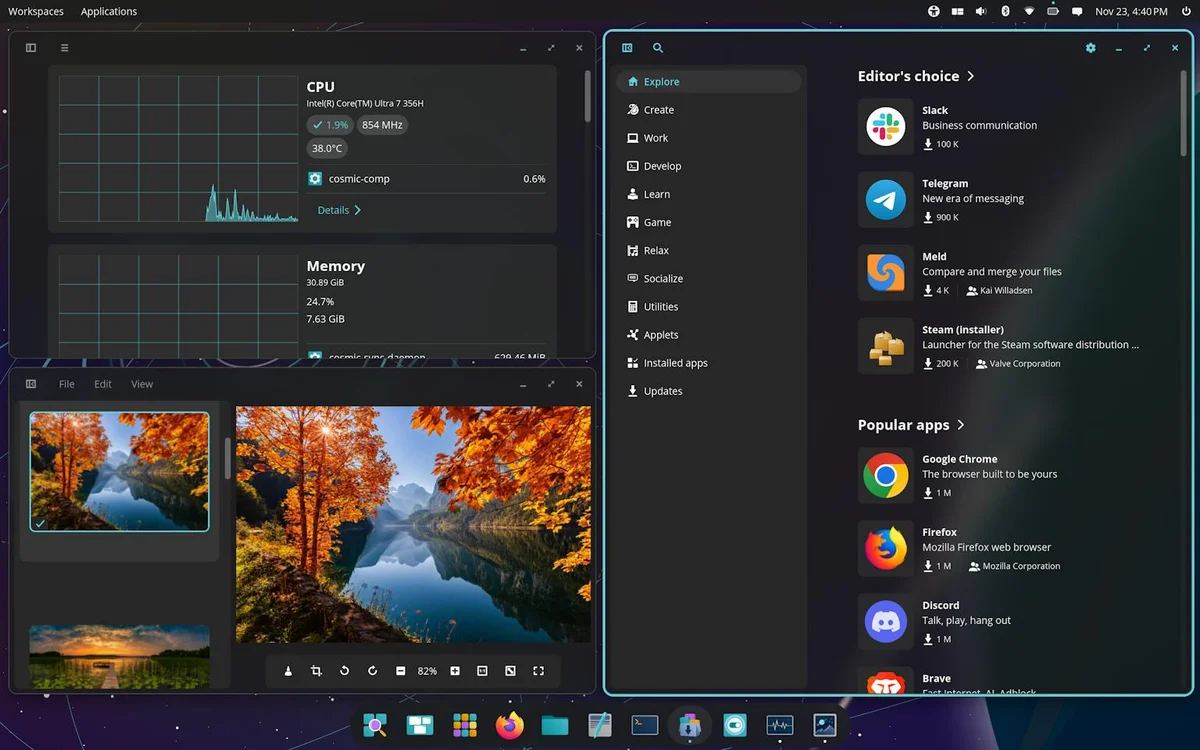
The native libcosmic app suite expands with COSMIC Image Viewer, COSMIC System Monitor (tracking real-time CPU clocks, temperatures, and memory usage), a ground-up redesign of the COSMIC Store, and the Popsicle USB flashing tool. System76 also added optional automatic system and app updates during initial setup, built-in drawing tablet support with pressure and tilt sensitivity, remote desktop support, per-app volume controls, configurable workspace wrapping, and accessibility tools such as shake-to-find cursor and scalable pointers.
For the complete 26.04 LTS experience today, System76 recommends a fresh install. In-place upgrades from Pop!_OS 24.04 LTS will unlock in December 2026. Where gaming-focused Linux distributions like CachyOS lean into bleeding-edge rolling builds, Pop!_OS 26.04 LTS pitches a predictable LTS base paired with a fast-evolving Rust desktop and continuously updated kernels.
My Test Bench
Looking at the technical package System76 just shipped, Pop!_OS 26.04 LTS checks almost every box I look for in a daily-driver Linux gaming OS. Having the NVIDIA 595 driver baked straight into the ISO, automatic hybrid GPU switching, a toggleable VRR switch, and proper Wayland pointer locking removes the top friction points that typically send Windows 11 converts running back after a single weekend.
One reality still has not changed: no matter how clean Linux 7.2.15, Mesa 26.2.3, and COSMIC are, competitive multiplayer games that enforce kernel-level anti-cheat still depend on publisher support. For single-player blockbusters, indie catalogs, and the vast majority of Steam libraries running through Proton, however, Pop!_OS 26.04 LTS stands out as one of the cleanest, lowest-maintenance entry points into PC gaming on Linux.

PC hardware enthusiast and competitive gamer, Arthur 'Heimdall' splits his time between France and the UK working in enterprise B2B software solutions. A business school graduate passionate about component benchmarking, he has been building, modding, and tuning PCs since childhood, optimizing every thermal degree and millisecond of display latency. An avid gamer across Assassin's Creed and sandbox titles, he forged his alliance with Grimtag and Chaya during late-night World of Warcraft raids before joining Pro-Gamer.