Heroic Games Launcher 3.0 Beta Lands With Steam, itch.io, and a Ground-Up UI Overhaul
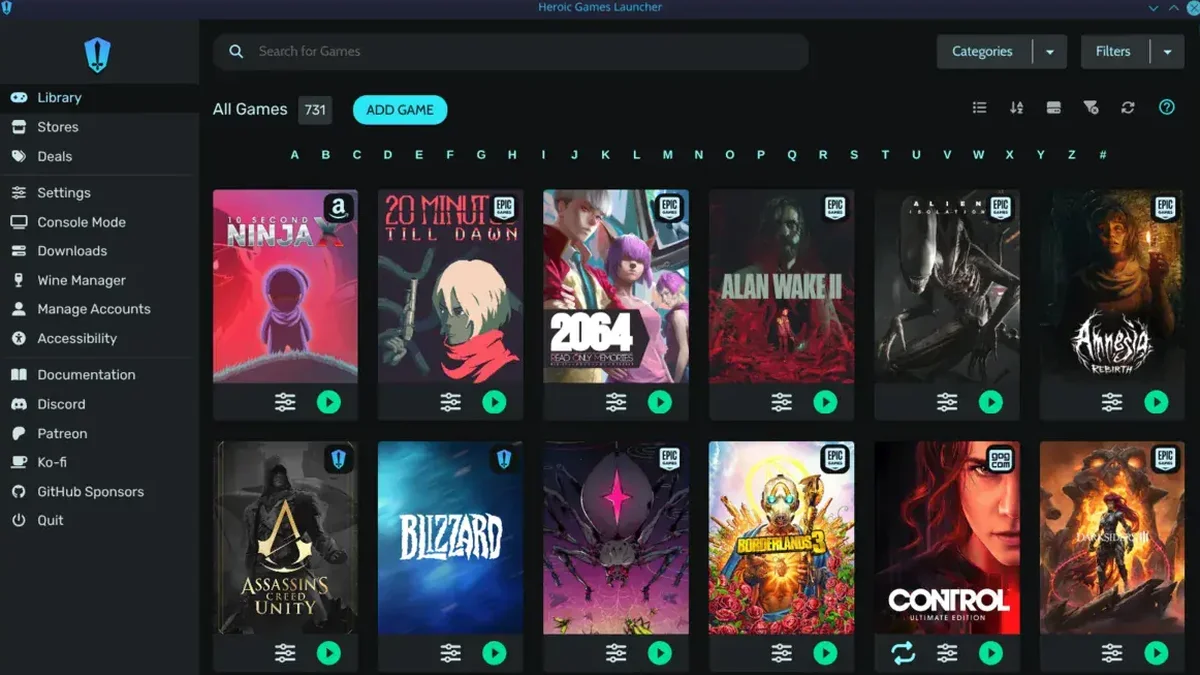
One of the most essential tools for Linux and Steam Deck gaming just took its biggest leap yet. The development team has rolled out Heroic Games Launcher 3.0.0 Beta 1 (tagged v3.0.0-beta.1), describing it as the largest update in the project's history. Long known as the open-source hub for Epic Games Store, GOG, and Amazon Games libraries, the launcher now brings Steam and itch.io into the fold alongside a ground-up user interface redesign.
Full release notes and test builds are live on the official Heroic Games Launcher 3.0.0-beta.1 GitHub release page as well as through the version selector on the official Heroic Games Launcher website. Meanwhile, version 2.22.4 remains the recommended stable branch while this major milestone gets battle-tested.
Steam and itch.io Join the Unified Library
The headline addition is support for two major PC storefronts. Steam integration is powered by Aurelia, a lightweight headless command-line Steam client written in Rust by contributor Drackrath. Inside Heroic, it unlocks account login, unified library browsing, game installation flows, dedicated game pages, Steam Cloud management, and Console Mode support.
The maintainers are upfront about early beta caveats. You still need the official Steam client installed on your system, several titles do not launch yet (including Valve's own Half-Life 2), and games relying on strict anti-cheat middleware are unlikely to work for now. That mirrors the ongoing compatibility realities we also saw when Epic Games Launcher and GE-Proton met SteamOS.
itch.io support runs on the platform's official Butler binary and embeds the storefront directly inside Heroic's in-app webview, complete with OAuth or personal API key login. A new webview toggle even lets you suspend keyboard and controller navigation so browser-based indie games capture inputs properly. On Linux, however, only Windows builds running through Wine or Proton are supported in this first beta, leaving native Linux itch.io games for a later update.
A Ground-Up UI Redesign and Smarter Controls
Version 3.0 goes far beyond adding store backends. Heroic's original designer, biliesilva, spent months rebuilding nearly every view from scratch, covering the library, game pages, modals, and settings screens. The new default Heroic Theme introduces a clean dark layout with cyan accents, switches the app typography to the Outfit font, and moves to sharp outlined icons. Five fresh themes (Candy Dark, Candy Light, Vampyria, Forest, and One Piece) also arrive as legacy classic variants are retired.
Everyday usability sees several welcome upgrades:
- Searchable settings: a built-in search bar cuts straight to the toggle you need, while a dedicated Runners tab declutters the old Advanced menu.
- Rebuilt Download Manager: cleaner queue visibility and smoother handling of active installations.
- New Add Game stepper: sideloading non-store titles now features automatic executable detection and a live installer log.
- Dedicated Gamepad tab: remap buttons, tune stick deadzones, turn off the Guide button Console Mode shortcut, and check remaining controller battery levels on Linux.
For handheld PCs like the Steam Deck, ASUS ROG Ally, and Lenovo Legion Go running SteamOS or Bazzite, gamepad navigation feels noticeably tighter, though the team notes that Console Mode still needs extra visual polish to match the rest of the 3.0 overhaul.
Safer Cloud Saves and a Full Backup Wizard
Losing save progress during a sync hiccup has long been a headache across multi-store setups. Heroic 3.0 hardens Cloud Saves with stricter path validation, automatic recalculation when a Wine prefix changes, automatic local backup snapshots before every sync, and a built-in restore option.
Alongside it sits a brand-new Backup System and Wizard that archives logins, global preferences, and per-game configurations while flagging missing game folders or Wine runtimes. Better yet, it helps migrate setups cleanly between Flatpak and native Linux packages, fitting right into the broader push toward hassle-free Linux gaming tools seen with CachyOS Package Installer 2.0.
Supported Platforms and Beta Precautions
Test builds for 3.0.0 Beta 1 are ready across Linux (x64 and ARM64 AppImage, DEB, RPM, Pacman, tar.xz, plus Flathub Beta via Konsole in SteamOS Desktop Mode), Windows (x64 and ARM64 installer and portable builds), and macOS (Intel and Apple Silicon DMG and ZIP packages).
Because this is an early beta, the developers strongly recommend creating a full backup using the Wizard before upgrading a daily-driver install, and filing bug reports on GitHub with the [BETA] tag or on Discord.
My Field Test on Heroic 3.0 Beta
Running Heroic across my Linux desktop and handheld test rigs, bringing Steam and itch.io under the same clean open-source roof as Epic and GOG is the milestone I have been waiting for. The redesigned library and settings search immediately strip away years of UI clutter. That said, I would keep 2.22.4 for your main library right now or test 3.0 through an isolated AppImage: until Valve staples like Half-Life 2 launch reliably and native Linux itch.io titles are wired in, this beta is an exciting preview rather than a full Steam client replacement.

PC hardware enthusiast and competitive gamer, Arthur 'Heimdall' splits his time between France and the UK working in enterprise B2B software solutions. A business school graduate passionate about component benchmarking, he has been building, modding, and tuning PCs since childhood, optimizing every thermal degree and millisecond of display latency. An avid gamer across Assassin's Creed and sandbox titles, he forged his alliance with Grimtag and Chaya during late-night World of Warcraft raids before joining Pro-Gamer.