What Is Actually Eating Your VRAM? Microsoft VP Releases GPU Task Manager, the Free Open-Source Tool Windows 11 Was Missing
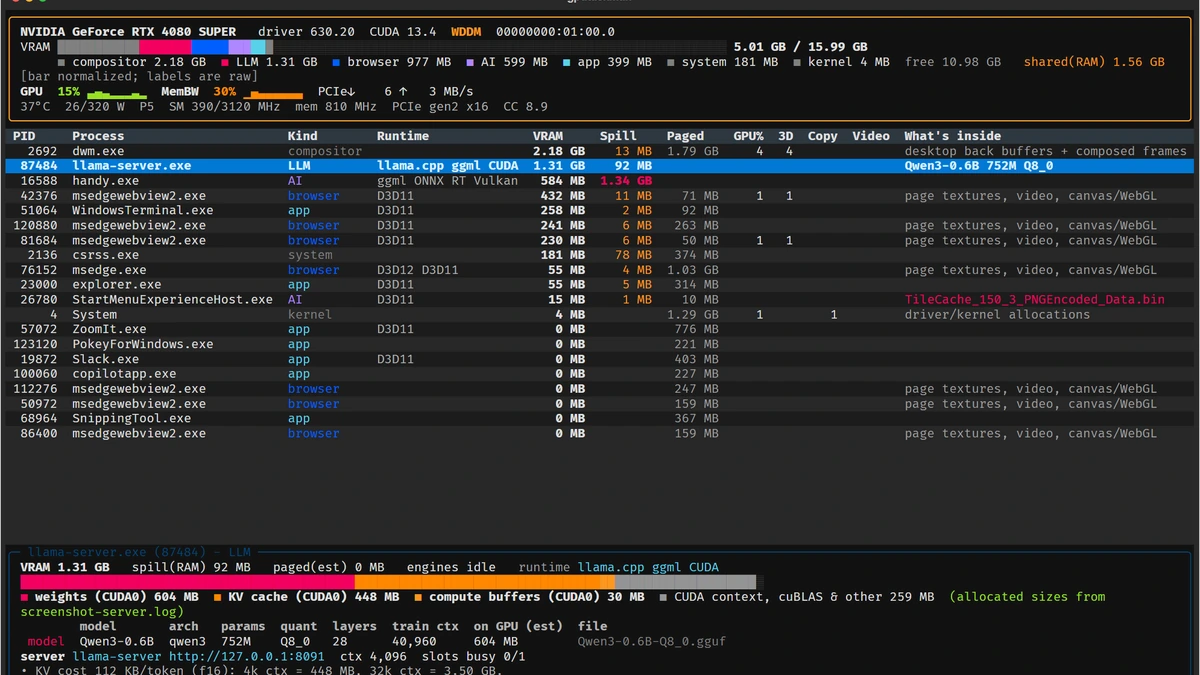
How many times has the Windows 11 Task Manager told you that 11.5 GB of video memory is in use on a 12 GB graphics card, without giving you a clear breakdown of which process is actually hogging your GPU buffers? To fix that long-standing blind spot, Microsoft Vice President Scott Hanselman has released gputaskman (GPU Task Manager). Available right now as a free, MIT-licensed project on the official gputaskman GitHub repository, this lightweight terminal utility acts as a real-time microscope for every megabyte sitting inside your VRAM.
Why the Native Windows 11 Task Manager Leaves PC Gamers Guessing About VRAM
In both Windows 10 and Windows 11, the Performance tab in Task Manager relies on a broad, device-wide gauge. It tells you how much dedicated video memory is currently allocated across the graphics card, but it routinely fails to provide a clean per-process breakdown or warn you when an application triggers silent spillover into shared system RAM through the Windows WDDM driver.
For PC gamers, that blind spot directly hurts frame pacing. The moment dedicated VRAM fills up, Windows quietly pushes excess textures and buffers into system DDR4 or DDR5 memory across the PCIe bus. That much slower pathway causes sudden frametime spikes and heavy stuttering, a bottleneck that has become a daily headache when you already have to watch out for the 6 graphics settings draining your VRAM for nothing on 8GB and 12GB cards in modern releases.
What gputaskman Shows in Real Time: An "htop" for Your Graphics Card
Built as a fast, responsive terminal user interface inspired by Linux's classic htop monitor, gputaskman queries low-level driver and OS counters to map every active process to its true memory footprint. At a glance, the dashboard separates dedicated local VRAM, shared system memory spillover (the Spill column), paged memory, and per-process utilization across individual GPU hardware engines (3D rendering, Compute, DMA Copy, and Video Encode/Decode).
That level of granularity makes it effortless to catch background apps quietly chewing through video memory before you even boot up a game. Between hardware-accelerated Chromium browsers (Chrome, Edge), the Windows desktop compositor (dwm.exe), game launchers, and chat overlays, hidden VRAM consumption adds up fast, even as Discord is finally ditching Electron for a native Rust and GPUI desktop app to curb its notorious resource overhead.
Beyond gaming, Hanselman's tool features deep inspection for local artificial intelligence workloads. If you run local large language models or inference servers on your GPU through Ollama, LM Studio, llama-server.exe, or ONNX Runtime, the monitor automatically detects the active runtime (CUDA, HIP/ROCm, Vulkan, DirectML) and breaks down VRAM usage into GGUF model weights, KV cache size, quantization format, and compute buffers. Live hardware telemetry (overall GPU load, core temperature, board power draw in watts, clock speeds, and PCIe bus throughput) is displayed right along the top header.
Check Availability for GeForce RTX 5070 and Radeon RX 9070 16GB Graphics Cards on Amazon→
Cross-Platform NVIDIA, AMD, and Intel Support with One-Command Setup
Completely free and released under the MIT license, gputaskman runs on Windows 10 and Windows 11 (both x64 and native ARM64), native Linux, WSL2 (where it automatically pairs Linux processes with the Windows host vmwp.exe virtual machine worker), and macOS on Apple Silicon. On Windows, no CUDA Toolkit, Visual Studio install, or administrator privileges are required: the app reads directly from the NVML library bundled with NVIDIA drivers, AMD ADL, and standard Windows WDDM performance counters.
| Feature | gputaskman Technical Specifications |
|---|---|
| Creator & License | Scott Hanselman (Microsoft VP), 100% free and open-source under MIT License |
| Supported Operating Systems | Windows 10/11 (x64 & ARM64), native Linux, WSL2, and macOS (Apple Silicon) |
| Supported GPUs | NVIDIA GeForce (NVML), AMD Radeon (ADL on Windows, amdgpu on Linux), and Intel Arc/iGPU (i915 on Linux) |
| Per-Process Metrics | Dedicated VRAM, shared system RAM spillover (Spill), paged memory, 3D, Compute, Copy, and Video engines |
| AI Inspection & Snapshots | LLM/GGUF model weights, KV cache breakdown, CUDA/ROCm/Vulkan detection, JSON export, diff mode, and live recording |
If you want to run it on Windows without touching Python, you can grab the standalone portable ZIP directly from the GitHub Releases page, extract the folder, and run gputaskman.exe inside Windows Terminal or PowerShell. Users who already have Python 3.11 or newer installed can set it up in a single command with uv tool install gputaskman or pipx install gputaskman and launch it using the short gtm alias. A built-in snapshot comparison command (gputaskman diff) even lets you measure the exact megabyte-by-megabyte delta before and after launching a game or background app.
My Take on the Spec Sheet
I cannot help but appreciate the irony here: it took a Microsoft Vice President writing and open-sourcing his own tool on GitHub to finally give PC users the granular VRAM monitor we have been begging the Windows team to put inside the native Task Manager since the Windows 10 era. In 2026, if you are gaming on an 8 GB or 12 GB graphics card, losing 1.5 GB to 2 GB of video memory to a handful of hardware-accelerated Chrome tabs, Steam WebHelper, and a chat overlay is enough to push a modern AAA title over the cliff into shared system RAM and wreck your 1% low frametimes. Being able to pop open gputaskman in a clean terminal window without installing bloated third-party suites, and immediately see which process is spilling into system RAM or how much VRAM a local KV cache is holding, makes this utility an instant staple on my test bench. We have not yet had a physical unit on our desk,if the manufacturer's team would like to send over a review sample so we can put it through our full real-world testing protocol, our lab doors are wide open.
PC hardware enthusiast and competitive gamer, Arthur 'Heimdall' splits his time between France and the UK working in enterprise B2B software solutions. A business school graduate passionate about component benchmarking, he has been building, modding, and tuning PCs since childhood, optimizing every thermal degree and millisecond of display latency. An avid gamer across Assassin's Creed and sandbox titles, he forged his alliance with Grimtag and Chaya during late-night World of Warcraft raids before joining Pro-Gamer.