Titanfall 2 Multiplayer Is Now Playable in VR on Northstar Servers: How to Install CircuitLord's Open Beta
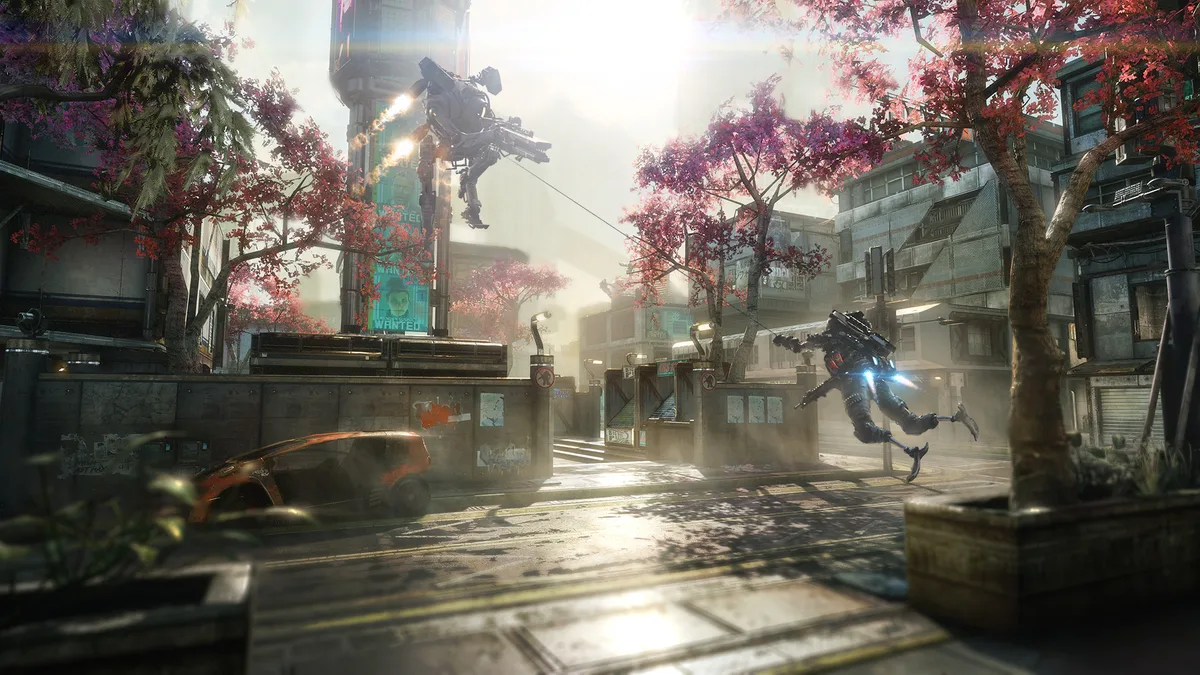
Exactly ten years after its original October 28, 2016 launch, Titanfall 2 is experiencing an unexpected and thrilling second wind on PC. Just weeks after bringing the entire single-player campaign into virtual reality, independent developer CircuitLord (also known for Big Walk VR and Visor) has officially launched the Multiplayer Open Beta for the Titanfall 2 VR mod. Updated to version 1.1.26 on October 31, 2026, the project hooks directly into the community-driven Northstar server framework, letting players experience high-velocity Pilot parkour and Titan warfare in full 6DoF virtual reality.
Full-Body IK, Manual Reloads, and 6DoF Grappling on Northstar Servers
Rather than settling for a basic stereoscopic camera wrapper, CircuitLord's conversion rebuilds Respawn Entertainment's fast-paced shooter around native OpenXR / SteamVR motion controls. Because the multiplayer mode runs on the open-source Northstar client, every weapon, tactical ability, boost, and Titan chassis is unlocked right out of the gate, allowing VR players to jump straight into custom matches with full loadout freedom.
Translating one of the fastest movement systems in our roundup of the best co-op and multiplayer games to play with friends into a physical first-person space comes with an impressive list of dedicated VR mechanics:
- Synchronized Full-Body Inverse Kinematics (IK): Your entire Pilot body is tracked and visible to other VR players on the server. You can wave at teammates in the dropship, physically shake hands in the pre-game lobby, or throw hand gestures from inside an open Titan cockpit.
- Physical Weapon Handling and Two-Handed Aiming: Every firearm requires grabbing magazines from your rig and manually slotting them home. Recent patches (spanning versions
1.0.24through1.1.26) standardized magazine grab poses across the entire arsenal, fixed the EPG energy launcher reload grip, refined two-handed aiming offsets for heavy anti-Titan weapons (the Archer, Thunderbolt, and Arc Gun), and added full support for Satchel charges and explosive Ticks. - Uncompromised Wall-Running and Titan Cockpits: Wall-running, slide-hopping, double-jumping, and grappling hook swings operate at full native speed. Once you call down your Titan, you can pilot the mech from inside the cockpit using motion controls alongside a newly introduced head-based Titan control scheme and a dedicated fix for Ronin's Sword Core ability.
- Proximity Voice Chat and bHaptics Integration: The multiplayer beta includes spatialized proximity voice chat and social post-match lobbies. Players with haptic vests can also install the official bHaptics Support (v1.7.2) add-on by floh-bhaptics directly from the installer's dedicated Add-ons tab.
If you do not yet own a PC copy of Respawn Entertainment's shooter (supported across Steam, the EA App, and the PC Xbox App), you can check the lowest digital key deals below:
How to Install the Titanfall 2 VR Multiplayer Open Beta Without Touching Your Vanilla Game
One of the smartest aspects of CircuitLord's setup is its clean isolation. The automated installer deploys the required Northstar client and VR files (roughly 75 MB) into a separate TF2VR profile folder inside your game directory, while storing VR saves independently in %LOCALAPPDATA%\Respawn\Titanfall2_VR. Launching Titanfall 2 normally through Steam or the EA App will still boot your unmodified flat-screen version.
- Check Your PC Prerequisites: Make sure you have a legal copy of Titanfall 2 installed on PC and that you are signed into the EA App in the background. If it is a fresh install, boot the flat-screen game once first so the EA services initialize properly. Avoid running Steam, the EA App, or the mod installer as Administrator to prevent SteamVR permission conflicts.
- Download the Official One-Click Installer: Grab the latest release of the open-source CircuitLord's VR Mod Installer (v1.2.12) from the official GitHub repository (
CircuitLordVRModInstaller.exe). - Select the Multiplayer Open Beta Channel: Open the installer, locate the Titanfall 2 VR section, and click the dropdown menu right next to the Install button to select MULTIPLAYER (multiplayer-beta, v1.1.26) instead of the default single-player campaign branch.
- Launch in VR and Join a Northstar Server: Start your PC VR runtime (SteamVR, Meta Quest Link, AirLink, Virtual Desktop, Valve Index, or PSVR2 PC adapter), then click the Launch in VR button inside CircuitLord's installer (note that you do not need to install Northstar manually beforehand, as the installer automatically downloads and configures it inside the isolated
TF2VRprofile). Once on the Titanfall 2 main menu, make sure to click Launch Northstar (rather than Electronic Arts' official matchmaking button) and open the Server Browser to join active VR multiplayer lobbies.
My Take
I will admit that when I first heard about multiplayer VR support for a shooter as blisteringly fast as Titanfall 2, my immediate thought was motion sickness: chaining a wall-run into a 50 mph grappling hook sling and dropping straight into a Titan cockpit sounds like the ultimate VR endurance test. Yet what CircuitLord has pulled off on top of the Northstar framework is genuinely remarkable. Between the tactile satisfaction of manual reloads, smart visual optimizations like the Shimmer Reduction toggle that cleans up jagged edges at almost zero performance cost, and the sheer comedy of proximity chat in VR-only lobbies, this mod turns a ten-year-old masterpiece into one of the most exhilarating multiplayer experiences on PC VR today. While Electronic Arts keeps the franchise on ice, the modding community is once again proving why the Frontier refuses to die.

SEO consultant for over 20 years and digital entrepreneur, Charles "Grimtag" is the founder of Pro-Gamer.gg, Retrocharting.com, and Gamescharting.com. A competitive gamer, streamer, and retro game collector, he has worked in the video game industry for over 15 years, notably as a consultant for leading game price comparison platforms. Passionate about real-time performance data and gaming technology, he analyzes competitive esports, gaming hardware benchmarks, and creator workflows on Pro-Gamer.gg with an authentic player perspective.