GTA 6 Headphones Guide: How to Buy Earbuds and Listen to Radio & Podcasts on Foot
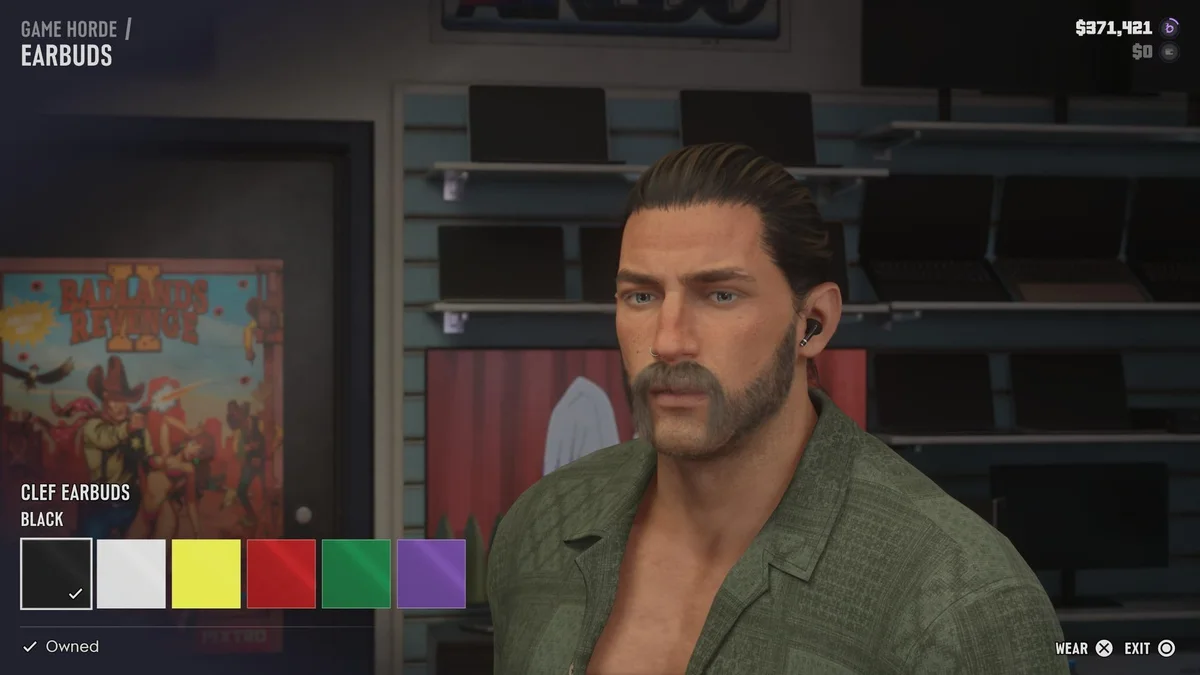
For the first time in the history of Rockstar Games' crime saga, your favorite music tracks and satirical talk shows no longer cut out the moment you step out of a vehicle. In Grand Theft Auto VI, Jason Duval and Lucia Caminos can link in-ear earbuds or over-the-ear headphones to their smartphones to stream all of Leonida's terrestrial radio stations alongside brand-new on-demand podcasts while exploring on foot. However, before you can build your walking soundtrack, you need to track down an electronics retailer, equip the accessory in the proper loadout slot, and make sure you do not lose it on the pavement during a street brawl.
Where to Buy Headphones and Earbuds in GTA 6
Neither Jason nor Lucia starts the campaign with portable audio gear in their inventory. To unlock on-foot listening, you first need to visit an electronics shop. The fastest way to locate the nearest storefront is to open the GTA 6 Index from your pause menu, tab over to the Style category, and select the Electronics filter. This directory lists every tech retailer across Leonida, automatically sorted by proximity to your current location.
Early in the story, two of the easiest chains to visit are Game Horde and Zeke's Gadgets (including an accessible branch in the northern section of Hamlet). When you browse the counter, you can choose between two main styles of audio headgear:
- In-Ear Earbuds: Compact wireless models such as the Clef Earbuds, starting around $100 to $119 depending on the shop. At Game Horde, Clef Earbuds come in six colorways: Black, White, Yellow, Red, Green, and Purple.
- Over-the-Ear Headphones: Studio-style wireless cans retailing for roughly $200, available in multiple colors and premium finishes.
Keep one vital inventory rule in mind: wardrobes and personal accessories are tracked separately for each protagonist. Once you unlock free character swapping covered in our guide on when you unlock Lucia and character switching in GTA 6, both Jason and Lucia must purchase their own individual pair of earbuds or headphones to listen to audio on foot.
How to Equip Headphones in the Items Wheel (PS5 & Xbox Series X|S)
When you buy a set of earbuds at Game Horde or Zeke's Gadgets, pressing Cross on PS5 or A on Xbox Series X|S on the Wear prompt puts them on immediately. If you unequip them or want to toggle your headset back on while roaming Leonida, you can equip them anytime through your loadout wheel:
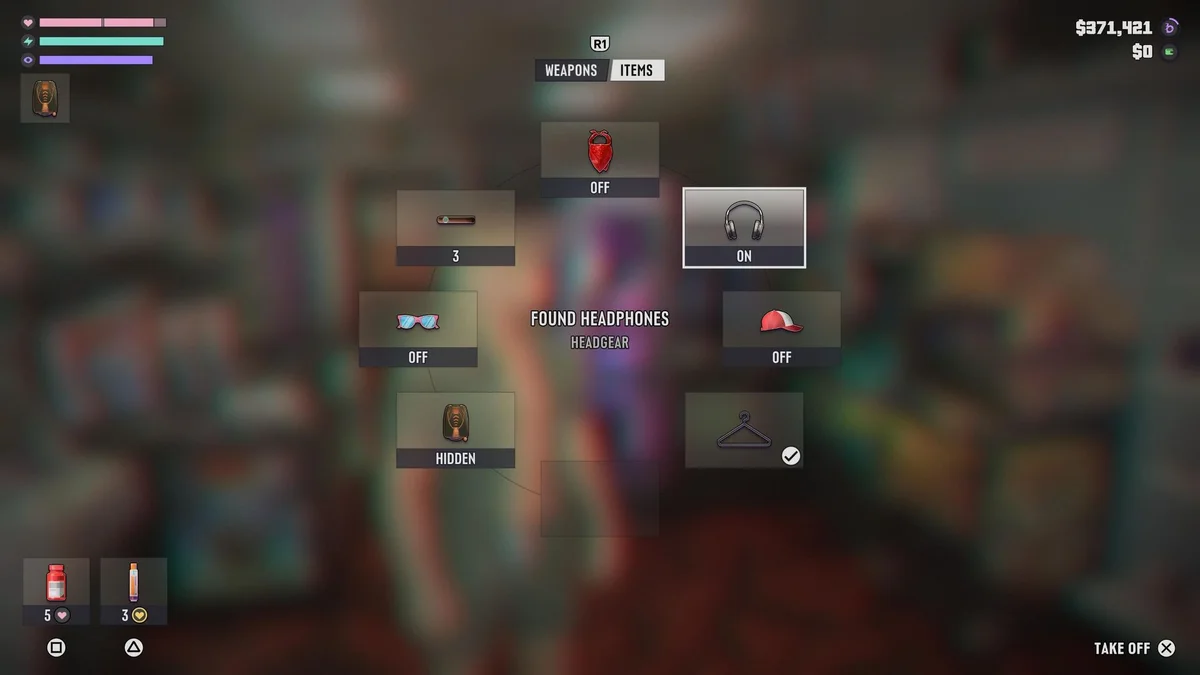
- Hold L1 (PS5) or LB (Xbox Series X|S) to bring up your character's loadout wheel.
- Press R1 (PS5) or RB (Xbox Series X|S) to switch from the Weapons tab over to the Items tab.
- Tilt your Right Thumbstick (R) to the second slot on the wheel (positioned at the top right at 2 o'clock, between the mask/bandana slot and the hat slot), which governs Headgear.
- Highlight your headphones (such as Found Headphones or Clef Earbuds) and press Cross (PS5) or A (Xbox) to switch them to ON. Pressing the same button again lets you remove them (Take Off).
How to Use the Radio and Change Stations on Foot
With your headphones set to ON and your smartphone free, tuning into Leonida's broadcasts on foot uses the exact same controls as driving a car, riding a motorcycle, piloting a boat or plane, or interacting with a safehouse stereo:
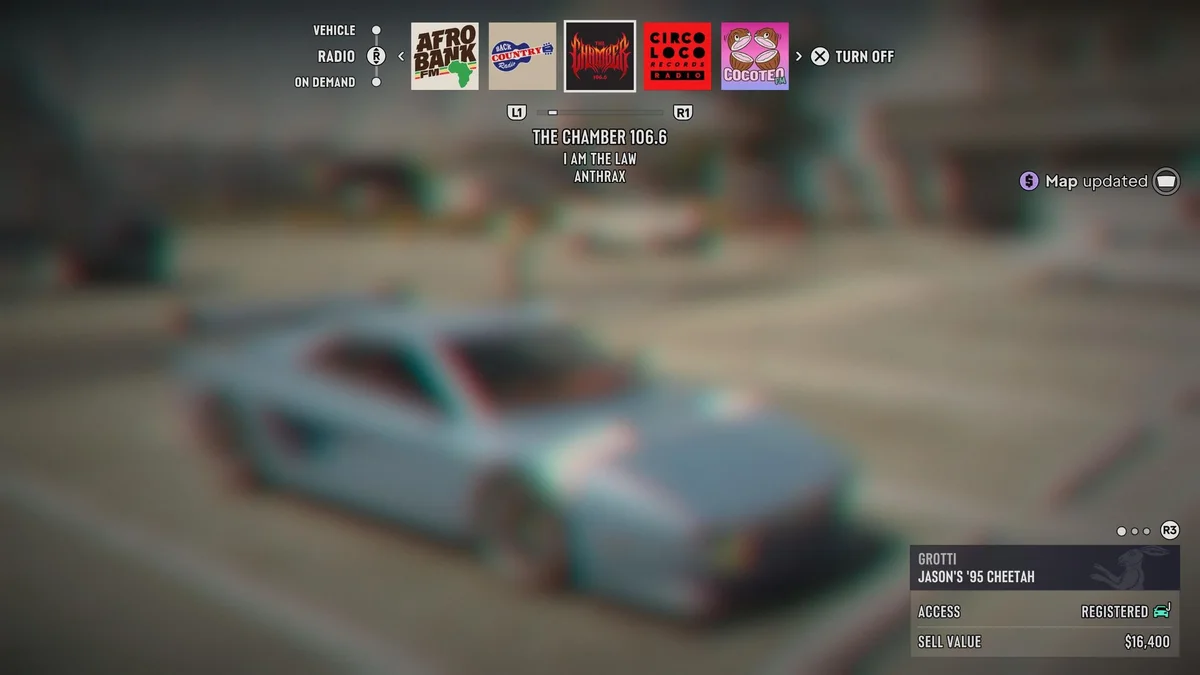
- Open the Radio Bar: Hold Left on the D-Pad to display the horizontal audio selector across the top of your screen.
- Cycle Radio Stations: While keeping Left on the D-Pad held down, scroll horizontally across the station lineup using L1 and R1 (LB and RB on Xbox) or your Right Thumbstick. You can jump seamlessly between contemporary African beats on AfroBank FM, outlaw country on Back Country Radio, classic thrash metal on The Chamber 106.6 (featuring tracks like Anthrax's I Am The Law), house and club sets on CircoLoco Records Radio, or Latin hits on Cocoteo FM.
- Confirm or Turn Off: Release Left on the D-Pad on your chosen station to start listening, or press Cross (PS5) / A (Xbox) on the Turn Off prompt to mute playback completely.
How to Listen to On-Demand Podcasts in GTA 6
Beyond traditional live radio stations, Grand Theft Auto VI introduces a dedicated On Demand audio hub. Instead of hoping you catch a talk radio segment at a random hour, you can select individual podcast shows, browse specific episodes, pause playback, and scrub through the timeline at will.
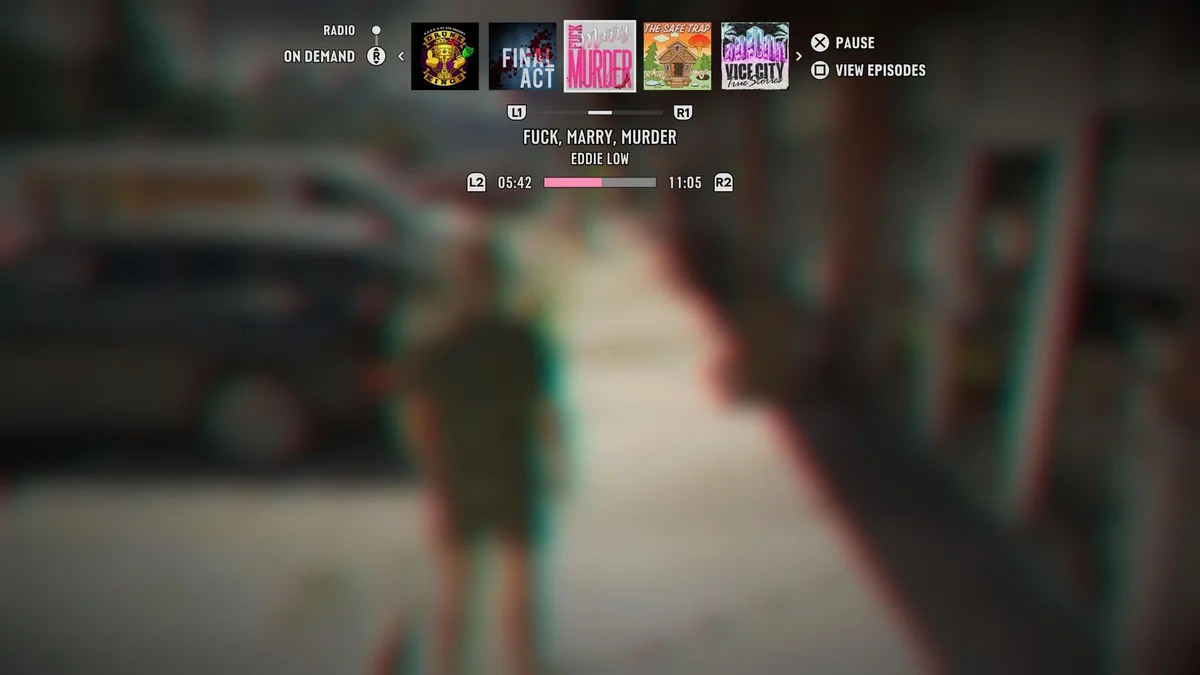
To switch from live radio to podcasts, hold Left on the D-Pad and push Down on the Right Thumbstick (R) to move the selector from RADIO to the ON DEMAND row. Five distinct podcast series appear in the carousel:
- Drunk Kings
- Final Act
- Fuck, Marry, Murder (featuring an 11-minute-and-5-second true-crime episode dedicated to Eddie Low, the infamous Liberty City serial killer from GTA IV)
- The Safe Trap
- Vice City True Stories
| Audio / Podcast Action | PlayStation 5 Input | Xbox Series X|S Input | In-Game Function |
|---|---|---|---|
| Open Audio Menu on Foot | Hold D-Pad Left | Hold D-Pad Left | Requires headphones or earbuds equipped (ON) |
| Switch Between Radio & Podcasts | Right Stick (R) Up / Down | Right Stick (R) Up / Down | Toggles between RADIO and ON DEMAND rows |
| Browse Stations or Podcast Shows | L1 / R1 | LB / RB | Scrolls horizontally through the top carousel |
| Browse Podcast Episodes | Square (View Episodes) | X (View Episodes) | Cycles through available episodes for a show |
| Pause Podcast / Turn Off Radio | Cross (Pause / Turn Off) | A (Pause / Turn Off) | Syncs exact playback timestamp with vehicles |
| Rewind or Fast-Forward Podcast | L2 / R2 | LT / RT | Scrubs backward or forward along the episode bar |
One of Rockstar's smartest quality-of-life touches is automatic cross-device syncing: if you pause a podcast episode on foot using Cross / A and later hop into a stolen car (or vice versa), playback resumes from the exact second where you left off. You can also hold L2 or R2 (LT or RT) while the On Demand bar is open to rewind or fast-forward through an episode if gunfire drowned out a punchline.
Warning: How You Can Permanently Lose Your Headphones in Combat
If you purchased a pair of headphones earlier in your session and suddenly notice they have vanished from the Headgear slot in your Items wheel, you probably lost them in a fight. In GTA 6, headgear reacts dynamically to physical impacts: if you get punched by an angry pedestrian or tackled by officers during a pursuit covered in our GTA 6 wanted levels and 6-star police Heat system guide, your headphones or earbuds can be knocked right off your head onto the ground.
Always scan the pavement around you once a fistfight or shootout ends and pick your headphones back up before leaving the area. If you sprint or drive away while they are lying on the ground, they despawn permanently, forcing you to head back to Game Horde or Zeke's Gadgets and spend another $100 to $200 on a replacement set.

My Take
For over two decades, every Grand Theft Auto fan has shared the same habit: sitting parked outside a mission marker for an extra minute just to hear the end of a hilarious talk radio segment or a classic song before stepping out of the car. By pairing wearable earbuds with a full On Demand podcast player complete with L2/R2 timeline scrubbing, Rockstar finally solves that long-standing open-world dilemma.
Being able to stroll down the neon sidewalks of Vice Beach or cut through Port Gellhorn's back alleys while listening to an eleven-minute true-crime breakdown of Eddie Low, pause it before a shootout, and have the episode sync seamlessly to your car stereo when you make your getaway makes Leonida feel far more alive. Just remember to take off your $200 headphones through the Items wheel before picking a bar fight, or you will be leaving your audio gear on the asphalt.

SEO consultant for over 20 years and digital entrepreneur, Charles "Grimtag" is the founder of Pro-Gamer.gg, Retrocharting.com, and Gamescharting.com. A competitive gamer, streamer, and retro game collector, he has worked in the video game industry for over 15 years, notably as a consultant for leading game price comparison platforms. Passionate about real-time performance data and gaming technology, he analyzes competitive esports, gaming hardware benchmarks, and creator workflows on Pro-Gamer.gg with an authentic player perspective.